
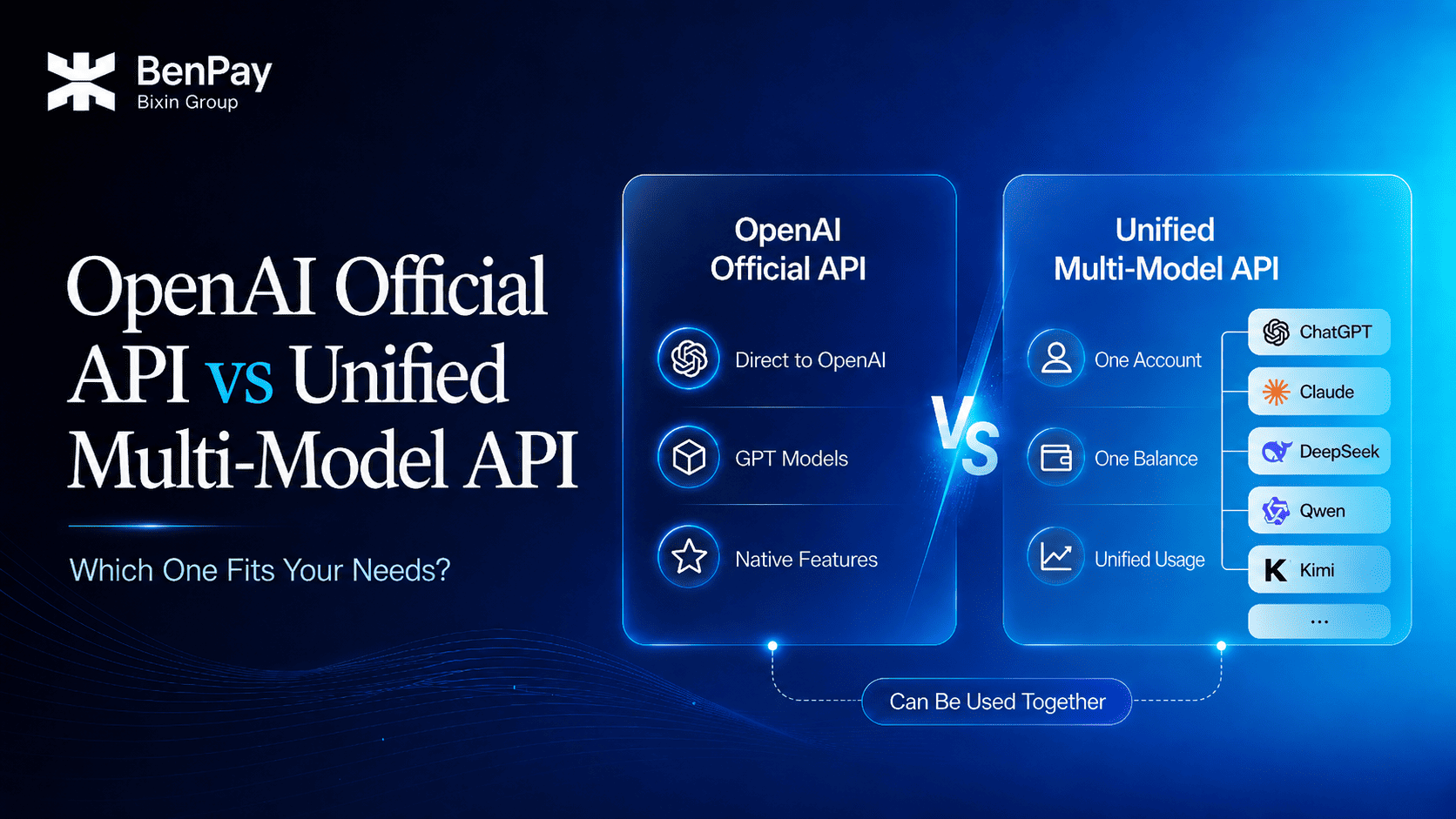
How should you choose between the OpenAI official API and a unified multi-AI API? Start with these three conclusions:
- If your project only uses GPT and depends on OpenAI’s official interfaces, latest features, or provider-specific parameters, the OpenAI official API is usually the more direct option.
- If you need to use models such as GPT, Claude, Gemini, and DeepSeek at the same time and want to manage API keys, balances, and usage in one place, a unified multi-model API is more convenient.
- If your core business depends on OpenAI-native capabilities while other tasks require additional models, you can use both types of API together.
In this article, “multi-AI API” refers to a unified multi-model API that provides access to models from multiple providers through one platform. The OpenAI API is used as the main example of connecting directly to a model provider’s official API. The same decision-making logic also applies to Anthropic’s Claude API, Google’s Gemini API, and the DeepSeek API. Official APIs generally provide more direct access to provider-native capabilities, while multi-AI APIs focus on unified access to and management of multiple models. Specific features, pricing, and data policies should still be reviewed for each provider.
The decision is influenced by more than the number of available models or the price per token. Native features, interface compatibility, account management, payment methods, data paths, and long-term maintenance costs also matter.
This article approaches the comparison from a practical decision-making perspective, helping individual users, content teams, developers, and businesses determine which access method better fits their current needs. To understand how a unified multi-model API works, read “What Is a Unified AI API? How One API Key Can Access Multiple Leading AI Models.”
OpenAI Official API vs. Unified Multi-AI API
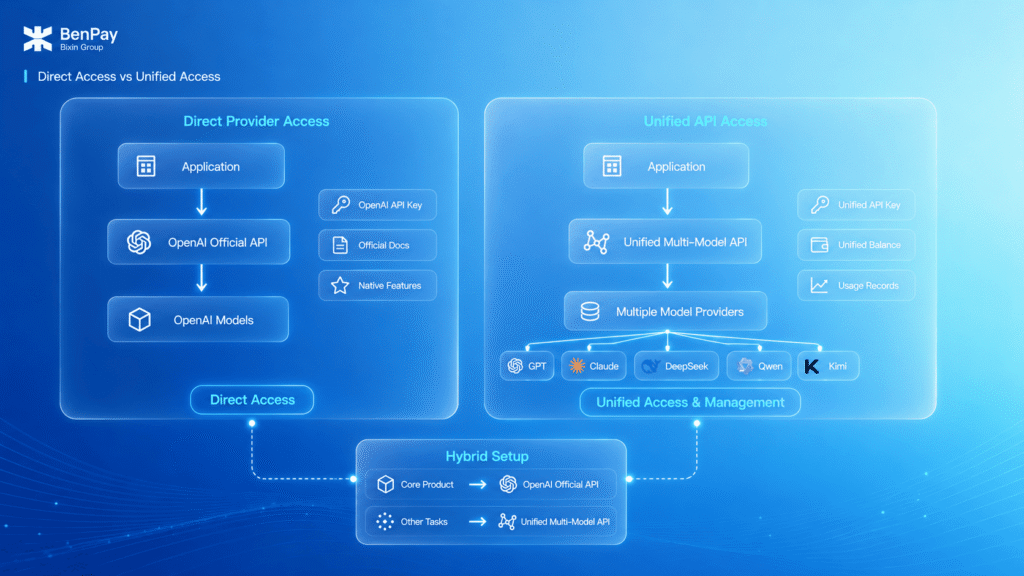
The OpenAI official API is provided directly by OpenAI. Users access the models and features currently available to their accounts through OpenAI’s official interfaces using an API key issued by OpenAI.
A unified multi-model API provides an access layer for multiple models. Users obtain an API key from the unified platform and use the platform’s interfaces to call the models it currently supports.
The main differences are shown below:
| Decision Factor | OpenAI Official API | Unified Multi-Model API |
|---|---|---|
| Service relationship | Direct connection to OpenAI | Access supported models through a unified platform |
| Model coverage | Models currently offered by OpenAI | Multiple model families supported by the platform |
| Native features | OpenAI-native capabilities are generally more complete | Depends on the platform’s integration and compatibility coverage |
| Interface format | Official OpenAI interfaces | Usually provides OpenAI-compatible or similar interfaces |
| Model selection | Choose from OpenAI models | Actively choose models from different providers |
| Support for new features | Can be integrated directly according to OpenAI’s official documentation | Requires confirmation that the platform already supports the feature |
| Account management | Manage OpenAI accounts, projects, and permissions | Manage multi-model access through one platform |
| Balance and billing | OpenAI Billing | Unified balance or billing system |
| Payment methods | Depends on the payment methods currently supported by OpenAI | Depends on the methods offered by the unified platform |
| Usage records | Viewed in the OpenAI dashboard | Records for multiple models viewed on one platform |
| Data path | Requests are sent directly to OpenAI | Requests pass through the unified API platform |
| Primary use cases | Single-provider access and native features | Multi-model access and unified management |
The core value of the OpenAI official API is direct access to OpenAI models and native interface capabilities. The core value of a unified multi-model API is reducing the work involved in managing accounts, interfaces, balances, and usage across multiple model platforms.
Therefore, broader model access does not necessarily mean more complete native functionality. A unified multi-model API offers more model choices, while official APIs generally provide fuller access to provider-specific features. The two approaches can also be used together.
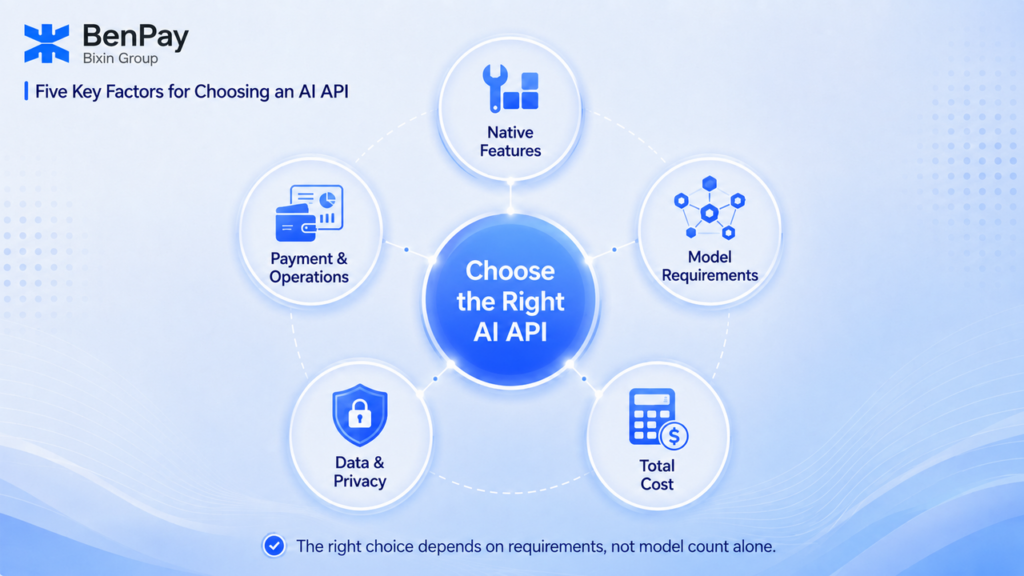
Five Factors That Should Determine Your AI API Choice
Do You Depend on Official Native Features?
Model coverage should not be the only consideration. Before selecting an API for production use, identify the features your project must have.
Examples include:
- Specific interfaces or request parameters;
- Tool calling;
- Structured outputs;
- Streaming responses;
- Multimodal input;
- Batch processing;
- File- or vector-related features;
- Real-time audio or other provider-specific capabilities;
- Official project permissions and budget management.
If your project depends heavily on OpenAI-specific interfaces or newly released features, using the OpenAI official API directly is usually the safer choice.
If your main requirements involve general text generation, coding, translation, analysis, or third-party AI tool integration, you can further evaluate the compatibility coverage of a unified multi-model API.
It is important to understand that OpenAI-compatible means that the request format offers a certain level of compatibility with the OpenAI API format. It does not mean that a third-party interface provides every feature available through the OpenAI official API.
Before using an API in production, test the specific request parameters, tool-calling behavior, streaming output, multimodal input, and error handling based on the platform’s documentation.
Do You Actually Need Multiple Models?
Users should not add new interfaces and platforms simply because more models are available on the market.
More practical questions include:
- Are you already using two or more models?
- Do you frequently need to compare outputs from different models?
- Are there tasks that one model cannot complete reliably?
- Do different stages of your business require different models?
- Are you planning to add other model providers in the next few months?
If most of your answers are “no,” continuing to use the OpenAI official API may already be sufficient.
If your team is already switching between OpenAI, Anthropic, Google, DeepSeek, and other platforms, the management value of a unified multi-model API becomes more significant.
To compare different types of alternatives, read “OpenAI API Alternatives: Moving from a Single Model to a Unified Multi-Model API.”
Does Total Cost Include More Than Token Fees?
When comparing API costs, you should not look only at the input and output token prices of a particular model.
A more complete calculation is: Total AI API cost = model usage fees + tied-up balances + integration and maintenance + monitoring and troubleshooting + financial reconciliation + human review and rework
Model Usage Fees
The OpenAI official API charges according to OpenAI’s official pricing.
A unified multi-model API charges according to the prices published by the platform. The price of the same model may differ between the official provider and a unified platform, so current pricing should be reviewed separately.
Tied-Up Balances
When connecting to multiple official APIs separately, users may need to purchase credits in advance on several platforms. Even when individual request costs are low, balances spread across multiple accounts can make fund management more difficult.
A unified multi-model API generally allows one balance to be used across multiple supported models, helping reduce repeated top-ups and fragmented balances.
Development and Maintenance
Connecting to multiple official APIs separately may require maintaining different:
- SDKs;
- Base URLs;
- Request parameters;
- Model names;
- Authentication methods;
- Error-handling logic;
- Version updates;
- Monitoring and alerts.
Compatible interfaces can reduce some repetitive work, but they cannot guarantee complete coverage of every platform’s native features.
Human Review and Rework
A lower-priced model may not reduce the final cost if its output requires repeated revisions. Similarly, using a more capable model for large volumes of simple tasks may result in unnecessary spending.
The potential advantage of a unified multi-model API therefore lies primarily in multi-model management and operational efficiency. It does not mean that the token price of every model will necessarily be lower than the official API price.
What Are Your Data Path and Privacy Requirements?
For businesses and professional projects, the platforms through which data passes can be just as important as the models being used.
Using the OpenAI Official API
When the official API is used, requests are sent directly to OpenAI.
OpenAI states that API data is not used to train or improve its models by default unless the user actively opts in to data sharing. At the same time, some API usage may generate abuse-monitoring logs. Default retention periods and available data controls should be confirmed against OpenAI’s latest data policies and the eligibility of the relevant account.
Businesses must still evaluate OpenAI’s terms of service, data retention practices, and data residency options based on the type of data involved, applicable regions, and compliance requirements.
Using a Unified Multi-AI API
When a unified multi-model API is used, requests first pass through the unified platform, which then sends the request to the selected model.
In addition to reviewing the policies of the target model provider, users should understand the unified platform’s:
- Data-processing practices;
- Logs and usage records;
- API key security mechanisms;
- Privacy policy;
- Terms of service;
- Model compatibility coverage;
- Technical support options.
If requests contain customer records, personal information, business secrets, or regulated data, the decision should not be based only on the number of models or the price.
Businesses should complete security and compliance assessments first, and then begin testing with non-sensitive, low-risk, or non-core use cases.
Are Payment and Operational Management Practical Barriers?
OpenAI manages API payments, balances, and billing. Users with the necessary permissions can view and filter project usage through the OpenAI Usage Dashboard.
This approach is suitable for users who primarily use OpenAI models and already have an eligible account and supported payment method.
A unified multi-model API generally includes the usage fees of multiple models within one balance or billing system. It is more suitable for:
- Users who do not want to top up multiple platforms separately;
- Teams that need to manage multiple API keys by project;
- Projects that want to review multi-model usage and costs in one place;
- Users without access to a suitable international credit card;
- Users who want to use other top-up methods currently offered by the platform.
Payment convenience can influence the final decision, but it should not replace an evaluation of models, interfaces, privacy, and service stability.
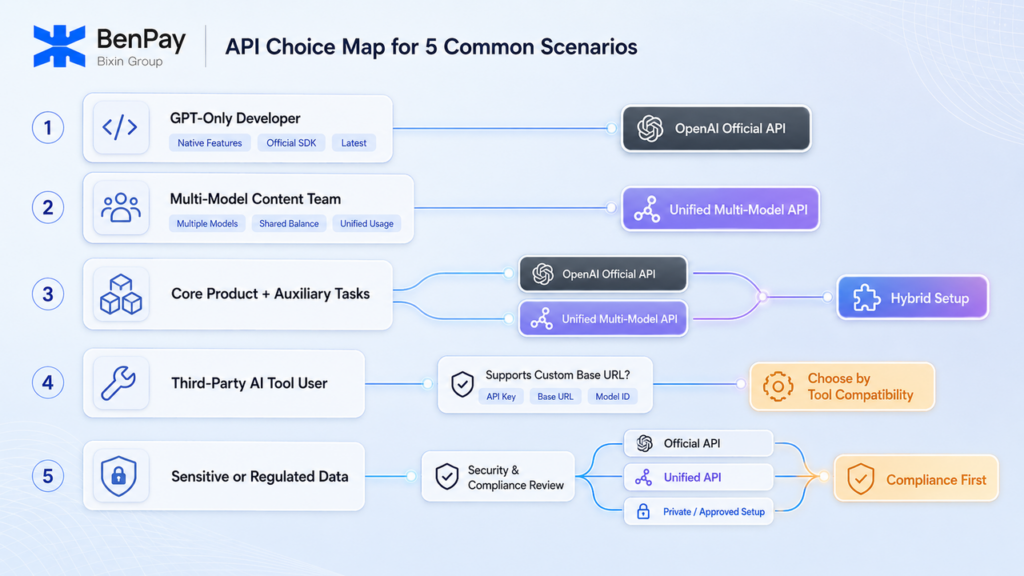
How to Choose in Five Common Scenarios
Scenario 1: An Individual Developer Who Only Uses GPT
The user primarily works with OpenAI models and needs the official SDK, newly released capabilities, or specific native features.
Recommended option: OpenAI official API.
Adding a unified platform may not provide significant value and may instead introduce an additional interface layer and platform dependency.
If you have not yet created an official API key, read “How to Get an OpenAI API Key: Official Application Guide and Multi-Model Options.”
Scenario 2: A Content Team That Needs Multiple Models
The team selects different models for article writing, translation, long-document processing, Chinese-language content, and batch-processing tasks, and wants to review costs in one place.
Recommended option: Unified multi-model API.
A unified account, API key management system, and balance can reduce the complexity of team members purchasing and managing multiple model APIs separately.
Scenario 3: Core Business Uses OpenAI, While Supporting Tasks Need Other Models
A company’s core product depends on OpenAI-native capabilities, while content, testing, Chinese-language, or batch-processing tasks require additional models.
Recommended option: Use both types of API.
The core interface can remain connected to the OpenAI official API, while a unified multi-model API can supplement it with other models. This approach avoids having to modify all existing systems at once simply to add more model options.
Scenario 4: A General User of Third-Party AI Tools
The user does not develop applications directly and mainly configures models in AI clients, coding tools, or other software that supports custom APIs.
Recommended option: Choose based on tool compatibility.
If the tool only supports official OpenAI sign-in or a fixed interface, use the method specified by the tool.
If the tool supports a custom Base URL, API key, and Model ID, you can evaluate a unified multi-model API and begin by sending a small number of test requests.
Scenario 5: A Business Processing Sensitive or Regulated Data
The business handles customer records, personal information, healthcare, financial, legal, or other regulated data.
Recommended option: Complete a security and compliance assessment before choosing an access method.
These projects should not make decisions based only on the labels “official” or “multi-model.” Businesses need to confirm data paths, log retention, contractual terms, access controls, data residency, subprocessors, and incident-response mechanisms.
When necessary, different interfaces can be selected for different business processes based on the sensitivity level of the data involved.
Who Is BenPay AI API Suitable For?
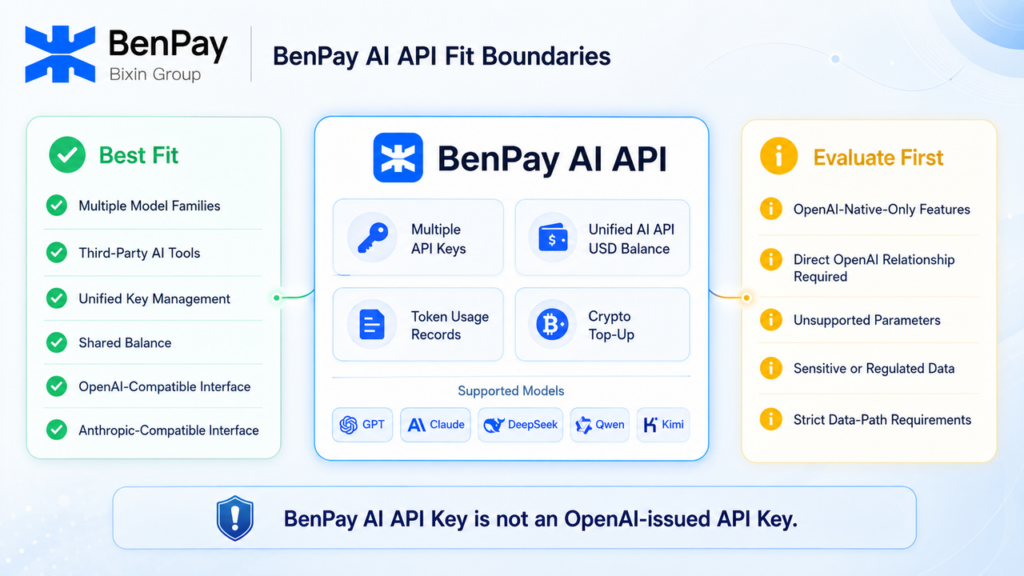
BenPay AI API is a unified multi-model API service designed for third-party AI tool users, content teams, developers, and enterprise projects.
According to BenPay’s current product information, users can access supported model families such as GPT, Claude, and DeepSeek through one account. They can also create multiple API keys for different tools, projects, or teams.
BenPay AI API provides:
- An OpenAI-compatible Base URL;
- An Anthropic-compatible Base URL;
- Multiple API keys under one account;
- A shared AI API USD Balance for multiple models;
- Billing based on actual token usage;
- Model usage and request records;
- Cryptocurrency top-up methods currently supported by the platform.
For specific Base URLs, authentication methods, and Model IDs, refer to the BenPay AI API integration documentation.
BenPay AI API Is More Suitable When You:
- Want to use multiple leading AI models;
- Use third-party AI tools that support custom APIs;
- Want to manage API keys, balances, and request records in one place;
- Do not want to top up multiple model platforms separately;
- Need an OpenAI-compatible or Anthropic-compatible interface;
- Want to use cryptocurrency top-up methods currently supported by the platform;
- Want to retain access to GPT while adding other model options.
BenPay AI API May Not Be Suitable When You:
- Depend heavily on OpenAI-specific interfaces or parameters;
- Must establish a direct service relationship with OpenAI;
- Require native features that are not yet supported by compatible interfaces;
- Have security or compliance requirements that prohibit requests from passing through another platform.
A BenPay AI API key is not an official API key issued by OpenAI. Users access the models currently supported by the platform through interfaces provided by BenPay. The actual available functionality depends on the model and interface compatibility coverage.
Final Selection Guide
| Primary Requirement | Recommended Option |
|---|---|
| Only use GPT or other OpenAI models | OpenAI official API |
| Depend on OpenAI-native features | OpenAI official API |
| Want to develop directly according to official documentation | OpenAI official API |
| Use multiple model families | Unified multi-AI API |
| Want to call multiple models using one balance | Unified multi-AI API |
| Want unified management of multi-model usage and costs | Unified multi-AI API |
| Use third-party AI tools | Choose based on tool compatibility |
| Need other payment or top-up methods provided by a platform | Unified multi-AI API |
| Core business depends on OpenAI, while supporting tasks require other models | Use both types of API |
| Process sensitive or regulated data | Complete a security and compliance assessment first |
The OpenAI official API and unified multi-model APIs are not simply replacements for one another.
A more accurate selection framework is:
- Prioritize an official API when you need provider-native capabilities.
- Consider a unified multi-model API when you need multiple models and unified management.
- Keep both access methods when you have both types of requirements.
- Complete security and compliance assessments before processing sensitive data.
Conclusion: Define Your Critical Requirements Before Choosing an API
When choosing an AI API, first identify the conditions your project cannot compromise on, including native features, model coverage, interface compatibility, data paths, payment methods, and management costs.
If your business primarily uses OpenAI models and depends on their native capabilities, the OpenAI official API is generally the more direct option. If multiple models have become an ongoing requirement, a unified multi-model API can make management easier. If both requirements exist, you can retain the official interface while using a unified multi-model API for other tasks.
If your main requirements are multi-model access, a shared balance, and compatible interfaces, you can review the models, versions, and pricing currently supported by BenPay AI API.
Before using it in a production project, begin with a small number of non-sensitive requests to test the target model, Model ID, streaming responses, tool calling, and usage records. Confirm that the available compatibility coverage meets your actual requirements.