
If you want to try out OpenAI’s latest mid-range model – GPT-6.1 Terra API – but also want to understand what tasks it is suitable for, how much it costs for long context requests, and how to integrate it? This article will clarify all these points.
BenPay AI API currently lists GPT-6.1 Terra with the public value/ Model ID value/gpt-6.1-terra.
Compared with OpenAI’s long-context rates, BenPay’s listed prices are about 20% of the official rates.
These comparisons use long-context pricing and are per million tokens. Your actual cost depends on input, output, caching, and any features used in the request. This guide explains what GPT-6.1 Terra is, compares the prices, and covers setup and compatibility checks.
What Is GPT-6.1 Terra?
GPT-6.1 Terra is an OpenAI model. OpenAI describes it as a fast, efficient model for visual reasoning, computer use, and drafting or revising text. Example tasks include interpreting technical drawings, understanding what is shown on an application screen, and drafting or editing written content. Read OpenAI’s GPT-6.1 Terra announcement
Results depend on the task, prompt, and settings. Test the model on a small set of real tasks instead of choosing based on the model name alone.
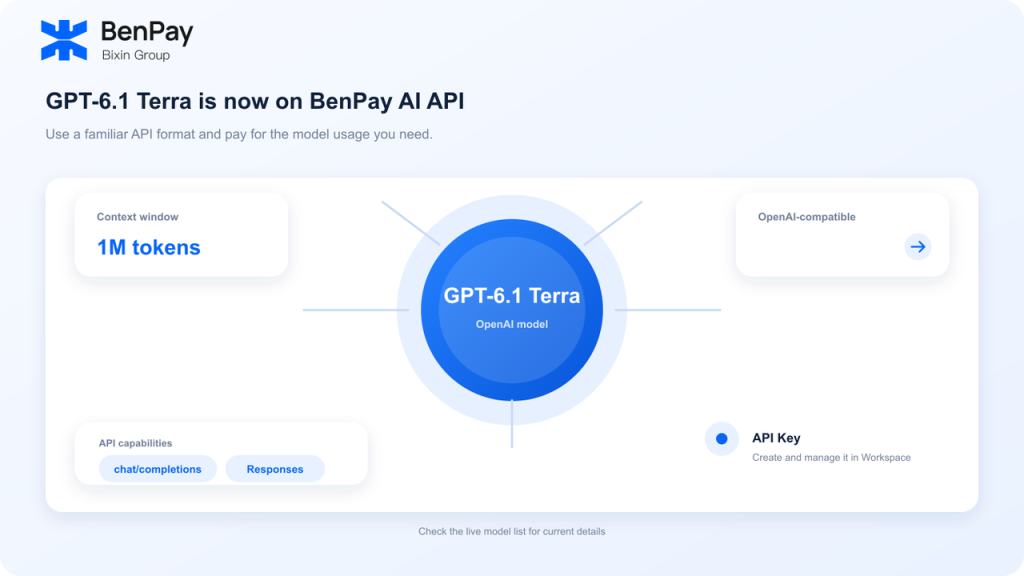
GPT-6.1 Terra on BenPay AI API
| Item | Information shown by BenPay |
|---|---|
| Model | GPT-6.1 Terra |
| BenPay Model ID | value/gpt-6.1-terra |
| API format | OpenAI-compatible |
| Listed interfaces | Chat Completions, Responses |
| Context window | 1M tokens |
| Billing | Pay as you go |
When calling the model through BenPay, use the full Model ID shown on its page: value/gpt-6.1-terra. Do not substitute OpenAI’s official Model ID, gpt-6.1-terra.
BenPay lists a 1M-token context window. OpenAI’s model documentation lists 1.05M tokens. The figures are not identical, so configure requests according to the service you are using and its current documentation.
GPT-6.1 Terra API Pricing: Long-Context Rates
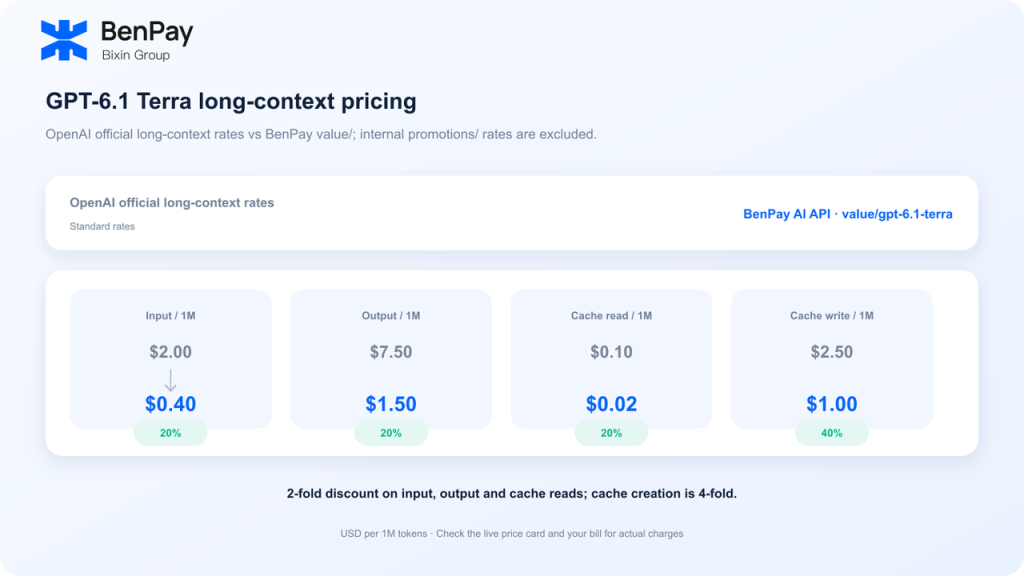
OpenAI’s standard rates are $1 for input, $5 for output, $0.05 for cached input, and $1.25 for cache writes per million tokens. For prompts with more than 272K input tokens, OpenAI applies long-context pricing: input and cache rates are doubled, while output is priced at 1.5 times the standard rate.
The table compares those OpenAI long-context rates with BenPay’s value/ rates. All prices are in USD per million tokens.
| Charge type | OpenAI long-context rate | BenPay value/ rate | Comparison |
|---|---|---|---|
| Input | $2.00 | $0.40 | About 20% of the official rate |
| Output | $7.50 | $1.50 | About 20% of the official rate |
| Cache read | $0.10 | $0.02 | About 20% of the official rate |
| Cache creation (30-minute) | $2.50 | $1.00 | About 40% of the official rate |
So it would not be accurate to say that every charge is 20% of the official rate. Input, output, and cache reads are about 20% of OpenAI’s long-context rates; cache creation is about 40%. This comparison does not include any applicable tool-call charges, and it does not mean the two services have identical context limits or feature support.
A Simple Long-Context Cost Example
Suppose a request uses 800,000 input tokens and 100,000 output tokens, with no caching and no additional tool-call charges:
- OpenAI long-context rates: 0.8 × $2 + 0.1 × $7.50 = $2.35
- BenPay
value/rates: 0.8 × $0.40 + 0.1 × $1.50 = $0.47
Under these assumptions, the BenPay estimate is about 80% lower than the OpenAI long-context estimate. This is an example based on listed rates, not a fixed-cost promise. Actual billing varies with token usage, caching, and the features used.
How to Call GPT-6.1 Terra Through BenPay
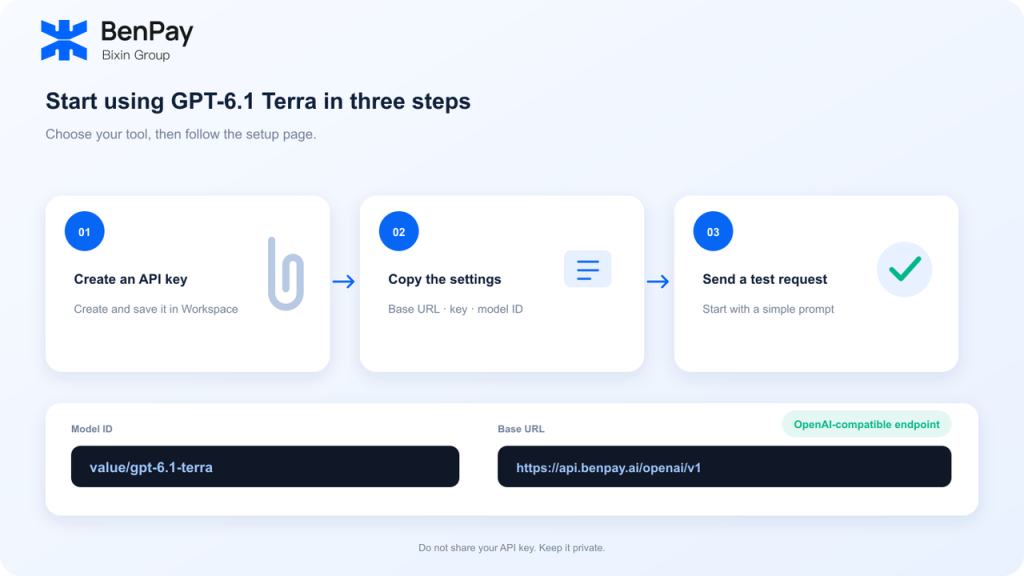
An API is a way for your code or tool to send a request to a model and receive a response. To connect through BenPay, you need three values:
- Base URL:
https://api.benpay.ai/openai/v1 - API key: Create and copy your own key in BenPay AI API Workspace.
- Model ID:
value/gpt-6.1-terra
Enter these values in a tool that supports a custom OpenAI-compatible API, then save the configuration. If the tool has a model selector, choose or enter the exact BenPay Model ID. Start with a simple, non-sensitive request. Once it returns a response, you can test your actual workflow.
Setup menus differ across tools. If you use a terminal CLI, desktop agent, IDE plugin, or another compatible tool, follow the BenPay AI API setup guide. Treat your API key like a password: do not expose it in public repositories, screenshots, or website front ends.
For more on token billing, read the AI API Pricing and Token Cost Guide. For pricing and setup information about another GPT model on BenPay, see the GPT-6 Astra API pricing and setup guide.
Frequently Asked Questions
What is the BenPay Model ID for GPT-6.1 Terra?
BenPay lists value/gpt-6.1-terra. Use this exact Model ID when making requests through BenPay.
Is GPT-6.1 Terra on BenPay 20% of OpenAI’s price?
Input, output, and cache-read rates are about 20% of OpenAI’s long-context rates. Cache creation is about 40% of the official long-context rate. This comparison uses OpenAI’s long-context pricing, not its standard pricing for requests below the long-context threshold.
When does OpenAI’s long-context pricing apply?
OpenAI says prompts with more than 272K input tokens use long-context pricing. Input and cache rates are doubled, and output is charged at 1.5 times the standard rate. Refer to OpenAI’s current pricing documentation for the exact terms.
Is the context window the same on BenPay and OpenAI?
No. BenPay currently lists 1M tokens, while OpenAI’s documentation lists 1.05M tokens. Check the current documentation for the service you use.
Which API should I use for tool calling with GPT-6.1 Terra?
OpenAI’s documentation says tool calling requires the Responses API. BenPay also lists the Responses interface, but check BenPay’s current compatibility details and test the specific feature you need before relying on it.
Start Testing GPT-6.1 Terra
If you want to try GPT-6.1 Terra in a tool or application you already use, first confirm BenPay’s current Model ID, interface, and pricing. Then create an API key and start with a small test request.
Visit BenPay AI API to check the current model information and rates. Compared with OpenAI’s long-context rates, BenPay’s value/ input, output, and cache-read rates are about 20%; cache creation is about 40%. Your actual cost depends on current pricing and usage records in Workspace.
Note: Model availability, prices, context limits, and API features can change. This guide uses information from the BenPay page provided on November 2nd 2026, and OpenAI’s current documentation. Check both before use. A BenPay API key is issued by BenPay; It is not an official OpenAI API key.