
One of the most confusing questions when using an AI API is simple: How much does one API request actually cost?
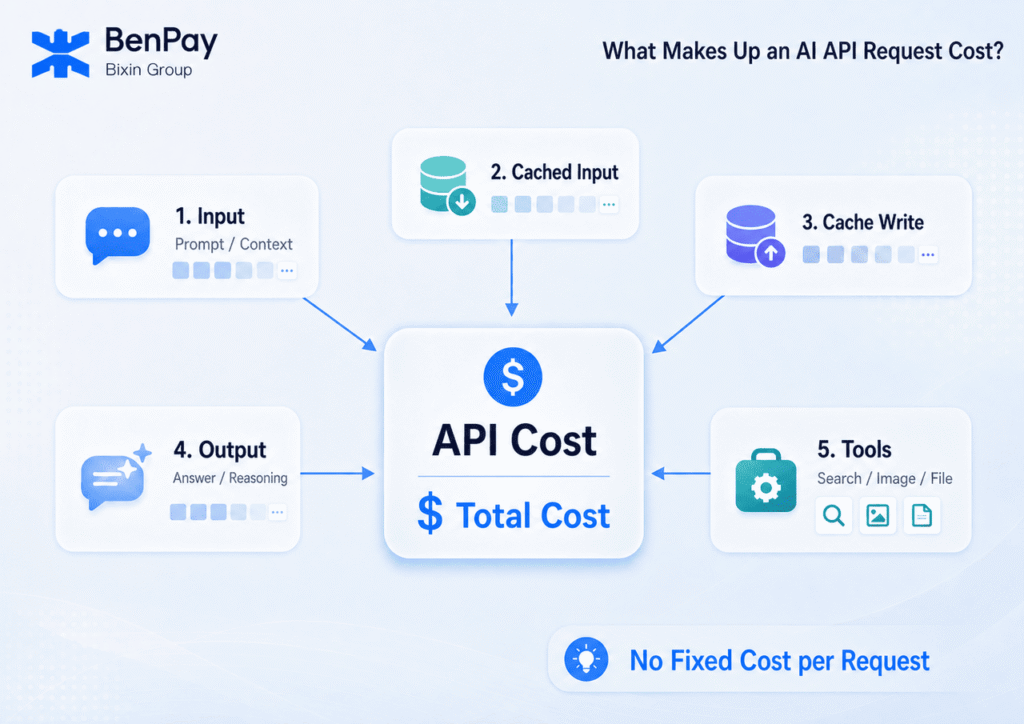
For text models, the most basic costs typically come from uncached input tokens, cached input tokens, cache write tokens, and billable output tokens. Reasoning models may also generate reasoning tokens, which are usually not shown directly to the user but are still included in billable output usage. Tool calls, multimodal input, long context, automatic retries, and model selection can also affect the final bill.
That means understanding AI API pricing requires more than checking the price per million tokens. You also need to understand what a task actually consumes.
This article explains how AI API billing works starting with tokens. Using current OpenAI API and BenPay AI API GPT-5.6 prices as examples, we will show how to calculate the cost of a single request, estimate monthly API expenses, and reduce long-term AI API costs.
How Does AI API Billing Work?
Most major AI APIs use a pay-as-you-go pricing model, meaning you pay based on actual usage.
For a standard text request, the basic formula can be written as:
API request cost = uncached input token cost + cached input token cost + cache write token cost + billable output token cost + tool and other costs
- Input tokens are the content sent to the model for processing, including prompts, system prompts, conversation history, documents, and some tool-related information.
- Output tokens are the content generated by the model.
- Other costs may include Web Search, image or audio input, long-context usage, and other model-specific charges.
Some models or APIs also report Cached Input, Cache Write, and Reasoning Tokens separately. Tool-based capabilities may be billed by the number of calls, storage used, or execution time.
As a result, the price of “one API request” is usually not fixed. Sending a short text prompt, uploading a long report, including dozens of previous chat turns, or asking the model to generate thousands of words can all result in very different costs.
What Is a Token?
A token is a basic unit that AI models use to process text.
Models do not simply count one Chinese character as one unit or one English word as one unit. Instead, a tokenizer splits text into tokens. Words, parts of words, punctuation marks, spaces, and Chinese characters may all be represented by different numbers of tokens.
This means the token count is neither the same as the character count nor the word count.
OpenAI provides the following rules of thumb for English text:
- 1 token is approximately 4 English characters.
- 1 token is approximately ¾ of an English word.
- 100 tokens are approximately 75 English words.
Tokenization varies across languages and text structures, so these English estimates should not be applied directly to Chinese content. For formal cost estimates, it is better to use the tokenizer provided by the platform or actual API usage data. More details are available in OpenAI’s token documentation.
Input tokens also include more than the sentence currently visible to the user. For example, suppose a user sends only: “Please continue revising the previous version of the article.”
To understand what “the previous version” refers to, the application will usually need to send the previous conversation or document to the model as well.
A single request may therefore contain: System Prompt + Current Prompt + Conversation History + Document Content + Tool Definitions
The user may see only a few words, while the model actually receives thousands or even tens of thousands of tokens.
This is one reason why the cost of long conversations and complex AI agent workflows can continue to increase over time.
How Do You Calculate AI API Costs?
Suppose a model charges:
- $A per 1 million input tokens
- $B per 1 million output tokens
If one request uses 100,000 input tokens and 20,000 output tokens, the calculation is:
Input cost = 100,000 ÷ 1,000,000 × A
Output cost = 20,000 ÷ 1,000,000 × B
Basic text cost = Input cost + Output cost
The formulas above are intended solely for calculating costs based on standard input and output. Actual cost estimates must also account for factors such as caching, tool calls, and multimodal inputs; additionally, the per-token price for certain models may vary depending on the length of the input. Therefore, before applying these formulas, please verify the specific model and its applicable pricing for context.
OpenAI API Pricing: How Much Do Costs Vary by Model and Context Length?
There is no single universal “GPT API price” for the OpenAI API. Different models have different rates for input, cached input, cache writes, and output. For the GPT-5.6 family, the amount of input in a single request can also affect the applicable pricing.
As of July 2026, the OpenAI GPT-5.6 family includes three main tiers: Sol, Terra, and Luna, designed respectively for complex professional tasks, a balance between quality and cost, and cost-sensitive high-volume workloads. All prices below are in USD per 1 million tokens:
| OpenAI Model | Pricing Scenario | Input | Cached Input | Cache Write | Output |
|---|---|---|---|---|---|
| GPT-5.6 Sol | Standard Pricing | $5.00 | $0.50 | $6.25 | $30.00 |
| GPT-5.6 Sol | Input >272K Tokens | $10.00 | $1.00 | $12.50 | $45.00 |
| GPT-5.6 Terra | Standard Pricing | $2.50 | $0.25 | $3.13 | $15.00 |
| GPT-5.6 Terra | Input >272K Tokens | $5.00 | $0.50 | $6.25 | $22.50 |
| GPT-5.6 Luna | Standard Pricing | $1.00 | $0.10 | $1.25 | $6.00 |
| GPT-5.6 Luna | Input >272K Tokens | $2.00 | $0.20 | $2.50 | $9.00 |
For GPT-5.6 Sol, Terra, and Luna, when a single request contains more than 272K input tokens, all input tokens in that request are billed at 2× the standard input rate, while output tokens are billed at 1.5× the standard output rate. Cache pricing is adjusted accordingly.
Therefore, when calculating OpenAI API costs, you need to consider not only which model is being used but also whether a single request exceeds the long-context pricing threshold.
When processing long documents, complete codebases, or large amounts of conversation history, actual costs may be significantly higher than standard pricing.
The prices above are based on OpenAI’s official pricing published in July 2026. Before actual use, check the latest pricing on the GPT-5.6 Sol, Terra, and Luna model pages.
Comparing OpenAI and BenPay AI API Costs for Long-Context Workloads
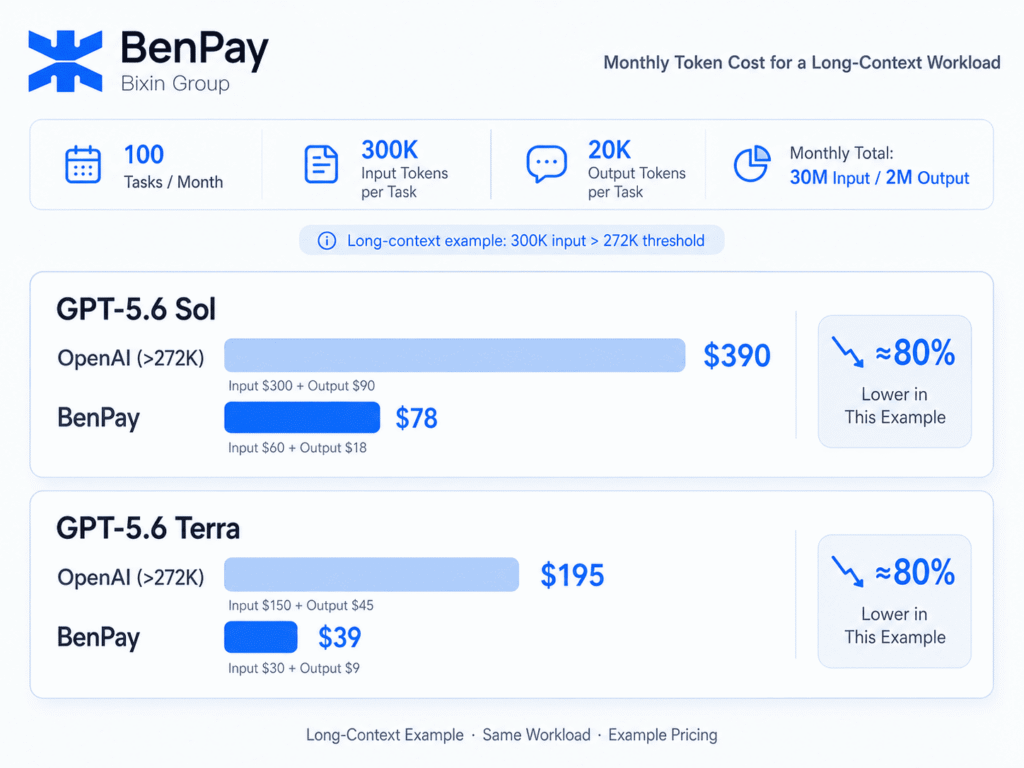
Suppose a long-document processing tool completes 100 tasks per month, with each task using an average of 300,000 input tokens and 20,000 billable output tokens.
Total monthly usage would be:
- 30,000,000 input tokens
- 2,000,000 output tokens
The 20,000 output tokens per task in this example represent all billable output usage, including any reasoning tokens that may be generated.
The calculation below compares only basic text token costs. It does not include caching, tool calls, failed-request retries, or other charges.
Because each request contains 300K input tokens, it exceeds OpenAI’s 272K pricing threshold. GPT-5.6 Sol and Terra, therefore, use the long-context pricing rates. This input size also falls within the 370K context range shown on the BenPay page.
OpenAI vs. BenPay AI API Pricing
According to information updated on the BenPay AI API Supported Models page on July 10, 2026, the displayed prices were as follows. All prices are in USD per 1 million tokens.
| Model & Access Method | Input | Cached Input | Cache Write | Output |
|---|---|---|---|---|
| OpenAI GPT-5.6 Sol, Input >272K | $10.00 | $1.00 | $12.50 | $45.00 |
| BenPay GPT-5.6 Sol | $2.00 | $0.20 | $2.50 | $9.00 |
| OpenAI GPT-5.6 Terra, Input >272K | $5.00 | $0.50 | $6.25 | $22.50 |
| BenPay GPT-5.6 Terra | $1.00 | $0.10 | $1.25 | $4.50 |
For this same task, the unit prices for input, cache read, cache write, and output for GPT-5.6 Sol and Terra (as listed by BenPay AI API) are all 80% lower than OpenAI’s long-context pricing.
Monthly Cost Based on the Example Workload
| Model & Access Method | Monthly Input Cost (30M Tokens) | Monthly Output Cost (2M Tokens) | Monthly Basic Token Cost |
|---|---|---|---|
| OpenAI GPT-5.6 Sol | 30 × $10 = $300 | 2 × $45 = $90 | $390 |
| BenPay GPT-5.6 Sol | 30 × $2 = $60 | 2 × $9 = $18 | $78 |
| OpenAI GPT-5.6 Terra | 30 × $5 = $150 | 2 × $22.50 = $45 | $195 |
| BenPay GPT-5.6 Terra | 30 × $1 = $30 | 2 × $4.50 = $9 | $39 |
Based on the fixed workload and displayed prices above:
- The monthly base token cost for GPT-5.6 Sol has dropped from $390 (OpenAI) to $78 (BenPay AI API);
- The monthly base token cost for GPT-5.6 Terra has dropped from $195 (OpenAI) to $39 (BenPay AI API);
- In both examples, the combined basic input and output token costs are approximately 80% lower.
This difference applies only to the example workload in which each request contains more than 272K input tokens and remains within the context windows supported by both access methods.
Note: The above comparison applies only to examples with a single input exceeding 272K tokens; actual pricing, features, and compatibility are subject to the latest information on the respective official pages and test results.
Which AI API Costs Are Most Often Overlooked?
The above example calculates the basic input and output Token fees. However, in actual projects, the final bill may also be affected by factors such as conversation history, caching, inference tokens, tool calls, and automatic retries.
Output Length and Conversation History
For many models, output tokens cost more than input tokens.
If a task only needs a short summary but the prompt asks the model to be “as detailed as possible,” unnecessary output tokens may be generated.
Multi-turn conversations also repeatedly include previous messages, which can cause the input size of later requests to grow over time.
Defining output length clearly, summarizing older conversations, and removing irrelevant history can help reduce both input and output costs.
Repeated Documents and Cache Pricing
Sending an entire PDF, knowledge base, or long system prompt with every request can continuously increase input token usage.
For GPT-5.6, the current cached input price is 90% lower than regular input pricing, while cache writes are billed at 1.25× the regular input price.
Whether caching actually saves money therefore depends on:
- How often the cached content is reused
- Cache hit rate
- Cache write cost
- Cache lifetime
You cannot determine the true savings by looking only at the Cached Input price.
Reasoning Tokens and Tool Calls
Some reasoning models use internal reasoning tokens before generating the final answer.
The visible answer is therefore not necessarily the same as the total billable output usage.
Tools such as Web Search, File Search, Computer Use, Code Interpreter, and image generation may also be billed based on calls, storage, execution time, or other usage metrics.
A complex AI agent may trigger several model requests and multiple tools while completing a single task. Costs should therefore be measured across the entire workflow, not just the final model response.
Automatic Retries
Not every failed or rejected request necessarily generates a charge.
However, a request may already have consumed processing resources before timing out, and a subsequent retry may become a new billable request.
Applications should track:
- Number of requests
- Success rate
- Retry count
- Error types
- Actual token usage
This helps prevent unexpected repeated calls during failures or service issues.
Human Review and Rework
The model with the lowest token price does not necessarily produce the lowest total cost per task.
Suppose:
Model A costs only $0.02 per task but requires 15 minutes of manual editing.
Model B costs $0.06 per task but produces output that can be used almost immediately.
For a business, a more useful metric is the combined API cost, number of calls, and human time required to complete one acceptable task.
How to Estimate Monthly AI API Costs
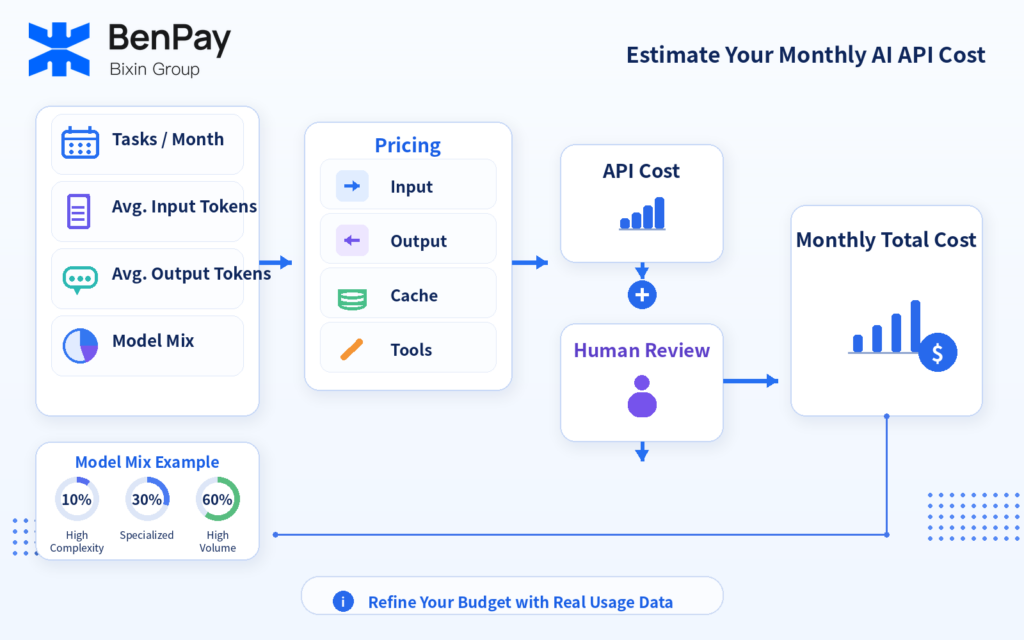
Before using an API in production, start by collecting four basic metrics:
Monthly task volume + Average input tokens per task + Average output tokens per task + Model usage distribution
Input tokens should include system prompts, documents, conversation history, and tool definitions—not just the user’s current message.
Output tokens should also be based on real testing data rather than simply using the maximum output length supported by the model.
The basic formulas are:
Monthly input cost = Monthly tasks × Average input tokens ÷ 1,000,000 × Input price
Monthly output cost = Monthly tasks × Average output tokens ÷ 1,000,000 × Output price
Monthly total cost = Input and output costs across all models + Caching and tool costs + Human costs
For workflows with different levels of complexity, you can first define a model allocation.
For example:
- 10% high-complexity tasks
- 30% specialized tasks
- 60% high-volume standardized tasks
You can then estimate the costs of each category separately.
After the product goes live, the budget should be continuously adjusted based on actual API usage data.
When comparing different APIs, also review the following cost dimensions:
| Cost Dimension | What to Check |
|---|---|
| Input & Output | Price per million tokens for each |
| Caching | How cache reads, writes, and cache lifetime are billed |
| Reasoning & Tools | Whether additional usage or per-call fees apply |
| Long Context | Whether there are length thresholds and higher pricing rules |
| Request Efficiency | How many calls and retries are required to complete a task |
| Model Quality | Whether significant human review and rework are required |
| Balance & Usage Records | Whether balances must be funded across multiple platforms and bills consolidated |
Eight Ways to Reduce AI API Costs
After completing the monthly cost estimation, costs can be reduced item by item from aspects such as model selection, context length, caching and calling methods.
- Choose Models Based on Task Complexity
Do not use the same high-cost model for every task.
Use a fixed evaluation set to determine which models are suitable for high-complexity tasks, specialized tasks, and high-volume standardized workloads.
- Remove Unnecessary Context
Send only the information required to complete the task.
Remove outdated conversations, irrelevant documents, and repeated examples.
- Control Output Length
For summarization, classification, and format-conversion tasks, specify word limits, required fields, or a JSON structure to avoid generating more content than needed.
- Use Caching Strategically
When many requests share the same long prefix or system prompt, caching may be worth evaluating.
However, you should calculate cache write prices, cache read prices, hit rates, and cache lifetime together.
- Use Batch Processing for Non-Real-Time Tasks
For tasks that do not require immediate responses—such as classification, offline summarization, and data cleaning—asynchronous batch processing may reduce costs.
OpenAI’s current Batch API provides 50% lower pricing than synchronous APIs for supported models and completes tasks within a processing window of up to 24 hours.
Check the official OpenAI Batch API documentation for current model coverage and requirements.
- Control Automatic Retries
Set a maximum number of retries, reasonable timeouts, error-type handling, and exponential backoff to avoid continuously generating requests when errors occur.
- Manage API Keys and Budgets by Project
Using separate projects or API keys for different products and workflows makes it easier to identify high-usage projects, abnormal requests, and models that need optimization.
- Compare Cost per Completed Task
The final metric should not simply be: “How much does one million tokens cost?”
A better question is: “How much does it cost to complete 1,000 acceptable tasks?”
A slightly more expensive model that reduces retries and manual rework may have a lower total cost.
How Does BenPay AI API Help Manage Multi-Model Costs?
Once multiple models become part of the same workflow, pricing, balances, and usage records may be distributed across different platforms.
BenPay AI API uses a pay-as-you-go pricing model, and charges are deducted based on the platform’s current pricing and actual token usage.
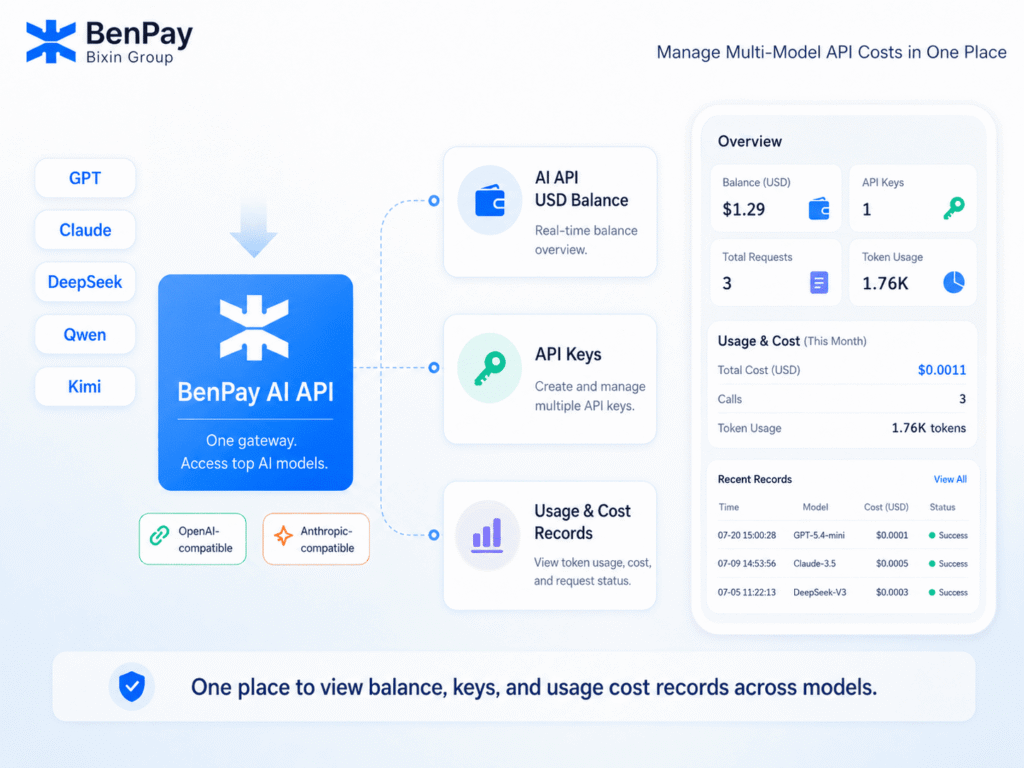
Users can call multiple supported models using the same AI API USD Balance. They can also create multiple API keys for different tools, projects, or teams and view model usage, token consumption, request status, and cost records within one account.
The platform also provides OpenAI-compatible and Anthropic-compatible interfaces, along with currently supported crypto top-up methods.
These features are mainly designed to reduce the work involved in managing balances, API keys, and usage records across multiple models.
Check the BenPay AI API Supported Models page for currently available models, Model IDs, features, and pricing.
Conclusion: Reducing AI API Costs Requires Both the Right Model and the Right Access Method
AI API costs depend on token usage, caching, tool calls, context length, and model selection. In addition to reducing unnecessary usage, differences in pricing across API access methods can also have a direct impact on long-term costs.
Based on the example in this article involving a single input exceeding 272K tokens, the base token costs for the GPT-5.6 Sol and Terra models listed on the BenPay AI API page are approximately 80% lower than OpenAI’s corresponding long-context pricing; additionally, a single account balance can be used to access multiple models. Actual costs may vary depending on the model, features, and pricing; users are advised to consult the BenPay AI API supported models page and verify costs and performance through real-world tasks before use.
FAQ: Common Questions About AI API Pricing
Is AI API pricing based on requests or tokens?
Most text-generation APIs are primarily billed based on token usage. However, tools, multimodal models, and specialized services may also charge based on calls, storage, execution time, or other usage metrics.
Which costs more, input tokens or output tokens?
It depends on the model. For the current GPT-5.6 family, output tokens cost more than input tokens, so generating long responses can significantly increase API costs.
Why is Cached Input cheaper?
When repeated input is served from cache, the platform can charge a lower cache-read rate. However, writing content to the cache may cost more. The actual savings therefore depend on cache write costs, hit rate, reuse frequency, and cache lifetime.
Does long context increase OpenAI API costs?
It depends on the model. For GPT-5.6 Sol, Terra, and Luna, when a single request contains more than 272K input tokens, the entire request is charged at higher input and output rates.
How should I compare the actual cost of OpenAI and BenPay AI API?
Use the same model, the same input and output token usage, and the same feature requirements to calculate costs. Then compare context length, compatibility, data paths, and task quality. Prices may change, so always refer to the latest pricing information published by both platforms.