
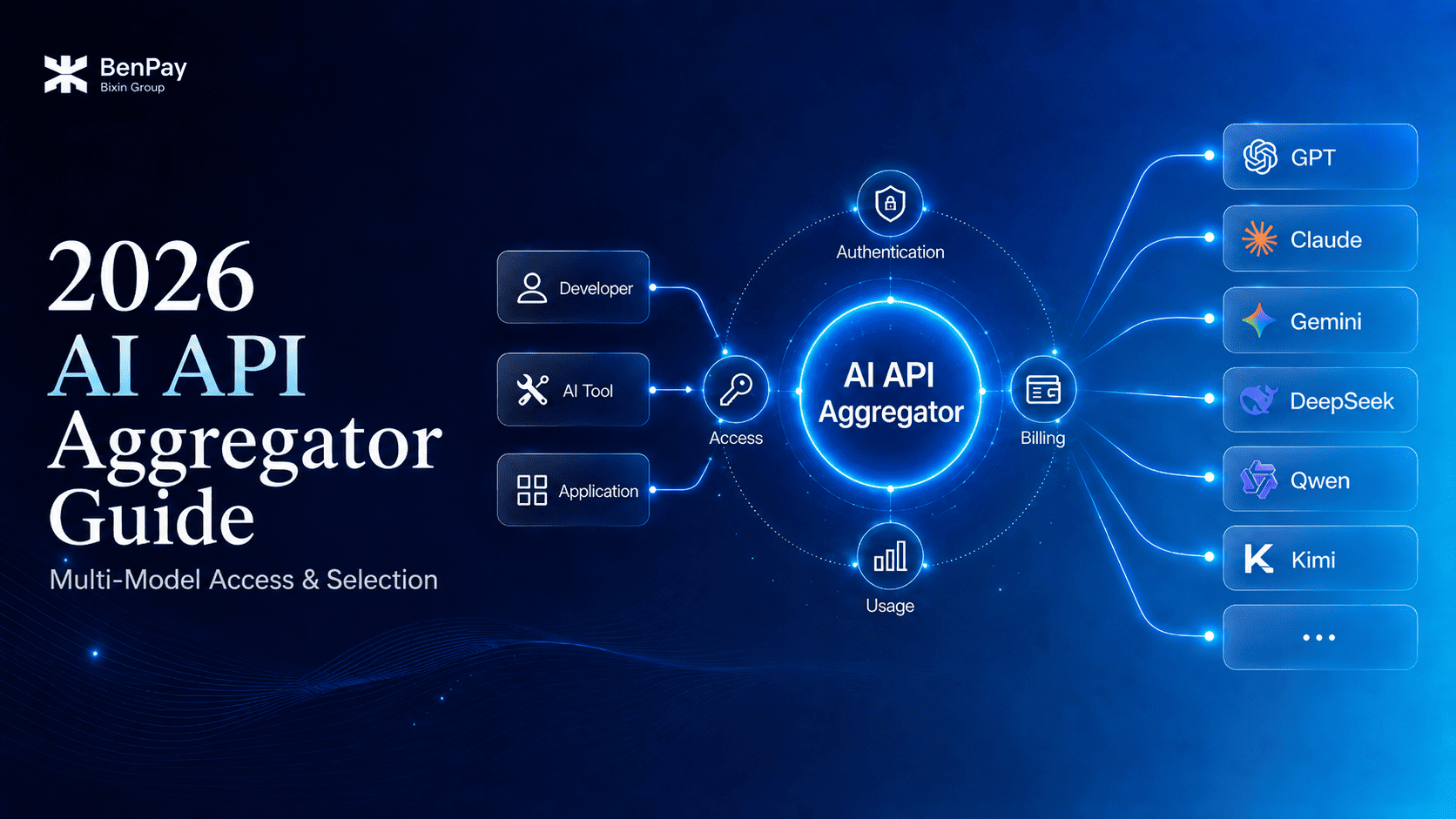
An AI API aggregator is a service that brings API access from multiple model providers into a single platform. It does not aggregate models into a new AI model. Instead, it consolidates different parts of API usage, including model access, interface adaptation, authentication, billing, and usage tracking.
For individual users, developers, and teams that use third-party AI tools, the main challenge is often not whether suitable models are available, but how to reduce repetitive integration work across multiple models, control costs, and preserve the flexibility to make changes later.
This guide focuses on three practical questions: why an AI API aggregation layer is needed, how it handles multi-model requests, and how to select and test one for production projects.
To first understand how one API Key can access multiple models, read “What Is a Unified AI API? How One API Key Can Access Multiple Leading AI Models.”
Note: This article is based on product and technical documentation available as of July 2026. Models, interfaces, pricing, and platform capabilities may change. Always check the latest documentation and live platform information before use.
Why Did the AI API Aggregation Layer Emerge?
When a project uses only one model provider, integrating directly with the official API is usually the simplest approach.
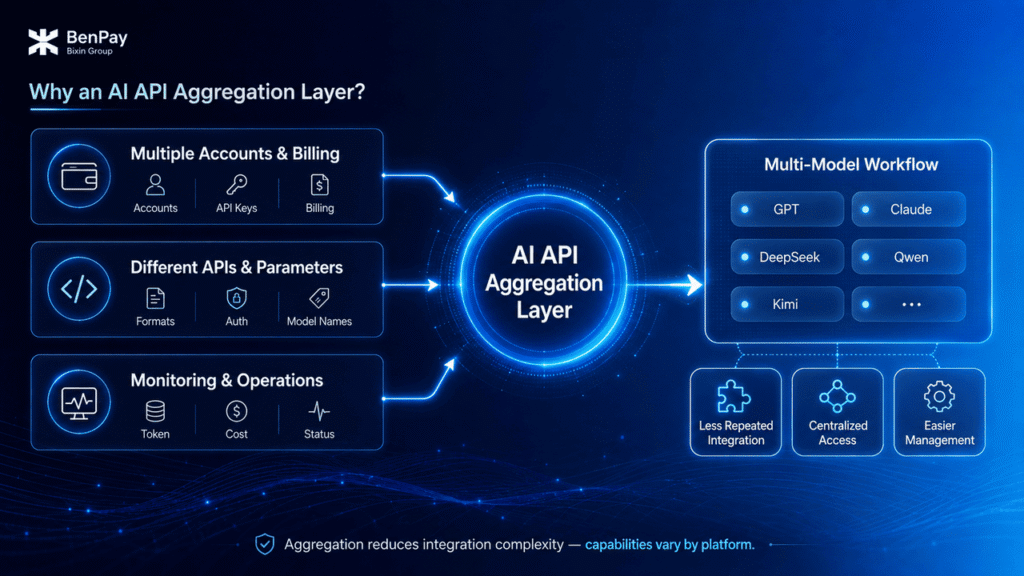
However, once models such as GPT, Claude, DeepSeek, Qwen, or Kimi are used within the same workflow, complexity expands beyond the model layer into account management, interfaces, billing, and operations.
- Multiple Account and Billing Systems
Integrating multiple official APIs separately means managing multiple accounts, API Keys, billing systems, balances, and usage dashboards.
Teams also need to consolidate requests and costs across different platforms to understand the total AI API spend of a project.
- Interfaces and Parameters Are Not Fully Consistent
OpenAI and Anthropic provide their own request formats, SDKs, and feature conventions. Other model providers may also use different model names, authentication methods, error codes, and Rate Limit rules.
If application code depends directly on each provider’s specific implementation, adding or replacing a model may require more configuration changes and code modifications.
- Production Workloads Require Monitoring and Control
Developers need to know which model handled a request, how many Tokens were consumed, whether the request succeeded, how much it cost, and how to handle timeouts, Rate Limits, and errors.
Some of these capabilities may be provided by an aggregation platform, while others may need to be implemented within the application itself or through an AI Gateway.
The core value of an AI API aggregation layer, therefore, is not simply providing more model choices. It is reducing the repetitive integration and management work that appears when multiple models become part of the same workflow.
What Are the Common AI API Aggregator Integration Models?
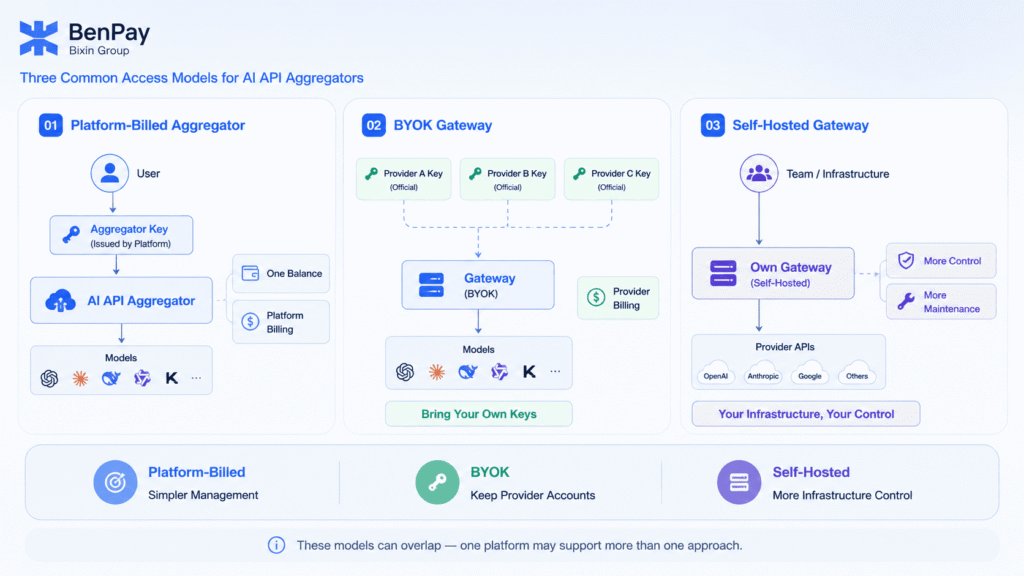
Based on who issues the API Key and who charges for model usage, multi-model access platforms can generally be divided into three types:
| Integration Type | API Key and Billing | Main Advantage | Main Limitation |
|---|---|---|---|
| Platform-Billed | Uses an API Key issued by the aggregation platform, with billing handled by the platform | No need to separately manage provider accounts and balances | Available models and features depend on the aggregation platform |
| BYOK | Users provide official API Keys from each model provider, while usage is typically still billed by the official providers | Keeps direct provider account relationships while adding centralized governance | Multiple official accounts and billing systems still need to be maintained |
| Self-Hosted Gateway | The team deploys its own gateway and connects official or other model services | Greater control over the data path and system infrastructure | Requires engineering resources, monitoring, and long-term maintenance |
- A platform-billed service is better suited to users who want unified model access and balance management.
- A BYOK (Bring Your Own Key) integration is better suited to teams that already maintain multiple official provider accounts but need centralized monitoring or governance.
- A self-hosted gateway is more suitable for enterprises that require greater control over infrastructure and data paths.
These three models are not mutually exclusive product labels. The same platform may offer both unified platform billing and BYOK, or add Gateway or Router capabilities on top of model aggregation.
When evaluating a platform, focus on the actual API Key structure, billing relationship, data path, and feature boundaries rather than the product name alone.
How Does an AI API Aggregator Work?
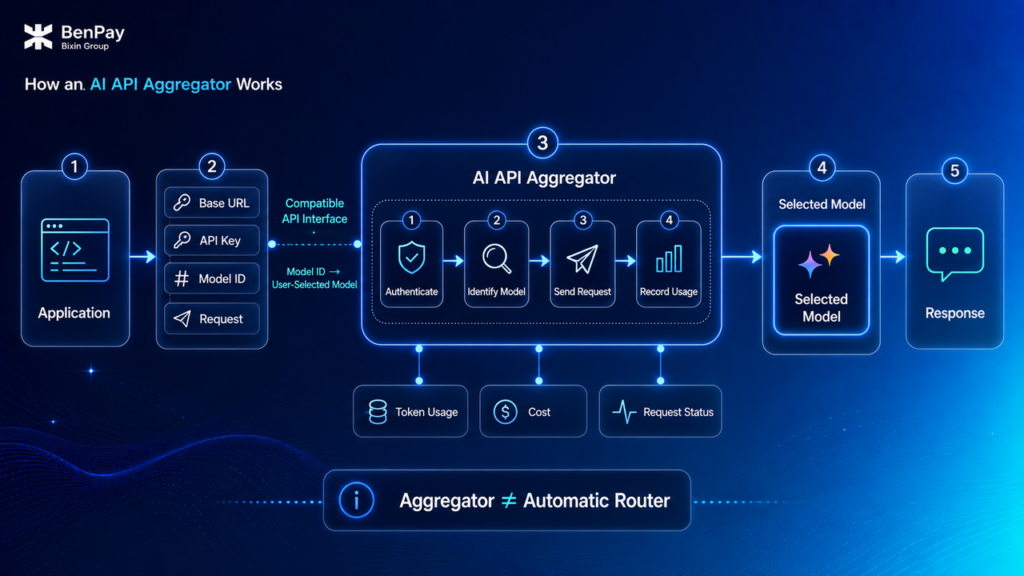
Using a platform-billed aggregator as an example, the user first obtains an API Key from the aggregation platform and then configures the Base URL and Model ID according to the platform documentation.
When a request is sent, the aggregation platform authenticates the request, identifies the model specified by the user, forwards the request to the corresponding model service, returns the result, and records usage.
A typical request path can be summarized as:
Application or AI Tool → Aggregator-Compatible Interface → Target Model Selected by Model ID → Response Returned → Token Usage and Cost Recorded
However, aggregation does not automatically mean routing, nor does it mean the platform provides the complete functionality of an AI Gateway.
The boundaries of each platform need to be checked separately:
| Capability | Is It Always Provided by an AI API Aggregator? | What to Verify |
|---|---|---|
| Multi-Model Access | Core capability of an aggregation service | Specific models, versions, and Model IDs |
| Compatible Interfaces | Common, but formats vary by platform | Base URL, parameters, and feature compatibility |
| Unified Billing | Depends on the integration model | Platform billing or official provider billing |
| Automatic Model Routing | Not necessarily | Whether Auto Router or LLM Router is explicitly supported |
| Caching, Retries, and Fallback | Not necessarily | Whether provided by the platform or needs to be implemented separately |
| Load Balancing and Traffic Governance | Not necessarily | Concurrency, Rate Limits, logging, and failure handling |
How Do Compatible APIs Reduce Multi-Model Integration Work?
OpenAI-compatible APIs are a common interface approach among multi-model platforms.
For tools or applications that already support custom APIs, integration may mainly involve changing the Base URL, API Key, and Model ID, reducing the need to rewrite the complete request logic for every model.
However, compatible does not mean identical.
Changing only the Base URL does not guarantee that every feature will work seamlessly. Model IDs, tool calling, structured outputs, streaming responses, multimodal inputs, and error handling may all differ between models and platforms.
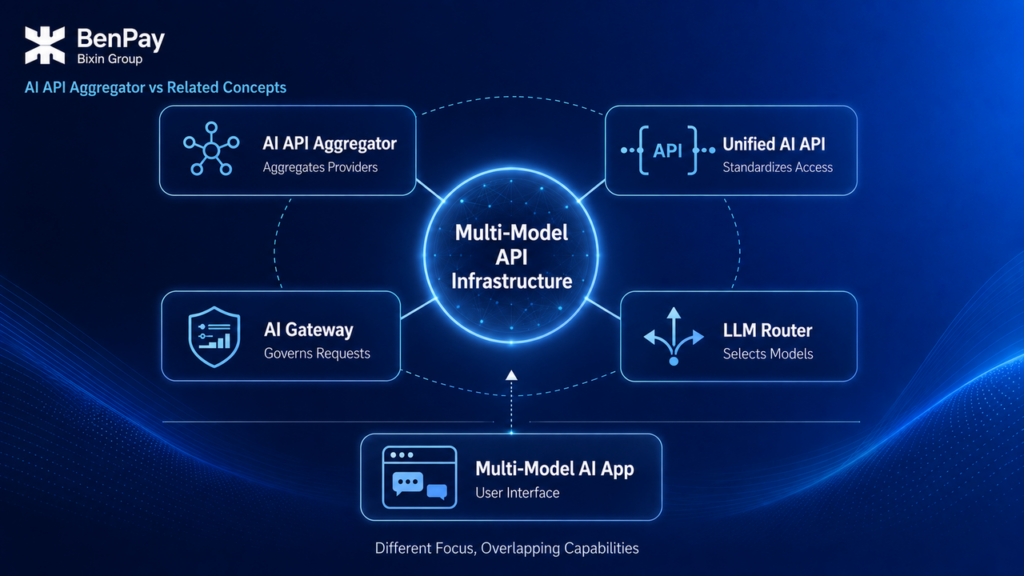
AI API Aggregator vs Unified AI API vs AI Gateway vs LLM Router
These terms often appear together, but they emphasize different capabilities and are not mutually exclusive categories.
| Concept | Core Function | Main Focus |
|---|---|---|
| AI API Aggregator | Aggregates APIs from multiple models or providers | Multi-model access, billing, and management |
| Unified AI API | Provides access to multiple models through unified or compatible interfaces | Interface consistency |
| AI Gateway | Manages requests, authentication, security, logging, and policies | API governance and observability |
| LLM Router | Selects models based on rules, cost, latency, or task requirements | Model routing |
| Multi-Model AI App | Lets users access multiple models through one application interface | End-user experience |
AI API Aggregator
An AI API aggregator is closer to a platform or service category. It emphasizes bringing APIs from multiple models together.
A unified AI API focuses more on the interface capability users ultimately receive.
An aggregator can provide unified AI API capabilities, but it may also retain different interface formats for different providers.
AI Gateway
An AI Gateway places more emphasis on governance capabilities such as logging, authentication, Rate Limits, budgets, caching, retries, failover, and security policies.
Modern AI Gateways may also provide multi-model access and unified billing, meaning that they can have aggregation capabilities as well.
For example, according to Cloudflare AI Gateway documentation, its capabilities include multi-provider access, logging, caching, Rate Limits, retries, and model failover.
Conversely, the fact that a platform aggregates multiple models does not mean it automatically provides a complete set of Gateway governance capabilities.
LLM Router
An LLM Router addresses the question: “Which model should handle this request?”
It may select a model based on rules, pricing, latency, availability, or other criteria.
An AI API aggregator instead addresses: “How can these models be accessed and managed through one platform?”
An aggregator can also include Router capabilities, but routing is not a required feature of an aggregation service.
Multi-Model AI App
A Multi-Model AI App is primarily designed for end users.
Users select a model and interact with it directly through a chat interface on the web or in an app.
An AI API aggregator operates more at the API layer and mainly serves third-party tools, automated workflows, developers, and enterprise applications.
How Should You Choose an AI API Aggregator for Production?
A real-world evaluation should not begin with “How many models does this platform support?”
Instead, start by identifying the specific models, features, and data requirements of your project.
- Confirm Specific Models, Not Just Model Families
The same model family may contain multiple versions.
Check the exact Model ID, context length, supported input and output types, pricing, and update date.
- Test API Compatibility Feature by Feature
A successful basic text request does not mean that streaming responses, tool calling, structured outputs, and multimodal inputs are also supported.
Testing should use the actual request patterns required by your project.
- Compare the Full Cost
In addition to input and output Token prices, check cache read and write pricing, tool-call costs, long-context pricing, and any other applicable fees.
The value of an aggregation platform may come from unified balance management and operational efficiency. It does not mean that the Token price of every model will necessarily be lower than the corresponding official API.
- Verify Latency, Reliability, and Rate Limits
Use a fixed test set to record request success rate, latency, timeouts, error codes, and Rate Limit behavior.
If the platform claims to support retries or Fallback, test how these capabilities behave under failure scenarios.
- Understand the Data Path and Logging Rules
When using an aggregation platform, requests pass through that platform.
If requests contain personal information, customer data, trade secrets, or regulated data, review the platform’s privacy policy, terms of service, log retention rules, API Key security mechanisms, and the data policies of the relevant model providers.
- Start With a Small Number of Non-Sensitive Requests
First verify output quality, compatibility, Token accounting, actual costs, and usage records before expanding usage.
For core business workloads, real-world testing provides more decision-making value than the number of models displayed on a marketing page.
If a project depends heavily on provider-specific parameters or the latest native features from a single provider, using that provider’s official API directly may be more appropriate.
For a more detailed comparison, read “OpenAI Official API vs Unified Multi-Model API: Which Is Right for You?“
BenPay AI API: A Multi-Model AI API Aggregator
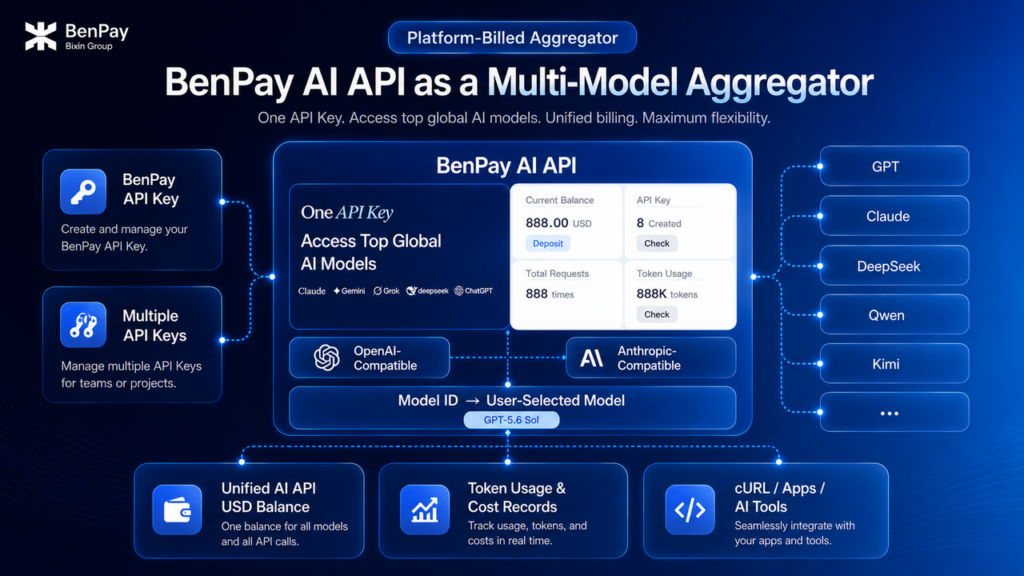
Under the classification used in this guide, BenPay AI API can be categorized as a platform-billed AI API aggregator that provides unified multi-model API capabilities. AI API aggregator describes the platform model: model access, interface adaptation, billing, and usage management across multiple models are brought together within one platform. Unified multi-model AI API describes the capability users receive: multiple models currently supported by the platform can be called through compatible interfaces and Model IDs.
For models currently supported by the platform, users can send requests using a BenPay-issued API Key and the same AI API USD Balance, without separately applying for official API Keys, topping up accounts, or managing balances with individual model providers.
A single BenPay account can create multiple API Keys for different tools, projects, or teams. The platform provides OpenAI-compatible and Anthropic-compatible Base URLs. Users can configure the Base URL, BenPay AI API Key, and model Model ID according to the interface format supported by the target tool.
BenPay AI API can be called directly from a computer terminal using cURL, and it can also be configured in AI coding tools, desktop clients, and command-line tools that support custom APIs.
BenPay currently provides configuration guides for using Codex and Claude through CC Switch, Claude Code, Claude Desktop, Codex CLI, OpenClaw, and other tools.
The required interfaces, environment variables, and model parameters vary by tool. Refer to the BenPay AI API integration documentation for specific configuration steps.
Using the OpenAI-compatible interface as an example, the following cURL request calls GPT-5.6 Sol:
curl https://api.benpay.ai/openai/v1/chat/completions \
  -H "Content-Type: application/json" \
  -H "Authorization: Bearer YOUR_API_KEY" \
  -d '{
    "model": "value/gpt-5.6-sol",
    "messages": [
      {"role": "user", "content": "Hello"}
    ]
  }'
Replace YOUR_API_KEY with your own BenPay AI API Key.
In this example, value/gpt-5.6-sol is the Model ID currently used for GPT-5.6 Sol. To call another model, use the corresponding Model ID shown on the Supported Models page.
For the exact Base URL, authentication method, and request parameters, refer to the BenPay AI API integration documentation.
Model names, Model IDs, and interface capabilities may change. Always check the live platform information before making API requests.
Conclusion: The Core Value of AI API Aggregation Is Reducing Multi-Model Integration and Management Complexity
An AI API aggregator brings model access, authentication, interface adaptation, billing, or usage management for multiple models into a single platform. This helps reduce the complexity that appears when multiple accounts, API Keys, and interface formats are introduced into the same project.
When choosing an AI API aggregator for production use, decisions should be based on specific models, feature compatibility, total pricing, Rate Limits, data paths, and real-world test results.
BenPay AI API is an AI API aggregation platform with unified multi-model API capabilities. Its core value is enabling users to manage multiple models currently supported by the platform through platform-issued API Keys, a shared balance, and compatible interfaces.
Before using it in a real workflow, users should still confirm the target Model ID and compatibility scope and validate the setup with a small number of non-sensitive requests.