
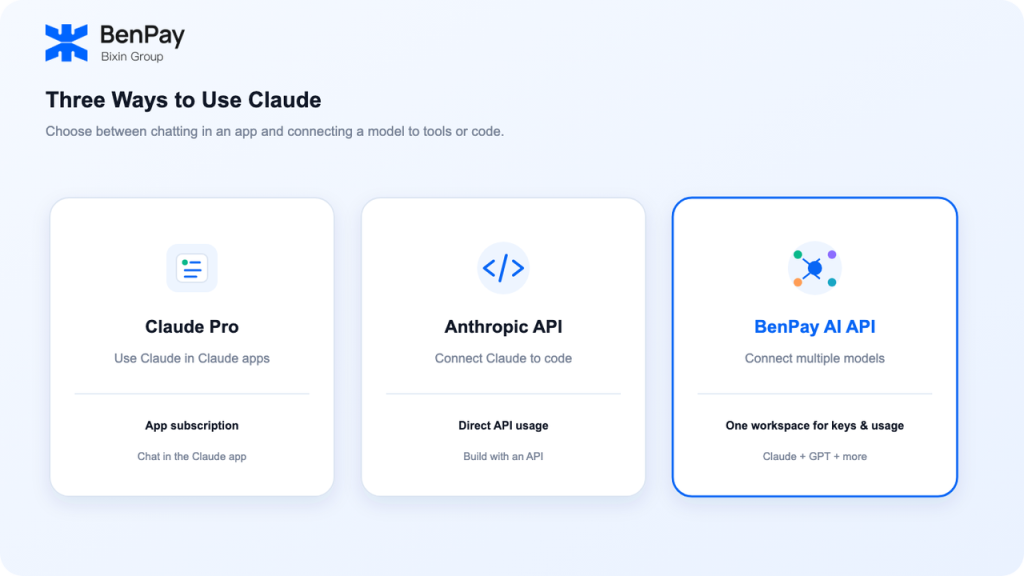
If you want to chat with Claude, write code, or connect a model to your own tools, you’ll usually come across three options: a Claude Pro subscription, the official Anthropic API, and multi-model API aggregators such as BenPay AI API. The differences go beyond price. They also include where you use the service, how you get started, network access, and how billing works.
This guide first explains what each option is. Then it looks at some practical hurdles users in China may face, compares the options across seven criteria, and uses a cost example to help you evaluate them. Finally, it suggests which option may fit different workflows.
What Are the Three Claude Access Options?
Claude Pro is a paid subscription for people who use Claude on the web, desktop, or mobile app. Anthropic explains that Claude subscriptions and the API Console are separate products. A Pro subscription does not include API usage fees. (Anthropic Help Center)
The official Anthropic API is designed for developers. It is billed based on API usage and lets you connect Claude to your code and compatible tools. API access and billing are separate from a Claude app subscription.
Multi-model API aggregators such as BenPay AI API provide access to multiple models and tools for managing usage. In addition to Claude, BenPay AI API supports models from GPT, DeepSeek, Kimi, Qwen, and other model families. Check the current model list for available models, prices, and features.
The three options use different access routes. In China, the differences often show up first in registration, payment, and network access—areas where many users run into practical hurdles.
What Hurdles Might You Face When Using Claude in China?
This section describes practical requirements, not a judgment about which service is better. Use it to check which hurdles you have already addressed.
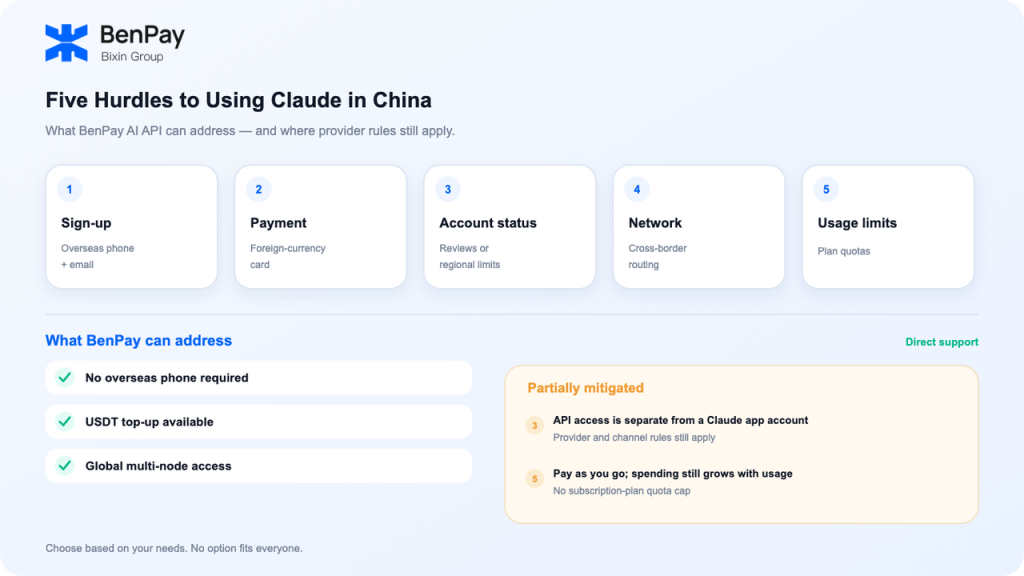
Hurdle 1: Registration
Registering for a Claude account in China may require an overseas mobile number that can receive verification codes, followed by email verification. This does not involve technical setup, but it can be a barrier if you do not have an overseas number.
Hurdle 2: Payment
Subscribing to Pro or Max and setting up billing for the official API generally relies on foreign-currency credit cards. Whether a payment goes through can also depend on the card issuer and account details. Without a suitable card, you may get stuck at this step.
Hurdle 3: Account status
Some users report encountering account reviews, regional restrictions, or even account suspension, whether they use a cross-border subscription or simply use the service day to day. Anthropic sets its own review criteria. We cannot speak on its behalf or promise that any account will be unaffected.
Hurdle 4: Network access
When you connect directly to an overseas service, latency and stability depend on the route between your location and the service. Changes in cross-border network conditions can affect the experience.
Hurdle 5: Usage limits
Pro and Max are subscription plans with usage limits. They may be enough for everyday chat, but long Agent sessions or batch tasks can use up the available allowance. Unlike API usage, subscription-plan limits generally cannot be increased on demand.
How can these hurdles be addressed?Aggregator APIs can often help reduce barriers related to registration, payment, and network access—for example, by not requiring an overseas phone number, supporting stablecoin top-ups, or offering multiple network nodes. Account rules still depend on the model provider. Usage-based billing removes the plan-based usage cap, but costs continue to rise with usage.
With these hurdles in mind, we can compare the main options using the same criteria. The table below includes BenPay AI API as one example of a multi-model aggregator and lists other API relay platforms separately, making it easier to compare registration, payment, billing, and other factors.
Seven Differences: Claude Pro vs. the Official API vs. BenPay AI API vs. Other API Relay Platforms
| Comparison | BenPay AI API | Official Claude Subscription | Official Anthropic API | Other API Relay Platforms |
|---|---|---|---|---|
| Registration | A Google or Apple account is enough to get started | Overseas phone number and email verification; subscription also requires an overseas payment method | Anthropic developer account and verification required | Separate registration required |
| Account and balance | Balance is deducted based on actual usage; check it in Workspace | Usage depends on subscription status and regional policies | Usage and billing managed in the Console | Varies by platform |
| Network | Global multi-node access, routed to nearby nodes | Cross-border access; latency depends on your location and network | Cross-border access; latency depends on your location and network | Some nodes available |
| Payment | Direct USDT/USDC top-ups, starting at $10 | Primarily foreign-currency credit cards | Primarily foreign-currency credit cards | Varies |
| Pricing | Usage-based; around 40% of official rates in some cases, depending on the model and current page | $20–$200/month, with usage limits | Official API rates, billed by tokens | Prices vary |
| Model coverage | Around 30 models, including GPT, Claude, DeepSeek, Kimi, and Qwen | Claude in the app | Anthropic models only | Varies |
| Billing transparency | Real-time usage details by model and API key | Usage is tied to plan allowance | Usage and billing details in the Console | Many show balance only |
The sections below compare registration, account management, network access, payment, pricing, model coverage, and billing. The first five hurdles have already been introduced, so the focus here is on how to get started and use each option.
- Registration and Setup: Chat in an App or Use an API?
Getting started with Claude Pro is straightforward: create a Claude account, subscribe to a plan, and use Claude in the app. The more difficult parts may be registration and payment, as described above.
The official Anthropic API involves another step: you need to set up API access and billing separately. A Claude Pro subscription does not automatically provide API usage credits. If you need both, you’ll need to manage the subscription and API access separately. Anthropic explains the distinction between Claude subscriptions and API billing in its Help Center.
Anthropic also currently provides monthly API credits to some Max and Team users: $100 for Max 5x, $200 for Max 20x, and up to $500 shared among Team members. Claude Pro does not include these credits. API credits are a separate usage allowance; they do not mean that a subscription fee can be applied to an API bill. Check Anthropic’s Help Center for current eligibility and terms.
If you already have a BenPay account, you can get started by creating an API key in Workspace. You do not need an overseas phone number or a second account. The automated CLI wizard, desktop-app instructions, and Universal API parameters support different setup preferences. See the BenPay AI API setup guide for details.
- Accounts and Usage: Subscription Limits and API Keys Work Differently
Claude Pro keeps usage within the Claude app and subscription account, so you do not need to enter API parameters manually. Your usage allowance and access are tied to your subscription status. Check Claude’s current plan details for the latest terms.
API access works differently. It does not depend on a Claude app account. Instead, you configure an API key, endpoint, and model ID in your tool or code. The BenPay AI API workspace provides an API key management area. If you want to distinguish usage across projects, you can create separate keys for each project and review their usage records individually.
BenPay AI API provides two API formats:
- Anthropic-compatible:
https://api.benpay.ai/anthropic - OpenAI-compatible:
https://api.benpay.ai/openai/v1
If your existing code uses one of these compatible formats, you may be able to connect by replacing the endpoint, key, and model ID. The exact changes depend on your code and tools. New users can also check the page for any available trial credits and test the connection with a simple request.
Using an API does not mean bypassing the model provider’s or tool’s terms of service. The rules that apply to each model and channel still apply. Choose an option based on your needs and the relevant terms.
- Network Access: Your Connection Route Affects the Experience
When using the Claude app or calling the Anthropic API directly, the connection experience depends on your location and the actual network route. Cross-border network fluctuations can affect response times.
BenPay provides global multi-node access as one way to connect to models. The availability of multiple nodes does not guarantee faster access in every region. A more practical way to evaluate the connection is to send a test request through the tool you plan to use and observe its response time and reliability.
- Payment: Check Which Payment Methods You Can Use
Claude subscriptions and the Anthropic API generally rely on foreign-currency credit cards. Availability can also depend on your region, card issuer, and account. Check the relevant service’s checkout page for current payment options.
The BenPay AI API page lists stablecoins top-ups (such as USDT) starting at $10. Minimum top-up amounts, supported networks, and other terms may change, so check the current BenPay AI API page before adding funds. For details on crypto top-ups, see the USDT/USDC top-up guide.
- Pricing: A Monthly Subscription and API Usage Are Not Directly Comparable
Claude Pro and Max charge a monthly subscription fee and are intended for people who mainly use Claude in the app. The Anthropic API and BenPay AI API charge based on model usage. Because subscriptions and API calls are billed differently, comparing only the monthly subscription price does not show which option will cost less for your usage.
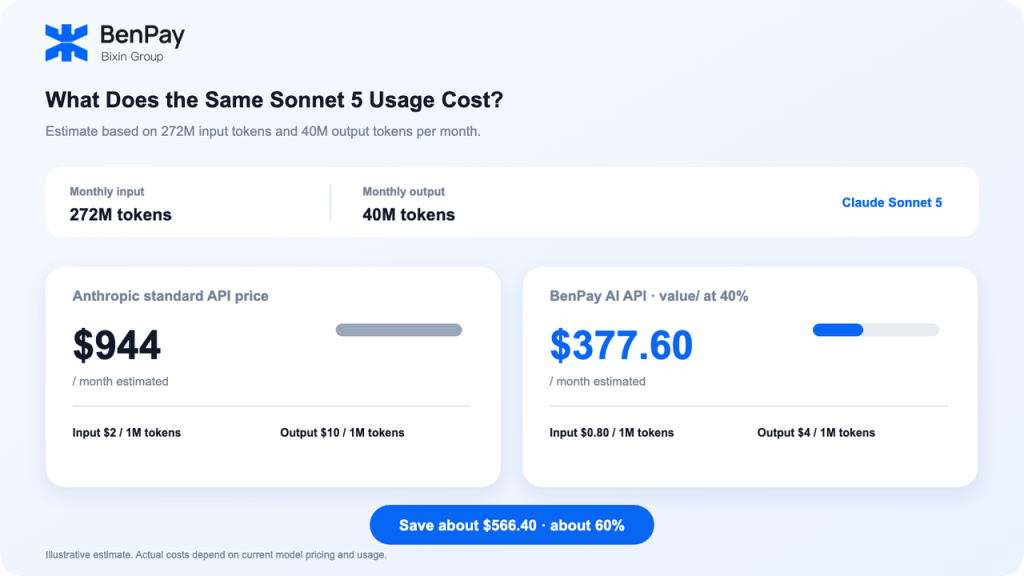
For Claude Sonnet 5, Anthropic lists standard API pricing at $2 per million input tokens and $10 per million output tokens. See Anthropic’s Claude Sonnet 5 announcement. BenPay’s Sonnet 5 value/ channel is listed at 40% of the standard rate, or $0.80 per million input tokens and $4 per million output tokens. Check the current model price card for the latest pricing.
A Monthly Sonnet 5 Usage Example
Assume 40 million output tokens per month and an estimated 272 million input tokens:
| Estimate | Anthropic Standard API Pricing | BenPay AI API value/ at 40% |
|---|---|---|
| Price per 1M input tokens | $2.00 | $0.80 |
| Price per 1M output tokens | $10.00 | $4.00 |
| Monthly input | 272 million tokens | 272 million tokens |
| Monthly output | 40 million tokens | 40 million tokens |
| Estimated monthly cost | $944 | $377.60 |
Based on these usage and pricing assumptions, the difference is $566.40, or about 60% of the standard Anthropic API cost. This is an example, not a guarantee that everyone will receive the same bill. Actual costs depend on input, output, caching, and how you make requests. Estimate your own usage and refer to your actual bill.
Different models tokenize text differently, so the same text can translate into different token counts. Estimating token usage by word or character count is only a rough guide; refer to the usage shown in your request records for actual billing details.
For more on how input, output, and cached tokens affect API costs, read the AI API Pricing and Token Cost Guide.
Pricing is only one part of the decision. It also matters whether you use Claude alone or need to switch between multiple models.
- Model Coverage: Claude Only or Multiple Models?
Claude Pro is designed for using Claude in the app. The official Anthropic API provides API access to Anthropic models. If you only need Claude for work, you can compare these options based on where you want to use it and how you prefer to pay.
BenPay AI API currently lists models from OpenAI, Anthropic, DeepSeek, Moonshot, Alibaba, and other providers, with around 30 models in total. These include GPT, Claude, DeepSeek, Kimi, and Qwen models.
The benefit of access to multiple model families is that you can choose models for different tasks and manage API keys and usage in one workspace. Whether this is useful for you depends on the models, API formats, and prices currently available. For a general explanation of unified access, see What Is a Unified AI API?.
- Billing Details: Subscriptions Are Simple; APIs Make Usage Easier to Track
Claude Pro charges by the month and suits people who mainly use Claude in the app. A subscription means you do not have to configure API requests individually, but it does not provide a usage bill itemized by model and API key.
API bills vary with the models you use and the amount of usage. The BenPay AI API workspace lets you view usage information by model and key. Using different keys for separate projects can make it easier to review their requests and costs separately. Save your API key securely and follow the current credential-management instructions in Workspace.
Claude Pro, the Anthropic API, or BenPay AI API: Which Should You Choose?
Consider how you plan to use AI, how you want to pay, and which models you need:
- You mainly chat, write, or organize information in the Claude app: Compare Claude Pro or another eligible plan based on its price and usage limits.
- You want to connect Claude to your own code or service: Review the setup, billing, and technical requirements for the official Anthropic API.
- You want to use Claude but do not have an overseas phone number or foreign-currency credit card: Review the setup and USDT top-up options for BenPay AI API.
- You want to connect AI models to a terminal tool, desktop app, IDE, or your own code: Check which tools, API formats, and models BenPay AI API currently supports.
- You use GPT, DeepSeek, Kimi, or Qwen as well as Claude: See whether BenPay AI API’s multi-model access, key management, and usage reporting fit your workflow.
No single option is right for everyone. First decide whether you want to use a model in an app or connect it to a tool or code. Then compare the costs and account-management options.
Claude Pro and AI API FAQs
What do I need to register for Claude in China?
You may need an overseas mobile number that can receive verification codes, followed by email verification. Subscribing to Pro or Max may also require a usable foreign-currency credit card. Check Anthropic’s current requirements and supported locations.
Does a Claude Pro subscription cover API costs?
No. A Claude Pro subscription does not include API usage fees. Anthropic currently offers separate API credits to some Max and Team users: $100 per month for Max 5x, $200 per month for Max 20x, and up to $500 shared by Team members. Eligibility, amounts, and usage terms may change; check Anthropic’s current information.
Do I have to use the API with Claude Code?
No. Claude Code can be used with eligible Claude plans or configured to use an API, depending on the setup. The options differ in usage limits, billing, and configuration. If you connect through an API, confirm that your tool supports the required API format, Base URL, and model ID.
How much does the Claude Sonnet 5 API cost?
Anthropic’s listed standard API rates are $2 per million input tokens and $10 per million output tokens. BenPay’s current price card lists the Sonnet 5 value/ channel at 40% of those rates. Check the current price card for available models and pricing.
Which models does BenPay AI API support?
The current page lists model providers including OpenAI, Anthropic, DeepSeek, Moonshot, and Alibaba, with around 30 models in total. The Claude lineup currently includes Sonnet 5. Model availability, API formats, and capabilities may change, so check the live model list.
Can I use BenPay AI API without a foreign-currency credit card?
The page lists stablecoin top-up options, including USDT, starting at $10. Check the current top-up page for availability, supported networks, and other details.
Choose the Access Path That Fits Your Workflow
Claude Pro is for using Claude in the app. The official Anthropic API is for connecting Anthropic models directly to your code and tools. BenPay AI API offers multi-model API access, four setup paths, and usage tracking.
If you use Claude Code, OpenCode, CC Switch, VS Code, Trae, Qoder, WorkBuddy, or AutoClaw, start with the BenPay AI API setup guide. Then visit the BenPay AI API page to check the currently supported tools, models, and prices.
Note: Prices, models, and payment information may change. Before publishing or using the service, check Anthropic’s official information and the current BenPay pages.