
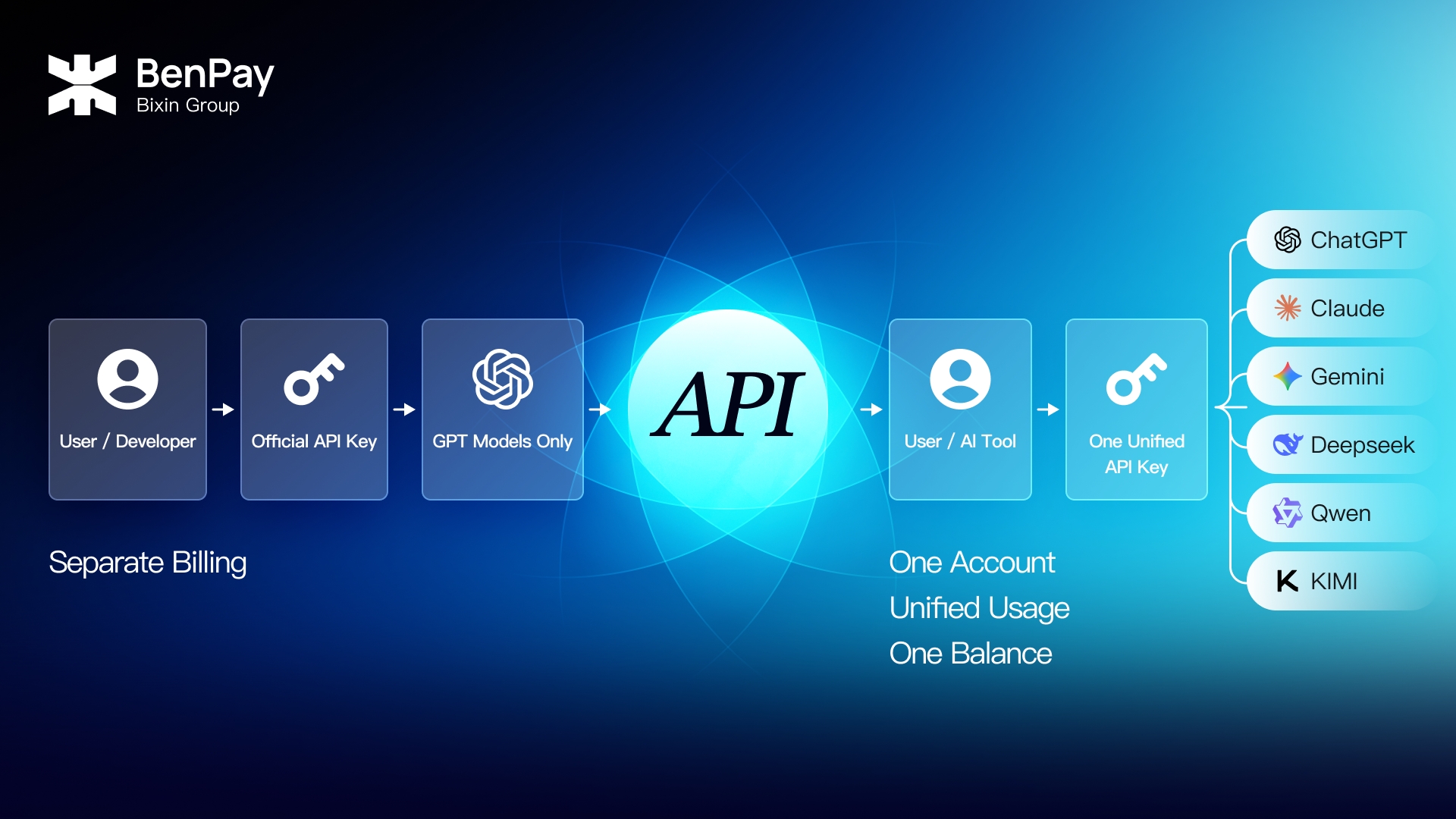
To use GPT in third-party AI tools, coding software, automated workflows, or your own applications, you will usually need to configure an AI API key first.
The most direct approach is to obtain an official OpenAI API key through the OpenAI API Platform. However, for users who also need access to Perplexity, Claude, Gemini, DeepSeek, Qwen, or Kimi, an OpenAI API key only provides access to OpenAI models.
To use multiple AI models, users typically need to register with additional platforms, create multiple API keys, and manage payments, balances, and usage records separately.
Therefore, the question “How do I get an OpenAI API key?” often reflects two different needs:
- If you only need OpenAI models, you can apply for an official OpenAI API key.
- If you want to access multiple leading AI models, you may need a unified multi-model AI API key.
This article explains the basic process of obtaining an official OpenAI API key. It also explores how BenPay AI API provides an alternative for users who need access to multiple models, a unified account balance, and more flexible payment options.
What Is an AI API Key Used For?
An AI API key is a credential used to authenticate a user or application when accessing AI model services. It works like a digital key that tells the API platform:
- Who is making the request;
- Which models the account is authorized to access;
- Which account should be charged for the API call;
- Which project should the usage record be associated with.
After obtaining an API key, users can configure it in:
- Third-party AI clients;
- AI writing and translation tools;
- AI coding tools such as Claude Code and Codex CLI;
- Workflow and automation platforms;
- Enterprise knowledge bases and customer support systems;
- Websites, applications, or software developed by the user.
Using an AI API does not necessarily require programming skills. As long as a third-party tool allows users to enter a Base URL, API key, and model ID, non-technical users can also configure and use an AI API.
ChatGPT Plus vs. The OpenAI API
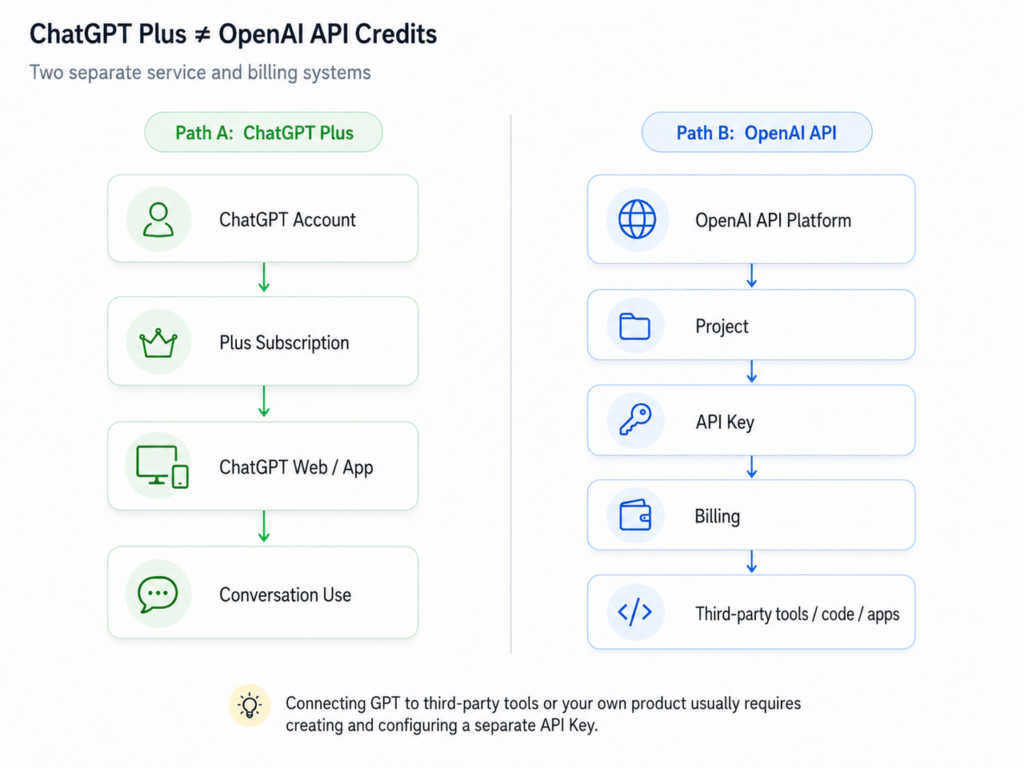
Purchasing a ChatGPT Plus or Pro subscription does not mean that your account automatically receives OpenAI API credits.
ChatGPT Plus or Pro is mainly used for accessing ChatGPT through the web interface and mobile app. OpenAI API usage is managed and billed separately through the OpenAI API Platform.
If you only use the official ChatGPT website or app for conversations, you generally do not need an API key.
However, if you want to integrate GPT into third-party tools, code, automated workflows, or your own products, you need to create and configure a separate API key.
How to Get an Official OpenAI API Key
Users who only need access to OpenAI models such as GPT, and whose region and payment method meet OpenAI’s requirements, can apply directly for an official OpenAI API key.
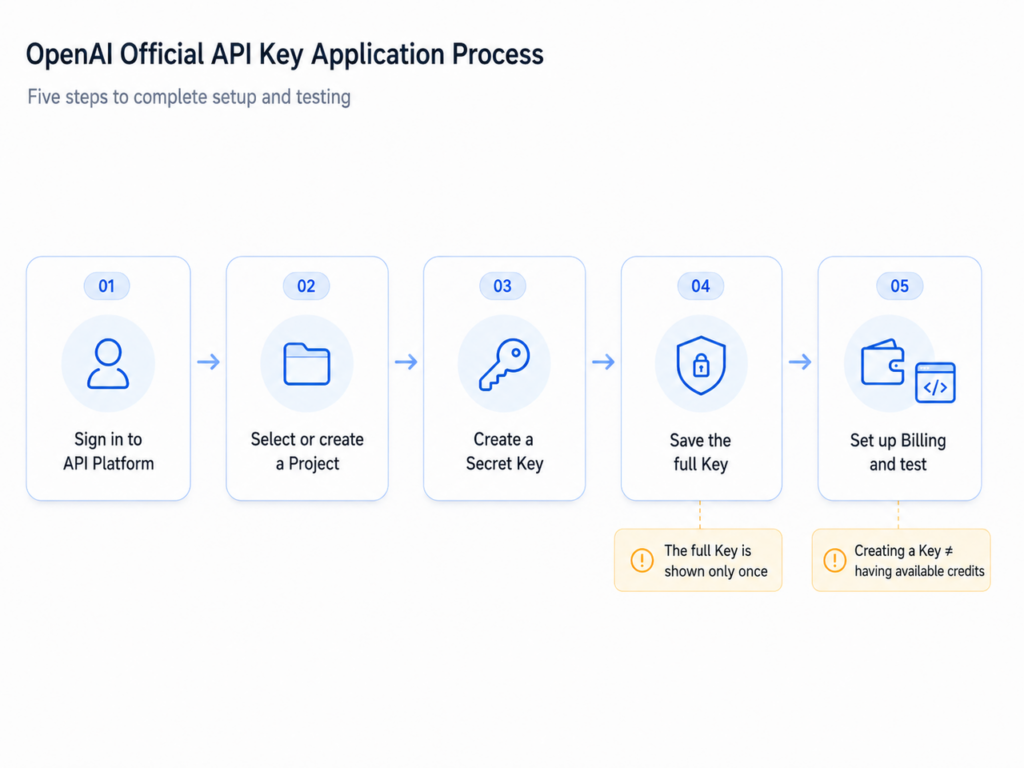
The process can be summarized in five steps.
Step 1: Log In to the OpenAI API Platform
Sign in to the OpenAI API Platform using your OpenAI account.
API keys, projects, and API billing are managed through the API Platform, not through the standard ChatGPT chat interface.
Step 2: Select or Create a Project
OpenAI API uses Projects to manage API keys, team members, permissions, model access, and budgets.
Individual users can use an existing project, while teams can create separate projects for testing environments, production environments, or different business functions.
Step 3: Create a Secret Key
Open the API Keys page within the selected Project and choose the option to create a new Secret Key.
OpenAI allows users to create and manage API keys for each project and assign different permission levels, such as All, Restricted, or Read Only.
When creating the key, you can give it an easily recognizable name, such as:
- Personal Test;
- Content Tool;
- Coding Project;
- Production App.
Step 4: Save the Full Key Immediately
The complete Secret Key is displayed only once when it is created.
If you do not save it at that time, you will not be able to view the full key again. Instead, you will need to create a new key and update the existing configuration. OpenAI also advises users not to share API keys with anyone else.
You should therefore copy the key immediately after creation and store it securely.
Step 5: Set Up Billing and Send a Test Request
After creating the API key, you also need to configure billing for the API account.
Even when the key itself is correct, API requests may fail if the account has no available balance or valid billing method.
Once billing has been configured, send a short test request to confirm that:
- The API key is valid;
- The account has available credit or an active billing method;
- The Project permissions are configured correctly;
- The selected model is accessible;
- The Base URL and model name have been entered correctly.
At this point, the basic process of obtaining and configuring an official OpenAI API key is complete.
Who Is an Official OpenAI API Key Best Suited For?
An official OpenAI API key is most suitable for users who:
- Primarily use OpenAI models;
- Need direct access to OpenAI’s official API;
- Require a broader range of native OpenAI features;
- Are located in a country or region supported by the OpenAI API;
- Have an accepted payment method;
- Can manage their OpenAI account and billing separately.
For individuals or projects that only need GPT models, this is a relatively straightforward option.
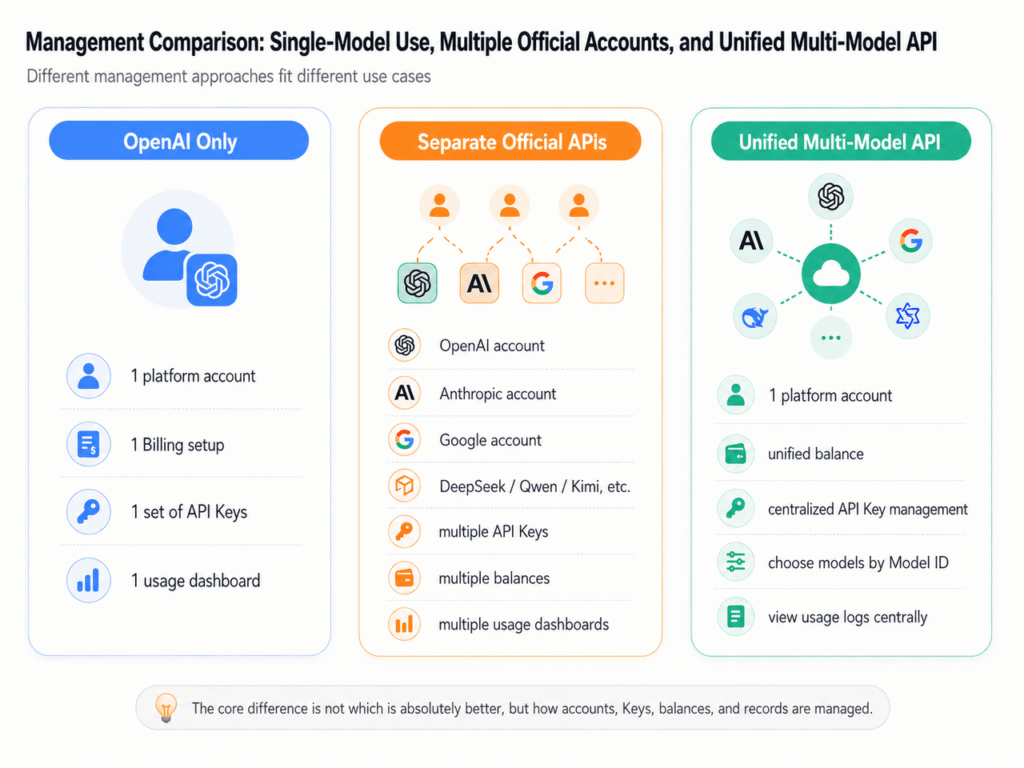
However, an official OpenAI API key does not cover every requirement for users who need access to multiple AI models.
A single official OpenAI API key cannot be used to call Claude, Gemini, DeepSeek, Qwen, or Kimi directly. Users must create accounts with the relevant model providers, configure billing, and generate additional API keys on each platform.
As the number of models increases, the amount of account and configuration management required by individuals and teams also grows.
| Management Area | OpenAI Only | Multiple AI Models |
| Platform accounts | One account | Multiple accounts |
| API keys | One or more keys managed in OpenAI | Keys managed separately across multiple platforms |
| Account balance | One balance | Separate balances on each platform |
| Usage records | Available in one platform | Distributed across multiple platforms |
| Payment settings | One billing setup | Billing configured separately for each provider |
| API configuration | OpenAI API configuration | Multiple APIs, endpoints, and model parameters |
For multi-model users, the real challenge may not be how to obtain another official API key, but how to manage multiple AI models through a single access point.
Multi-Model Options Beyond Official API Keys
In addition to obtaining official API keys directly from individual model providers, users can also choose a unified multi-model AI API.
A unified multi-model AI API brings access to multiple models together on one platform. With an API key issued by that platform, users can access the range of models currently supported by the service.
A unified platform typically offers:
- One account for managing multiple AI models;
- A shared balance for calls across different models;
- Centralized API key management;
- Unified usage and billing records;
- OpenAI-compatible or other compatible API interfaces;
- Top-up methods beyond credit cards.
It is important to understand that a unified AI API key is not the same as an official OpenAI API key.
An official OpenAI API key is issued by OpenAI and is primarily used to access the OpenAI API. A unified AI API key is issued by a third-party platform and allows users to access multiple supported models through that platform’s API endpoints.
When deciding which type of API key to obtain, the key question is not what the key is called, but how many different AI models you actually need to use.
Why One OpenAI API Key May Not Be Enough
More users are choosing not to rely on a single AI model for every task. For example, they may:
- Use GPT for general writing, coding, and tool calling;
- Use Claude for long-form text and complex content;
- Use Gemini for certain multimodal tasks;
- Use DeepSeek for reasoning or high-volume requests;
- Use Qwen or Kimi for Chinese-language content.
If users obtain an official API key separately for each model, they may need to repeat the following process:
- Register a new platform account;
- Verify the account and region;
- Add a payment method;
- Fund a separate account balance;
- Create and securely store a new API key;
- Update the configuration in third-party tools or projects;
- Review usage and billing separately on each platform.
For users who only work with one model, these additional steps may not create much difficulty.
However, for content teams, AI tool users, independent developers, and businesses, managing multiple accounts and API keys can gradually become a significant operational burden.
Payment is another common barrier. OpenAI currently requires eligible standard credit or debit cards for purchasing API credits, while prepaid cards cannot be used. The user’s location and the issuing country or region of the payment card must also fall within the platform’s supported areas.
When users do not have access to a suitable international payment method, or need to configure billing repeatedly across multiple AI model platforms, a unified AI API can offer a more convenient alternative.
BenPay AI API: Access Multiple Leading Models with One API Key
BenPay AI API is a unified multi-model AI API service designed for everyday AI tool users, content teams, developers, and businesses.
Instead of applying for separate API keys from multiple model providers, users can create and manage API keys through a single BenPay account and access supported model families such as GPT, Claude, DeepSeek, Qwen, and Kimi.
The core value of BenPay AI API is not to provide an official OpenAI API key. Rather, it allows users to access multiple supported AI models through one BenPay AI API key and a unified account balance.
Create and Manage API Keys in One Place
After logging in to BenPay, users can open the AI API page and create an API key.
The complete key is displayed only once after creation, so users should copy and store it securely immediately. If a key is suspected of being compromised, the original key can be deleted and a new one created.
Users can also create separate API keys for different tools or projects, such as:
- AI writing tools;
- Content team projects;
- Coding tools;
- Testing environments;
- Production applications.
This makes it easier to manage access and reduces the risks associated with sharing one API key across multiple projects.
Access Multiple Models Through One Account
BenPay AI API brings multiple leading AI models together on one platform.
Users do not need to apply separately for API keys from OpenAI, Anthropic, Google, or other providers. Instead, they can choose from the models currently supported by BenPay according to the needs of each task.
Available models, versions, context window limits, and pricing are subject to the latest information shown on the BenPay AI API supported models page.
Use One Balance Across Multiple Models
After adding funds to the BenPay AI API USD Balance, users can use the same balance to call different models supported by the platform.
Charges are deducted from the AI API balance according to the selected model’s pricing and the actual number of tokens used.
This means users do not need to:
- Maintain a separate balance with OpenAI;
- Maintain another balance with Anthropic;
- Continue topping up accounts on additional model platforms.
For users who need to test, compare, or switch between multiple models, a shared balance can reduce fragmented funds and simplify cross-platform cost management.
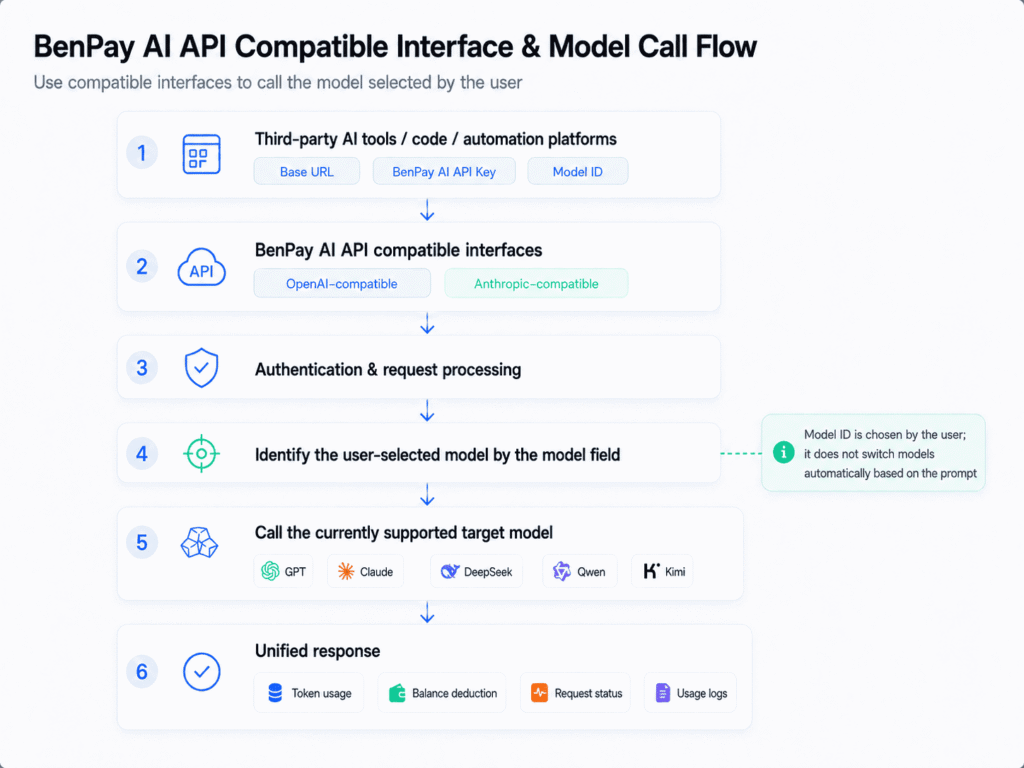
Compatible API Interfaces
BenPay AI API provides:
- An OpenAI-compatible Base URL
- An Anthropic-compatible Base URL
Users can select the appropriate Base URL based on the API format supported by the third-party tool, then enter their BenPay AI API Key and the Model ID of the target model.
The model field in each request specifies which model should be called. BenPay AI API identifies the target model based on this field and handles authentication, request processing, response delivery, token usage tracking, balance deductions, and usage records through a unified process.
The target model is selected directly by the user. Users can enter the corresponding Model ID based on their needs for writing, coding, translation, analysis, or other tasks. BenPay AI API does not automatically switch a request to another model based on the content of the prompt.
For general users, this means BenPay AI API can be configured in third-party AI tools that support custom API settings.
For developers, compatible interfaces can reduce repetitive configuration and code changes when connecting existing applications to different models. Specific API parameters, model names, and compatibility coverage are subject to the latest BenPay AI API documentation.
Top Up with Crypto Assets
BenPay AI API currently supports adding funds to the AI API balance with crypto assets such as USDT and USDC. Available assets and supported networks are subject to the information displayed on the payment page.
For users who do not have an international credit card, experience failed card payments, or prefer to use crypto assets, this provides an alternative way to fund AI API usage.
Pay Only for Actual Usage
BenPay AI API uses a pay-as-you-go pricing model.
Users do not need to purchase a separate fixed monthly plan for each model. Instead, charges are based on the selected model and the actual number of tokens used.
Usage records can also be reviewed by time, model, and request status, making it easier to understand and track actual spending across different AI models.
How to Get a BenPay AI API Key
Compared with applying separately for official API keys from multiple model providers, the BenPay AI API setup process is more centralized.
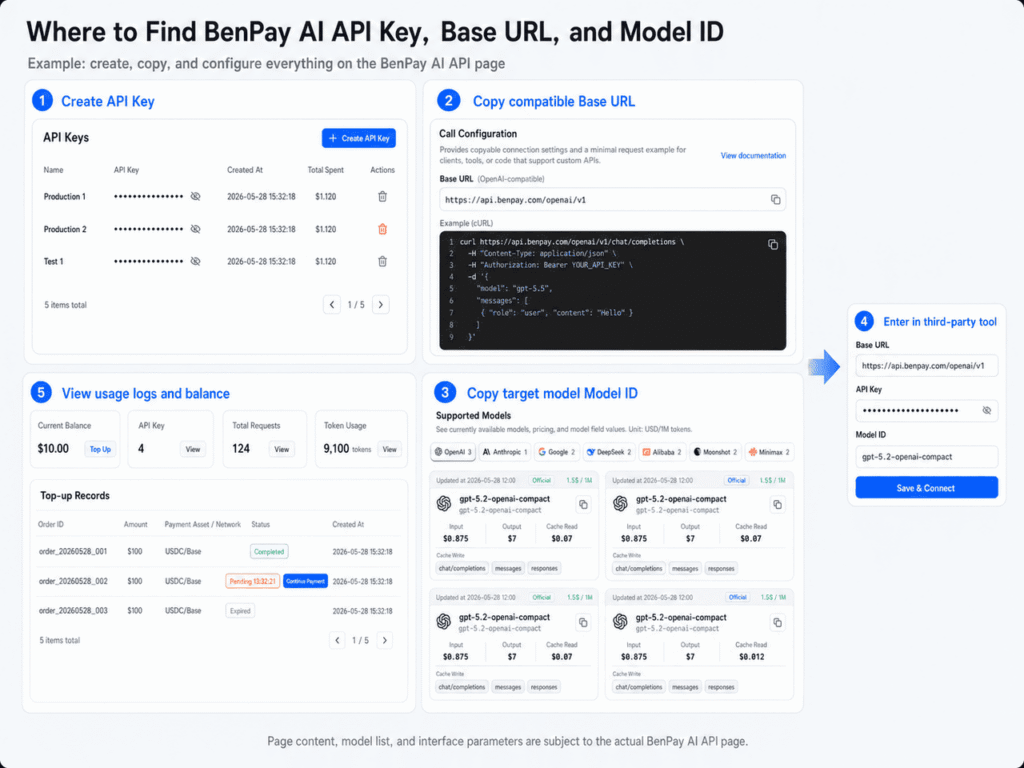
Step 1: Open the BenPay AI API Page
Log in to your BenPay account, then access the AI API page from the homepage or navigation menu.
Step 2: Claim Trial Credit or Add Funds
Eligible new users can claim limited trial credit by following the instructions shown on the page. Users can also add funds directly to their AI API balance.
Trial eligibility and the available credit amount are subject to the latest information displayed on the relevant campaign page.
Step 3: Create an API Key
Go to the API Keys section, enter a name for the key, and complete the creation process.
The full API key is displayed only once, so it should be copied and stored securely immediately.
Step 4: Select an API Interface and Model
Choose the appropriate interface based on the third-party tool you are using or the target model:
- OpenAI-compatible API;
- Anthropic-compatible API.
Then copy the required Model ID from the supported models list.
Step 5: Complete the Configuration and Start Using the API
Enter the following information into the third-party tool or your own application:
- Base URL;
- BenPay AI API Key;
- Model ID.
Once the configuration is complete, you can begin sending API requests and review your balance and usage records on the BenPay AI API page.
OpenAI Official API Key vs. BenPay AI API
| Comparison Item | OpenAI Official API Key | BenPay AI API Key |
| Key Issuer | OpenAI | BenPay |
| Main Models | OpenAI models | Multiple models supported by the platform |
| Account Management | OpenAI account | One BenPay account |
| Model Switching | Within the OpenAI model lineup | Across multiple model families, including GPT, Claude, and DeepSeek |
| Balance Management | OpenAI Billing | Unified BenPay AI API balance |
| Payment Methods | Subject to the payment methods supported by OpenAI | Supports top-ups with crypto assets available on the platform |
| API Type | Official OpenAI API | OpenAI-compatible and Anthropic-compatible APIs |
| Native Capabilities | Generally provides more complete access to OpenAI-native features | Depends on the features currently supported by BenPay’s compatibility layer |
| Best Suited For | Users who only need OpenAI models | Users who need multiple models and centralized management |
Neither option is inherently better in every situation.
The OpenAI Official API Key is better suited for users who:
- Only use OpenAI models;
- Need access to the full range of OpenAI-native features;
- Already have an eligible payment method;
- Prefer to connect directly to the official OpenAI API;
- Do not need centralized management for models from other providers.
BenPay AI API is better suited for users who:
- Need access to multiple mainstream AI models;
- Do not want to register accounts with multiple model providers separately;
- Want to use one balance across multiple models;
- Need top-up options beyond credit cards;
- Use third-party tools that support custom API configurations;
- Want to view usage and costs across different models in one place.
API Key Security Tips Before Use
Whether you use an official OpenAI API key or a BenPay AI API key, you should never expose the full key publicly.
If an API key is leaked, unauthorized users may use your account balance to send requests, resulting in unexpected charges or abnormal usage.
To protect your API key:
- Do not post the full key on social media;
- Do not store the key in a public code repository;
- Do not display the full key in screenshots;
- Do not submit it to unknown or untrusted websites;
- Use separate API keys for different projects;
- Regularly remove keys that are no longer in use;
- Revoke and replace a key immediately if you suspect it has been compromised.
OpenAI also recommends that each team member use an individual API key rather than sharing one personal API key among multiple people.
Conclusion: You May Need More Than an OpenAI API Key
Obtaining an official OpenAI API key is relatively straightforward: log in to the API Platform, select a Project, create a Secret Key, configure billing, and send a test request.
For users who only need OpenAI models such as GPT and can complete the account registration and payment setup without difficulty, using the official OpenAI API is a reasonable choice.
However, if users also need Claude, Gemini, DeepSeek, Qwen, or Kimi, obtaining an OpenAI API key alone will not solve the challenge of accessing multiple models.
In that case, what they may actually need is:
- One account for managing multiple models;
- One or more centrally managed API keys;
- A shared balance across different models;
- Unified API usage and billing records;
- More flexible top-up methods.
BenPay AI API provides unified access to multiple AI models, OpenAI-compatible and Anthropic-compatible interfaces, pay-as-you-go pricing, and crypto asset top-ups.
For users who want to reduce the complexity of managing accounts, payments, and API keys across multiple platforms, BenPay AI API is not simply a fallback for those who cannot obtain an official OpenAI API key. It is a standalone option designed specifically for multi-model AI usage.
FAQ: OpenAI API Keys and BenPay AI API
Does ChatGPT Plus/Pro Include OpenAI API Credits?
No. ChatGPT Plus/Pro subscriptions and OpenAI API usage are managed and billed separately.
Can I Use an OpenAI API Key to Access Claude or Gemini?
No. An official OpenAI API key is used to access the OpenAI API. To use models such as Claude or Gemini, you need to obtain an API key from the corresponding provider or use a unified multi-model AI API.
Is a BenPay AI API Key an Official OpenAI API Key?
No. A BenPay AI API key is issued by BenPay and provides access to multiple models currently supported by the platform through BenPay’s compatible API interfaces.
Can I Use BenPay AI API Without Programming Skills?
Yes. As long as a third-party AI tool supports a custom Base URL, API key, and Model ID, users can usually configure and use BenPay AI API without writing a complete software program.
Can I Purchase BenPay AI API Credits Without an International Credit Card?
Yes. Users can choose platforms that support alternative top-up methods. BenPay AI API supports funding with currently available crypto assets such as USDT and USDC. The specific assets and networks available are subject to the information displayed on the payment page.
Should I Choose an Official OpenAI API Key or BenPay AI API?
An official OpenAI API key may be the better choice if you only use OpenAI models and need full access to OpenAI’s native API capabilities.
BenPay AI API may be more suitable if you need access to multiple models, a shared balance, or the ability to top up with crypto assets.