
The main alternatives to the OpenAI API include connecting to official APIs from other model providers, using a unified multi-model AI API, and deploying open models. Each approach involves different trade-offs in native capabilities, model coverage, interface compatibility, cost management, and maintenance requirements.
If a project only needs GPT models and OpenAI-native features, continuing to use the official API is usually the most direct option. If users need simultaneous access to models such as Claude, Gemini, and DeepSeek, a unified multi-model API can reduce the work involved in managing multiple accounts, API Keys, and billing systems.
Looking for an OpenAI API alternative does not necessarily mean completely stopping the use of GPT. For many individual users, AI teams, and developers, a more practical approach is to retain the OpenAI API while adding other model options for different tasks, creating a more flexible multi-model environment.
This article compares the main types of OpenAI API alternatives and explains how to evaluate models, connect multiple models, understand compatibility limitations, and determine whether BenPay AI API is suitable for a particular use case.
Why the OpenAI API Is Often the First Choice
For many individual users, AI teams, and developers, the OpenAI API is often their first point of entry into AI APIs.
OpenAI offers mature model capabilities, a broad developer ecosystem, and strong market recognition. GPT models can be used for content generation, coding assistance, customer support, translation, information organization, data processing, automation, and many other use cases. For users who only need OpenAI models, the official API is often sufficient.
In addition, a large number of third-party AI tools, coding applications, and development frameworks support the OpenAI API format. Users can usually start calling models in an existing tool or application by configuring an API Key, Base URL, and Model ID.
Documentation, SDKs, code examples, and community tutorials related to the OpenAI API are also widely available. Whether someone is a general AI tool user, part of a content team, or a developer, it is relatively easy to find configuration and integration resources.
Continuing to use the official OpenAI API therefore remains a reasonable choice for users who:
- Primarily use GPT models;
- Already have an active OpenAI API account;
- Are located in a supported region and have an accepted payment method;
- Need more complete access to OpenAI-native features;
- Do not currently need models from other providers;
- Can independently manage OpenAI API costs and usage.
As AI use cases continue to expand, users may find that different tasks have different requirements for long-context processing, complex reasoning, Chinese-language writing, coding, multimodal capabilities, response speed, and API cost.
At that point, the main question is usually not whether the OpenAI API can still be used, but whether users should retain GPT while adding other options such as Claude, Gemini, and DeepSeek. This is gradually turning the OpenAI API from the only access point into one component of a broader multi-model environment.
For users who only need GPT models and OpenAI-native features, obtaining an official OpenAI API key remains a reasonable choice. For step-by-step instructions, see “How to Get an OpenAI API Key: Official Guide and Multi-Model Options.”
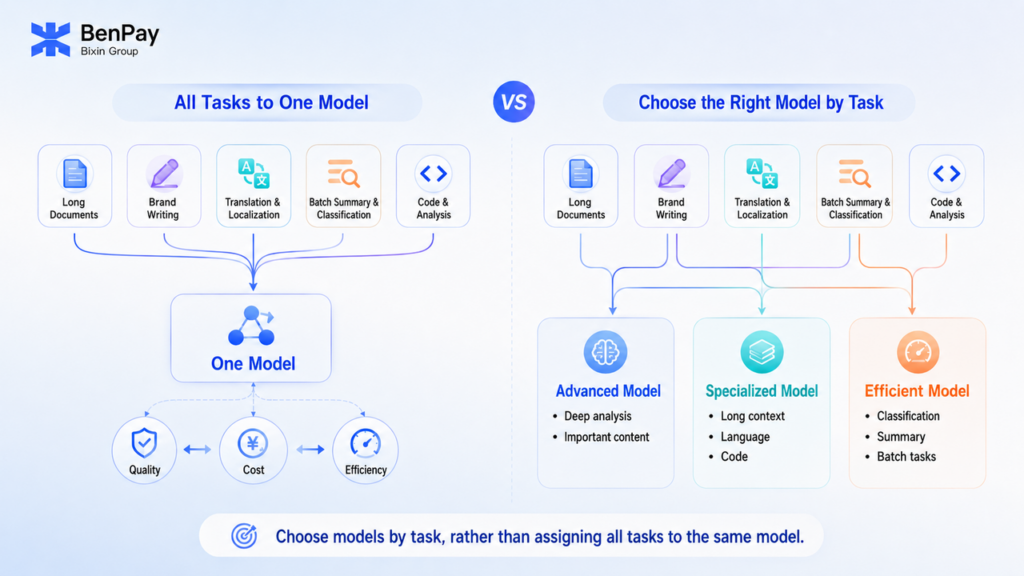
A Single Model May Struggle to Meet Quality, Cost, and Efficiency Requirements at the Same Time
Consider a content marketing team preparing to launch a new product. The project may involve the following tasks:
- Reading product documentation, whitepapers, and competitor reports to extract key information;
- Developing product positioning, communication themes, and a content structure based on the source material;
- Writing a complete product launch article and landing page copy;
- Adapting long-form articles into shorter content for LinkedIn, X, Telegram, and other channels;
- Completing Chinese-English translation and localization;
- Organizing user feedback in batches and classifying it by product features, pricing, user experience, and other dimensions;
- Analyzing campaign data and generating performance summaries and recommendations for further optimization.
Although all of these tasks relate to content generation, they do not require the same model capabilities.
When reading long documents, the team may focus more on contextual understanding and information extraction. When writing brand content, language quality, logical structure, and style consistency may be more important. For high-volume classification and summarization tasks, API cost and processing efficiency may become the main priorities. Multilingual communication requires attention to Chinese-language quality, English writing, and localization capabilities.
If every task is assigned to a single model, users may have to compromise between output quality, API cost, and processing efficiency.
The core logic of multi-model usage is not to decide which model is absolutely better. It is to select a more suitable model for each task instead of assigning every task to the same model.
For example, a team can assign high-value and complex content tasks to a more capable model, use a more cost-effective model for frequent and standardized tasks, and select models with relevant capabilities for long documents, Chinese-language content, or multimodal tasks.
This is one of the main reasons why more users are exploring OpenAI API alternatives and multi-model API services. They do not necessarily want to stop using GPT completely. Instead, they want to add more model options beyond GPT and avoid locking every task into the same model and provider.
Scalability Limitations Caused by Dependence on a Single Provider
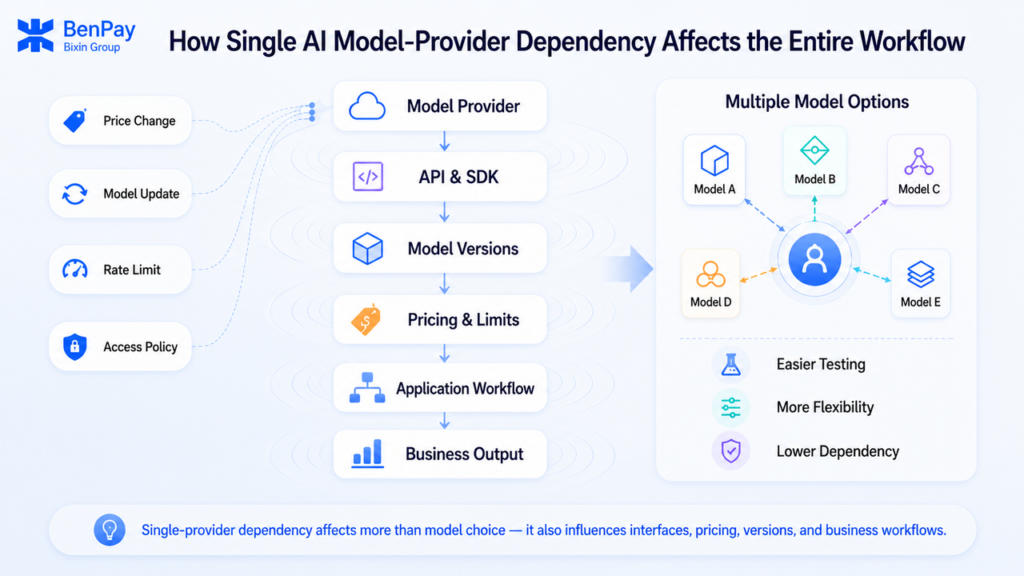
When an AI tool or business depends entirely on a single model provider, many critical parts of the product become tied to that platform.
Model Choice Is Limited
An OpenAI API Key is primarily used to access models provided by OpenAI.
If users want to access Claude, Gemini, Perplexity, Grok, DeepSeek, Qwen, or Kimi, they need to register with additional platforms and apply for new API Keys, or choose a unified multi-model API that supports those models.
Pricing Changes Affect Overall Costs
Different AI tasks require different levels of model capability.
If both simple and complex tasks use the same category of high-performance model, the project may incur unnecessary costs. Users also have fewer opportunities to optimize their overall budget by assigning certain tasks to other models.
Model Changes Can Affect Existing Workflows
Model versions, pricing, permissions, context-window limits, and rate limits may change.
When a product depends on only one model provider, changes to the platform’s rules or services may directly affect existing business operations.
Testing New Models Becomes More Expensive
AI models are updated rapidly.
When a team wants to test a new model, it may need to complete account registration, payment setup, API Key creation, and interface configuration again. As the number of models increases, testing and management become more complicated.
Teams Can Become Locked into a Single Technical Environment
When application code, third-party tools, and internal workflows are all built around one interface, the cost of replacing that provider or adding other models gradually increases.
For this reason, users often explore OpenAI API alternatives not because their existing model has become unusable, but because they want to expand their model options and reduce dependence on a single provider.
Main Alternatives to the OpenAI API
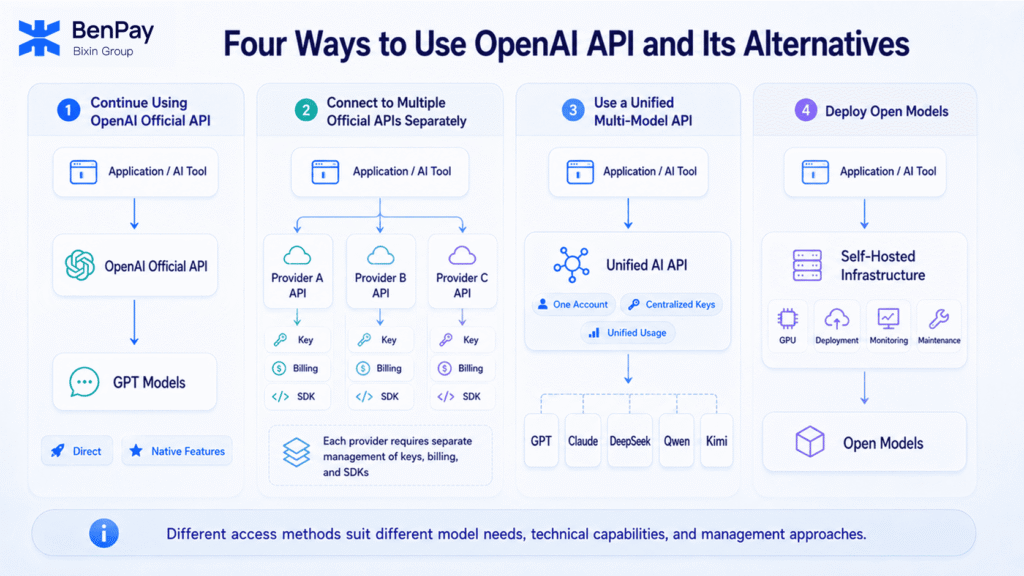
An OpenAI API alternative is not a single product. It can refer to several different integration approaches.
| Approach | Main Advantages | Main Limitations | Best Suited For |
| Continue using the official OpenAI API | More complete access to OpenAI-native capabilities, supported by mature documentation and a well-established ecosystem | Model coverage is mainly limited to OpenAI models | Individuals and projects that only need GPT |
| Connect to multiple official APIs separately | Direct access to each platform’s native models and features | Requires managing multiple accounts, API Keys, interfaces, and billing systems | Teams with development and operations capabilities |
| Use a unified multi-model API (e.g., BenPay AI API) | Unified access, API Key management, and billing | Available models and features depend on the platform’s compatibility coverage | Multi-model users, content teams, and small and medium-sized businesses |
| Deploy open models | Greater flexibility and control over deployment, data, and models | Requires computing resources, engineering expertise, and ongoing maintenance | Enterprises with infrastructure capabilities |
Option 1: Continue Using the Official OpenAI API
Strictly speaking, retaining the OpenAI API is not a replacement. However, it may still be the most appropriate choice.
If a project primarily uses GPT and depends on OpenAI-native functionality, the latest OpenAI models, or official technical support, there is no need to replace the existing setup simply to increase the number of available models.
Option 2: Connect to Multiple Official Model APIs Separately
Users can apply separately for official APIs from OpenAI, Anthropic, Google, DeepSeek, and other providers.
This approach generally provides more direct access to each platform’s native interfaces and features. However, users must separately manage:
- Platform accounts and identity verification;
- API Keys;
- Billing and account balances;
- Interface formats and SDKs;
- Model names and parameters;
- Usage records and financial reconciliation;
- Permissions and security management.
This approach is suitable for teams that can maintain multiple API integrations and place a high priority on access to each platform’s native capabilities.
Option 3: Use a Unified Multi-Model AI API
A unified multi-model AI API acts as a unified access and billing layer between users and multiple models.
Through one platform account and a unified API Key management system, users can access multiple models currently supported by that platform.
A unified AI API can typically provide:
- One account for managing multiple models;
- One balance for calls to different models;
- Unified API Key management;
- Unified usage and cost records;
- OpenAI-compatible or other compatible interfaces;
- A more streamlined process for testing and switching models.
A unified AI API is not a new large language model, nor is it the same as an official API provided by a model provider.
To learn more about how a unified AI API works, including model access and account management, read “What Is a Unified AI API? Access Multiple AI Models with One API Key.”
Option 4: Deploy Open Models
Teams with sufficient infrastructure and engineering capabilities can also choose to deploy open models.
This approach can provide greater control over deployment and data processing, but teams must consider:
- GPU and server costs;
- Inference frameworks and model deployment;
- Scaling and high availability;
- Model upgrades and security maintenance;
- Monitoring, logging, and incident handling;
- Long-term engineering and maintenance costs.
For individual users and small or medium-sized teams, self-hosting is not necessarily simpler than using an API service.
Multi-Model Usage Is Becoming a More Practical Choice
In the past, many AI products selected one model with strong general capabilities and attempted to use it for as many tasks as possible.
As the model ecosystem becomes more diverse, more individuals and teams are adopting multi-model strategies. They assign relatively clear responsibilities to different models based on task value, complexity, calling frequency, and functional requirements.
Assign Models Based on Task Complexity
Different tasks require very different levels of model capability. Revising a single product description or classifying user comments is not comparable to analyzing a report containing dozens of pages or generating a complete strategic proposal.
Teams can divide tasks into three general levels:
| Task Level | Typical Tasks | Main Considerations |
| High-Complexity Tasks | In-depth analysis, complex reasoning, important content creation, and code refactoring | Output quality, reasoning capability, and accuracy |
| Specialized Tasks | Long-document processing, Chinese-language localization, multimodal tasks, and code debugging | Context handling, language capabilities, and task-specific features |
| High-Frequency Standardized Tasks | Summarization, classification, format conversion, and batch rewriting | Token pricing, response speed, and processing efficiency |
This division helps prevent every task from being sent to the same high-cost model. It also reduces the risk of sacrificing quality on important tasks simply to lower API expenses.
Build Model Combinations Around Business Stages
A complete AI workflow often contains multiple stages rather than a single generation request.
A content production workflow, for example, may include:
- Reading source materials and extracting information;
- Topic selection and structural planning;
- Draft generation;
- Language editing;
- Translation and localization;
- Content review;
- Batch distribution and rewriting.
Teams can preselect suitable models for different stages instead of requiring each team member to choose a model independently every time.
A development project can similarly assign different models to requirement analysis, code generation, bug diagnosis, code review, and documentation.
This approach turns multi-model usage from random switching into a repeatable workflow.
Consider Quality, Speed, and Cost Together
Model selection should not be based only on the price of an individual Token.
Teams should evaluate:
- The input and output Tokens required to complete a task;
- Whether multiple revisions are needed to achieve an acceptable result;
- Whether response speed affects user experience;
- Whether the model can correctly understand long-context input;
- How much manual editing the output requires;
- Whether the model supports the native features required by the task;
- The monthly calling volume for similar tasks.
A lower-priced model may not reduce total costs if its output requires repeated revisions. A more capable model may also waste resources if it is used for a large number of simple tasks.
The goal of a multi-model strategy is therefore not simply to find the cheapest model. It is to create a more reasonable balance between task quality, manual labor, response efficiency, and API cost.
Evaluate Models with a Fixed Test Set
Before assigning tasks to models in production, teams can create a representative test set containing:
- Real user questions;
- Common writing tasks;
- Typical coding problems;
- Long-document samples;
- Chinese and English content;
- Tasks requiring structured output.
The same or similar Prompts can then be used to test multiple models. Teams can record:
- Output quality;
- Accuracy;
- Formatting consistency;
- Response speed;
- Token consumption;
- Actual cost;
- Amount of manual editing required.
Compared with a one-time subjective impression, a fixed test set provides a more reliable basis for determining whether a model is suitable for handling a particular category of tasks over the long term.
Preserve the Ability to Adjust Models
AI models are updated rapidly. A model that is suitable for a particular task today may not remain the best option in the future.
If a product deeply connects every workflow to a single model from the beginning, testing or adding other models later may require more extensive adjustments.
One of the main benefits of a multi-model environment is that it preserves the team’s ability to change models. When pricing, model capabilities, or business requirements change, task allocation can be adjusted without rebuilding the entire AI usage system.
Multi-model usage therefore provides more than simply a larger number of models. More importantly, it enables teams to:
- Assign models according to tasks;
- Control API costs across different workflow stages;
- Reduce dependence on a single provider;
- Test new models more quickly;
- Preserve flexibility for future model updates.
For individual users, this strategy may involve actively selecting models for different tasks within a third-party AI tool. Teams can go further by creating fixed model usage rules and evaluation processes.
Signs That You May Benefit from a Unified AI API
Not every OpenAI API user needs to add another platform.
If the existing official API already meets all requirements, there is no need to change the current setup merely for the sake of using multiple models.
However, a unified AI API may become more suitable when the following situations begin to appear.
You Already Use Two or More Models
If users have already applied for API Keys from multiple model platforms, this indicates that a real multi-model requirement already exists.
You Frequently Switch Models Based on the Task
When writing, coding, translation, reasoning, and long-context tasks require different models, a unified access point can reduce repetitive configuration.
Balances Across Multiple Platforms Are Becoming Difficult to Manage
When funds are distributed across several AI API accounts, users may find that one platform has an unused balance while another has insufficient funds. A unified balance can simplify this situation.
You Use Multiple Third-Party AI Tools
Different tools may require different API Keys and interface addresses. A unified compatible interface can reduce the cost of configuring and switching between tools.
Your Team Cannot Easily Reconcile Overall AI Expenses
When several team members purchase APIs independently, it may become difficult to understand the team’s total model usage and spending.
You Test New Models More Frequently
If every new model test requires account registration, account funding, and a new integration, a unified platform can shorten the testing process.
International Credit Cards or Cross-Border Payments Are Restricted
Some users may be unable to use the payment methods supported by official model platforms and may therefore need alternative top-up channels provided by another platform.
These situations indicate that the user’s challenge is no longer simply how to obtain an OpenAI API Key, but how to manage multiple AI models more efficiently.
How to Add a Unified AI API to an Existing Workflow
Using a unified AI API does not necessarily require users to stop using the official OpenAI API.
Users can configure a unified AI API directly in third-party tools that support custom API settings. They can also retain their existing OpenAI API integration and add other model options for specific tasks.
Review Existing Model Usage
First, identify which OpenAI models are currently being used and what tasks they perform.
Users can record:
- Main use cases;
- Current API costs;
- Third-party tool configurations;
- OpenAI-native features that must be retained;
- Other models they plan to add.
Users who have not previously used the OpenAI API can instead begin by evaluating the tasks they need to complete and the types of models required.
Confirm the Unified Platform’s Model Coverage
Check whether the unified AI API supports the GPT models currently required, as well as the additional models the user plans to access.
Do not review only the general model family. Also confirm:
- Specific model versions;
- Model IDs;
- Context-window limits;
- Supported input and output types;
- Pricing;
- Whether the required features are supported.
Check Interface Compatibility
If an existing tool or application uses the OpenAI API format, users can prioritize platforms that offer an OpenAI-compatible interface.
In some compatible scenarios, the main configuration changes may involve:
- Replacing the Base URL;
- Replacing the API Key;
- Updating the Model ID.
However, compatibility coverage differs between platforms. Support for tool calling, streaming output, multimodal input, and other features should still be confirmed through platform documentation and actual testing.
Test with a Small Number of Requests
Users can begin with a non-critical tool, an internal test project, or a small number of requests to verify:
- Whether the output meets expectations;
- Whether the model name is correct;
- Whether Token calculations are clear;
- Whether the interface is stable;
- Whether the third-party tool is compatible;
- Whether costs remain within budget.
Add Models Gradually Based on Tasks
The purpose of using a multi-model API is not to use more models simply for the sake of variety.
Users can retain their existing GPT calls and add another model for a specific task. For example, they may first introduce another option for long-context tasks, Chinese-language content, coding, or batch processing.
Retain Official Interfaces Where Necessary
Some OpenAI-native features may not be fully available through a third-party compatible interface.
Businesses that depend heavily on exclusive official capabilities can continue using the official OpenAI API while using a unified AI API for multi-model testing, routine tasks, or access to other models.
The official API and a unified multi-model API can be used at the same time. They are not mutually exclusive.
How BenPay AI API Helps Users Expand Their Model Options
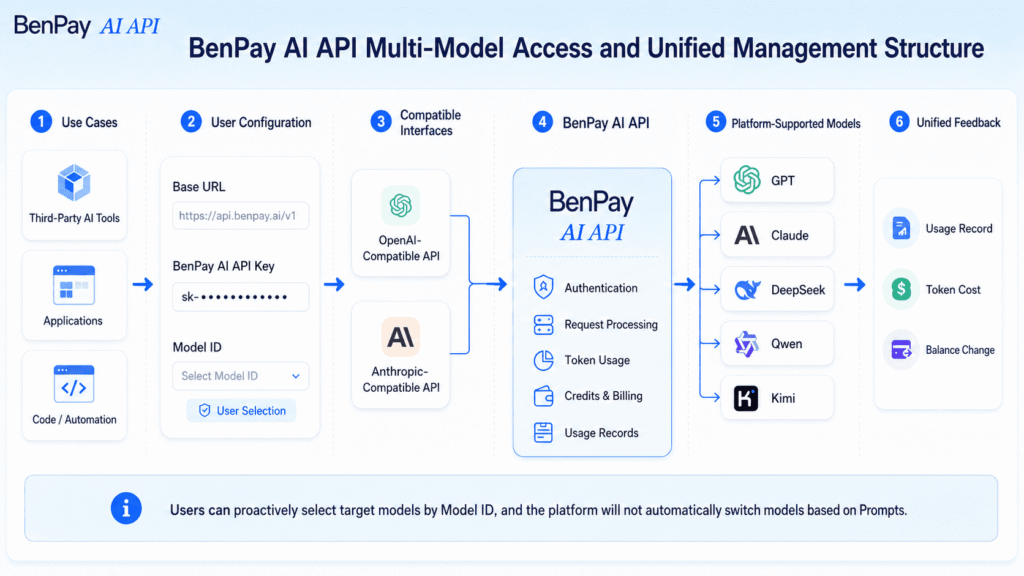
BenPay AI API is a unified multi-model AI API service designed for individual users, third-party AI tool users, content teams, and developers.
BenPay AI API does not require users to stop using the official OpenAI API. Users who have not previously used an API can directly create a BenPay AI API Key and select from the models currently supported by the platform. Users who already use the OpenAI API can retain their existing integration and add BenPay AI API as another multi-model access point when needed.
BenPay AI API provides both OpenAI-compatible and Anthropic-compatible interfaces.
For tools or applications that support custom API configurations, users can configure the following according to actual compatibility:
- Base URL;
- BenPay AI API Key;
- Model ID.
After completing the configuration, users can begin with a small number of requests to test the models currently supported by the platform. They can compare how different models perform in content generation, coding, long-context processing, Chinese-language tasks, and batch operations.
Through one BenPay account, users can manage AI API Keys, their account balance, and calling records, while actively selecting the target model according to the task.
Visit the BenPay AI API supported models page to view currently available models, versions, and pricing. Specific interface parameters and compatibility coverage are subject to the BenPay AI API documentation.
In this workflow, BenPay AI API is not intended to completely replace OpenAI. Its role is to help users retain access to GPT while adding and managing other model options through one account.
Conclusion: Expanding from a Single-Model Entry Point to Multi-Model Choice
The OpenAI API remains a mature and important access point for AI models. For users who only need GPT, value OpenAI-native capabilities, and do not face regional or payment restrictions, the official API remains a suitable choice.
However, as the number and variety of tasks increase, users may begin to need capabilities from other models. Connecting separately to multiple official APIs can then create additional management work involving multiple accounts, API Keys, balances, and interface formats.
Unified AI APIs have emerged in response to this situation. They do not require users to completely replace OpenAI. Instead, they use a unified account, compatible interfaces, and unified billing to allow OpenAI models and other models currently supported by the platform to coexist within the same usage environment.
BenPay AI API provides a more unified multi-model option for individuals and teams that want to move from single-model usage to a multi-model environment. Users can retain their existing OpenAI API or use BenPay AI API directly to add and manage multiple supported models through one account.
When the OpenAI API already meets all requirements, users can continue using their existing setup. When model selection, account management, payments, and cost control become more complicated, a unified multi-model AI API can provide another independent option.
FAQ: OpenAI API Alternatives and Multi-Model Usage
What Are the Main Alternatives to the OpenAI API?
Common alternatives include connecting separately to official APIs from other model providers, using a unified multi-model API, and deploying open models. Each approach has different characteristics in terms of native functionality, model coverage, interface compatibility, and maintenance requirements.
Can an OpenAI-Compatible Interface Directly Replace the OpenAI API?
Not necessarily. Some tools may only require users to replace the Base URL, API Key, and Model ID. However, support for tool calling, streaming output, multimodal input, and other native features still needs to be confirmed through platform documentation and actual testing.
How Can I Determine Whether a Model Is Suitable for a Particular Task?
Users can test multiple models with a fixed test set and record output quality, accuracy, formatting consistency, response speed, Token consumption, actual cost, and the amount of manual editing required. Important business decisions should not be based only on a single response or the model’s Token price.
Do I Need to Stop Using the Official OpenAI API After Using BenPay AI API?
No. BenPay AI API and the official OpenAI API can be used at the same time. Users can configure different interfaces according to the tool, project, and task.
How Do I Configure BenPay AI API in a Third-Party AI Tool?
If the tool supports custom APIs, users generally need to enter the Base URL provided by BenPay, a BenPay AI API Key, and the Model ID of the target model. The exact configuration process depends on the interface format supported by the tool.
What Should I Confirm Before Using a Unified Multi-Model API?
Before using a unified multi-model API, confirm whether the platform supports the required models and review the corresponding Model IDs, interface types, and pricing.
When configuring the API in a third-party AI tool, users should also confirm whether the tool supports a custom Base URL and API Key. After configuration, send a small number of test requests to verify that the model can be called successfully, the responses meet expectations, and usage and cost records are displayed correctly.