
DeepSeek V4.1 Flash is now available on BenPay AI API, with separate prices displayed for Peak Hours and Other Time Periods.
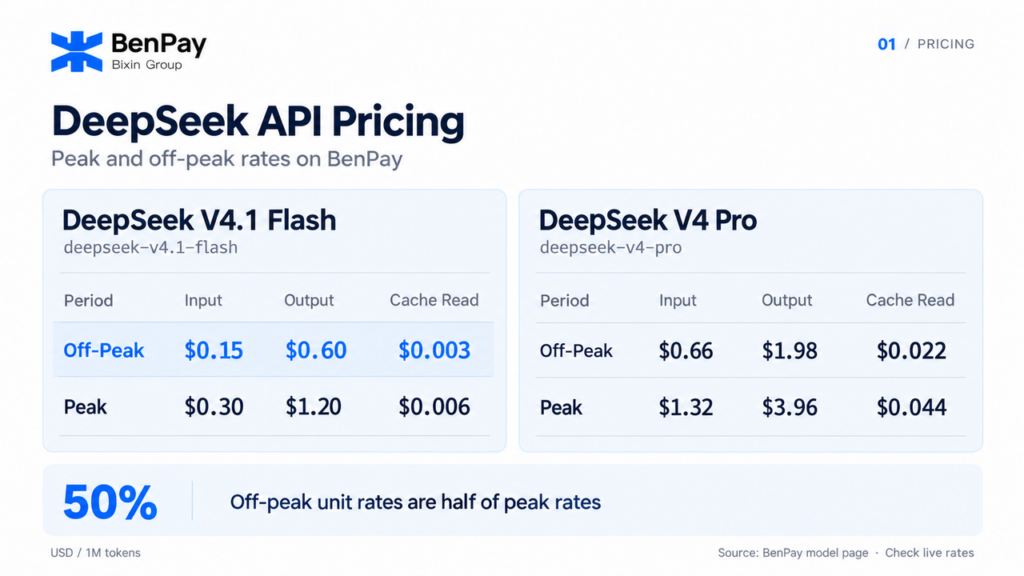
For V4.1 Flash, BenPay currently lists off-peak rates of $0.15 for input, $0.60 for output and $0.003 for cache reads per million tokens. Each rate is half its peak equivalent.
For users working with DeepSeek alongside models such as GPT and Claude, BenPay also offers a shared balance and centralized usage records. This makes it possible to compare model costs, test workloads and review spending within one account.
This guide explains DeepSeek V4.1 Flash pricing, compares it with V4 Pro, and looks at when BenPay may suit users who would otherwise connect directly to DeepSeek.
What Is DeepSeek V4.1 Flash, and Is Its API Available?
DeepSeek released V4.1 Flash on September 10, 2026. It belongs to a new architecture family, includes native multimodal visual understanding and is available through the official DeepSeek API.
DeepSeek has also confirmed that V4 Pro API service continues after September 14, 2026, with its billing method unchanged. This updated position supersedes the earlier retirement plan.
The Model ID for V4.1 Flash differs between the two services:
| Service | V4.1 Flash Model ID |
|---|---|
| Official DeepSeek API | deepseek-flash |
| BenPay AI API | deepseek-v4.1-flash |
When connecting through BenPay, use BenPay’s endpoint, API Key and Model ID.
DeepSeek V4.1 Flash Pricing on BenPay AI API
All prices below are in USD per 1 million tokens.
| Model | Pricing period | Input | Output | Cache Read |
|---|---|---|---|---|
| DeepSeek V4.1 Flash | Other Time Periods | $0.15 | $0.60 | $0.00 |
| DeepSeek V4.1 Flash | Peak Hours | $0.30 | $1.20 | $0.01 |
| DeepSeek V4 Pro | Other Time Periods | $0.66 | $1.98 | $0.02 |
| DeepSeek V4 Pro | Peak Hours | $1.32 | $3.96 | $0.04 |
These are usage rates, not flat fees per request. Input, output and cache reads are calculated from the billable tokens in each category.
As of this article’s verification date, all listed rates match the corresponding USD prices published by DeepSeek. Check each platform’s current pricing page for subsequent changes.
DeepSeek Peak Pricing and Off-Peak Pricing Explained
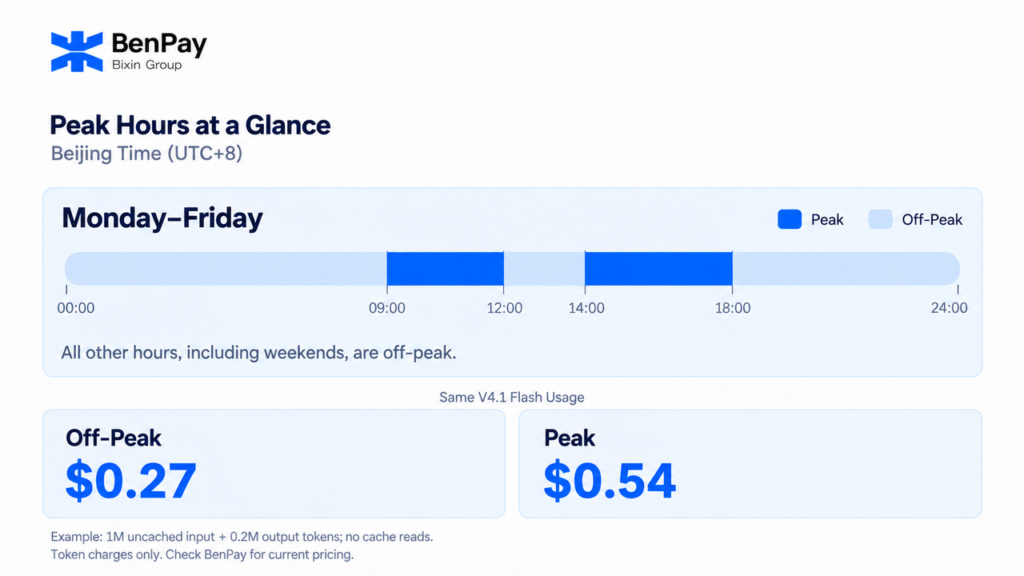
On BenPay, Peak Hours identifies the higher pricing period. Other Time Periods covers the remaining hours at the lower rates, referred to here as off-peak pricing.
BenPay defines peak hours as Monday through Friday, 09:00–12:00 and 14:00–18:00, in UTC+8 (Beijing time). All remaining hours are off-peak, including the weekday interval from 12:00 to 14:00 and weekends.
This matches DeepSeek’s official schedule: Monday through Friday, 01:00–04:00 and 06:00–10:00 UTC. Adding eight hours gives the Beijing-time periods displayed by BenPay.
For V4.1 Flash, the input rate is $0.15 off-peak and $0.30 at peak. Output costs $0.60 and $1.20 respectively. Cache reads and all three V4 Pro rates follow the same ratio.
With the same model, billable token quantities and cache-hit usage, off-peak token charges are 50% lower than peak charges.
Flexible workloads, such as document summarization and offline content processing, may benefit from off-peak scheduling. Interactive applications also need to account for response deadlines.
If the schedule changes or a request crosses a pricing boundary, refer to BenPay’s latest billing guidance and actual usage charges.
How to Estimate Your DeepSeek API Cost
Calculate input, output and cache-read charges separately. Keep cached and uncached input quantities distinct so that the same input tokens are not counted twice.
For example, suppose a set of V4.1 Flash requests consumes:
- 1 million uncached input tokens;
- 200,000 billable output tokens;
- No cache-read tokens.
Using BenPay’s displayed rates:
| Pricing period | Input charge | Output charge | Total |
|---|---|---|---|
| Off-peak | 1 × $0.15 = $0.15 | 0.2 × $0.60 = $0.12 | $0.27 |
| Peak | 1 × $0.30 = $0.30 | 0.2 × $1.20 = $0.24 | $0.54 |
This example assumes all usage is billed within the same pricing tier. It includes only the token charges shown; any applicable funding or external transfer fees should be considered separately.
An application’s overall spending will not necessarily fall by 50%. Output length, retries, cache-hit usage and the share of traffic in each pricing period can all change the result. Use actual request records to assess costs rather than relying on the input rate alone.
For a broader explanation of billing categories, see the AI API pricing and token cost guide.
V4.1 Flash vs V4 Pro: Price and Capability Differences
At BenPay’s current rates, V4.1 Flash has a lower unit price in every listed token category.
| Token category | V4.1 Flash unit-price reduction versus V4 Pro |
|---|---|
| Input | Approximately 77.3% |
| Output | Approximately 69.7% |
| Cache Read | Approximately 86.4% |
These percentages are calculated from the price table above and apply to both pricing periods. They compare unit rates, not the total cost of completing every possible task.
For capabilities, DeepSeek lists vision support for V4.1 Flash and no vision support for V4 Pro. Both support thinking and non-thinking modes, JSON output and tool calls.
A useful comparison uses the same business examples and measures whether the results meet requirements, how long responses take, how many tokens are consumed and whether retries are needed. Lower rates translate into useful savings when the model also meets the task’s quality requirements.
If Prices Match, Why Use DeepSeek Through BenPay?
For the two models covered here, BenPay currently matches DeepSeek’s official USD token prices and peak-hour schedule. The practical reasons to choose BenPay depend on how many models you use and how you prefer to fund API access.
Manage Several Model Providers Through One Account
If your project uses DeepSeek alongside GPT or Claude, separate provider integrations usually mean separate accounts, credentials and balances. BenPay lets you access supported models with one API Key and pay for their usage from a shared AI API balance.
For example, a team can test DeepSeek alongside other available models and review their usage and costs in one place. Users select the model for each task, subject to the features BenPay supports. Learn more in the unified AI API guide.
Use Your Existing BenPay AI API Balance
If you already use BenPay for other models, you can access V4.1 Flash through your existing account and balance, without opening and funding a separate DeepSeek account.
For users who regularly test new models, a shared balance reduces the work of managing additional accounts and funds spread across several services. It also keeps model spending together for review.
Fund API Usage with Supported Crypto Assets
BenPay offers funding through external wallets and the BenPay wallet, with assets such as USDT and USDC available according to the checkout options. This can suit users who already hold those assets.
See the USDT/USDC API funding guide for the process, and check the payment page for supported assets, networks and applicable fees.
If you only use DeepSeek and your official API setup already meets your needs, switching is a matter of preference. BenPay is more relevant when you need multiple models, a shared balance or crypto funding within one service.
How to Start Using V4.1 Flash on BenPay
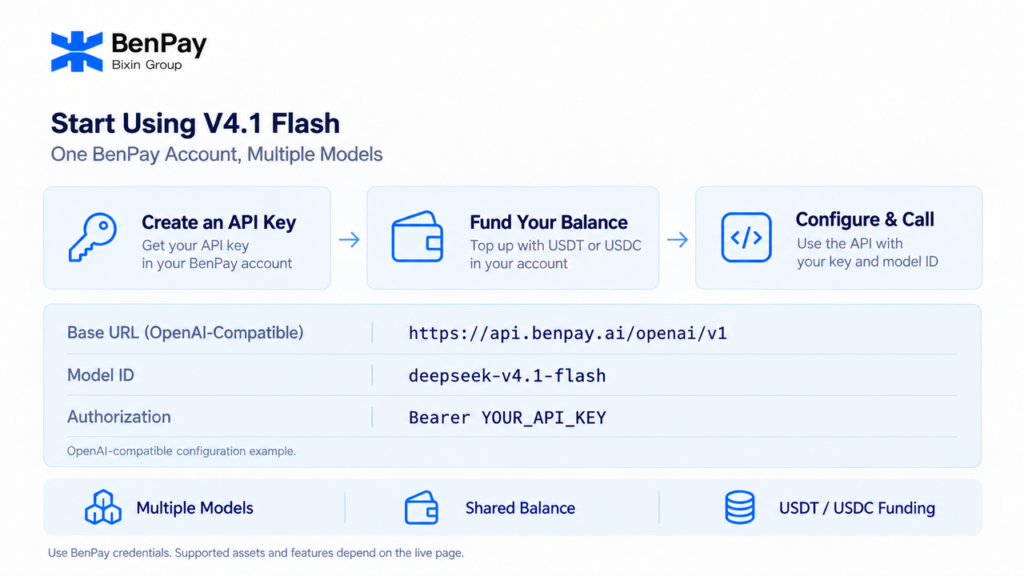
- Sign in to BenPay and open the AI API page.
- Find DeepSeek V4.1 Flash under Supported Models, review its pricing and copy the Model ID:
deepseek-v4.1-flash. - Create an API Key and check that your AI API balance is sufficient. Add funds if needed.
- Configure your client with BenPay’s endpoint and API Key, set the model to
deepseek-v4.1-flash, and send a test request. - Review the response and usage records to check output quality and actual cost.
See the BenPay AI API getting-started guide for the setup steps. Testing representative requests before increasing volume will give you a more useful budget estimate than unit prices alone.
FAQ
What Is the DeepSeek V4.1 Flash Price per Request?
There is no single fixed price per request in the rates shown here. Charges depend on billable input, output and cache-read tokens, as well as the applicable pricing period.
Is DeepSeek V4.1 Flash Cheaper on BenPay than on the Official API?
As of this article’s verification date, the listed rates match the corresponding official USD prices. BenPay’s main differences are its multi-model access, shared balance, centralized usage management and funding options.
Does DeepSeek Off-Peak Pricing Also Reduce Cache-Read Charges?
Yes. BenPay lists V4.1 Flash cache reads at $0.003 per million tokens off-peak and $0.006 at peak. V4 Pro cache reads are $0.022 and $0.044 respectively.
Does “Other Time Periods” Mean Nighttime?
No. Peak hours are Monday through Friday, 09:00–12:00 and 14:00–18:00 in UTC+8. All other hours are off-peak, including the weekday interval from 12:00 to 14:00 and weekends.
Which Model ID Should I Use for V4.1 Flash on BenPay?
Use deepseek-v4.1-flash, as shown on BenPay’s current supported model page. The official DeepSeek API uses deepseek-flash; the identifier should match the service you are connecting to.
Should Every V4 Pro Workload Move to V4.1 Flash?
A lower unit price alone does not settle that decision. Evaluate required features, output quality, response time and actual token consumption. For an existing application, start with a small comparison using representative tasks.
Plan Your DeepSeek API Budget Around the Model and the Workload
V4.1 Flash gives BenPay users a DeepSeek option with lower input, output and cache-read rates than V4 Pro. For workloads with flexible deadlines, off-peak token charges are half the peak amount when the model and billable quantities remain the same.
For users who need several models or crypto funding, BenPay also brings model access, balances and usage records together. The decision to use V4.1 Flash should still be based on results and costs from actual tasks.
Visit BenPay AI API to review supported models and current peak and off-peak prices. Start with a representative V4.1 Flash workload to see how its results and costs fit your application.