
GPT‑6.2 Astra and GPT‑6.2 Sol are available through BenPay AI API. BenPay’s Astra costs $3.20 per million input tokens and $12 per million output tokens. BenPay’s Sol costs $0.80 per million input tokens and $3 per million output tokens. Compared with the price of OpenAI’s long context API, BenPay is 80% cheaper.
This guide explains what GPT‑6.2 Astra and Sol are designed for, compares their long-context prices, estimates costs, and shows how to connect to them through the BenPay AI API. Prices and features may change, so check the current BenPay AI API model list and OpenAI’s release notes before use.
What Are GPT‑6.2 Astra and Sol Best For?
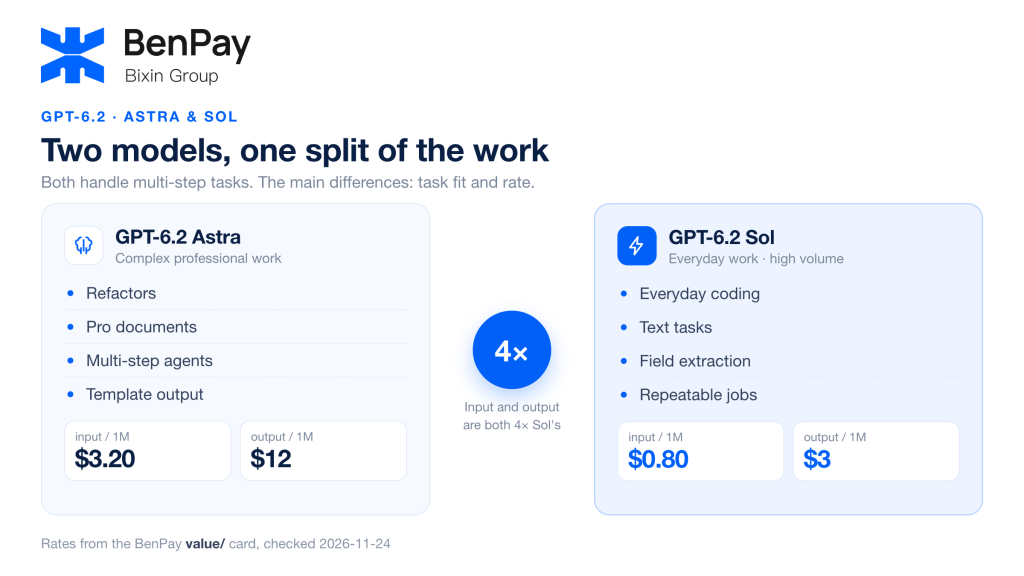
In short, Astra is designed for complex professional tasks, while Sol is designed for everyday work and repeatable tasks. Both can handle multi-step workflows. The main differences are their intended use cases and their API costs.
GPT‑6.2 Astra: For Complex Tasks That Require Careful Judgment
Astra is worth testing when a task requires the model to understand a large amount of information, plan an approach, carry out several steps, and review the result.
For example:
- Complex coding work: Explore an unfamiliar codebase, understand how files relate to each other, plan a refactor, or investigate a problem that spans multiple modules.
- Professional document work: Extract information from several sources, identify inconsistencies, and organize the findings into a report, spreadsheet, or proposal.
- Multi-step agent workflows: Call tools in sequence, adjust the next step based on the results, and check whether the task is complete.
- Deliverables that must follow a template: Create a document, presentation, or spreadsheet that follows a supplied format or professional conventions.
These are task types you can use to evaluate Astra. They are not a guarantee that every task will be completed in one attempt or that the output will not need human review. OpenAI also highlights complex professional work, coding, documents, and computer use as areas for Astra.
GPT‑6.2 Sol: For Everyday Work and Higher-Volume Tasks
If the goal is clear and the steps are relatively consistent, or you need to process many similar requests, Sol can be a good place to start. It is positioned for everyday work and aims to balance speed, capability, and cost.
For example:
- Everyday coding: Explain code, add a small feature, write a common script, or suggest ways to investigate an error.
- Text tasks: Summarize emails, rewrite paragraphs, extract key points, categorize feedback, or organize meeting notes.
- Structured extraction: Process tickets, forms, or product information using a fixed set of fields and return the results in a specified format.
- Repeatable agent tasks: Apply the same steps to many similar documents, such as extracting fields, checking formatting, or creating short summaries.
Sol can be a starting point for routine work. If testing shows that it often misses important requirements, struggles to follow complex instructions consistently, or needs more reasoning and step-by-step adjustment, consider assigning those requests to Astra. OpenAI describes Sol as a model for everyday work that can also handle multi-step workflows.
GPT‑6.2 Astra and Sol Long-Context Pricing on BenPay
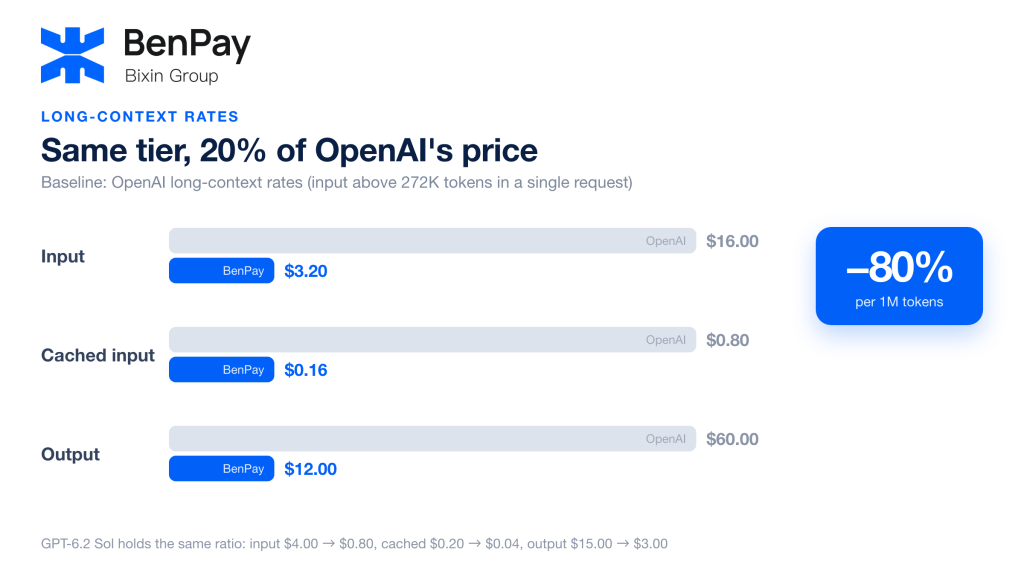
The prices below are per million tokens. OpenAI’s long-context rates apply when the input in a single request exceeds 272K tokens. BenPay currently lists the corresponding input, cached-input, and output prices at 20% of OpenAI’s long-context rates.
GPT‑6.2 Astra Price Comparison
| Billing item | OpenAI long-context rate | BenPay value/ rate | Difference |
| Input | $16.00 | $3.20 | 80% lower |
| Cached input | $0.80 | $0.16 | 80% lower |
| Output | $60.00 | $12.00 | 80% lower |
GPT‑6.2 Sol Price Comparison
| Billing item | OpenAI long-context rate | BenPay value/ rate | Difference |
| Input | $4.00 | $0.80 | 80% lower |
| Cached input | $0.20 | $0.04 | 80% lower |
| Output | $15.00 | $3.00 | 80% lower |
Cached-input writing is not included in the discount comparison above. BenPay’s current rate cards list cache-write prices of $4 for Astra and $1 for Sol, but do not specify the cache retention period. OpenAI lists different cache-write rates by retention period. Because the conditions may differ, the prices alone do not establish that the two services use identical cache rules. If your workflow depends on caching, check the current rules for both services.
When Does OpenAI’s Long-Context Pricing Apply?
The threshold is calculated based on a single request and not accumulated monthly. If a single request does not exceed 272K tokens, the actual price range applicable to OpenAI should be compared, and the long-context rate cannot be directly applied.
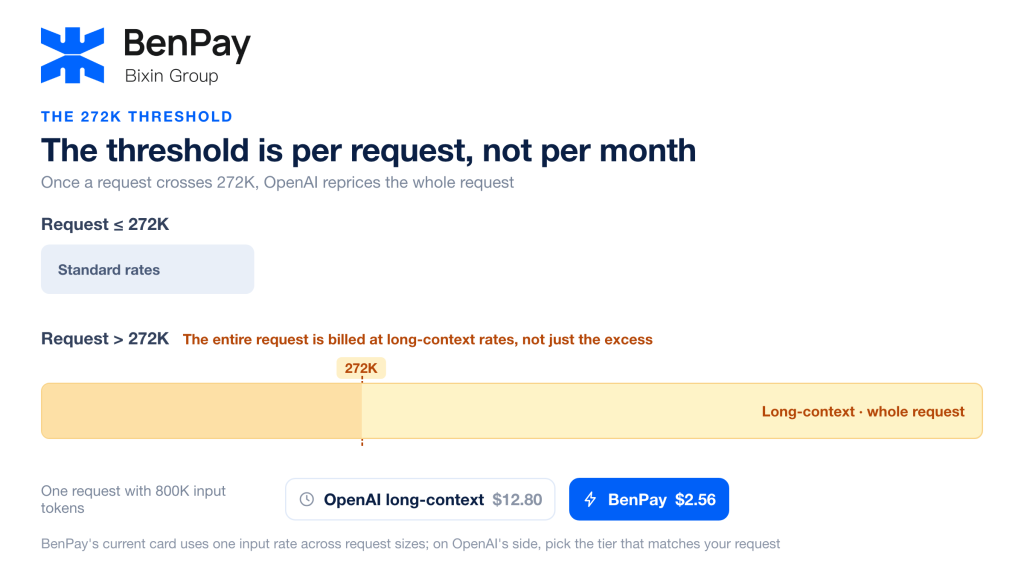
The comparison with OpenAI’s long-context rates shows the difference at that pricing tier. If your individual requests do not exceed the threshold, do not use the long-context rate as your estimate of OpenAI costs. For budgeting, choose the price tier that matches the size of your actual requests.
Monthly Cost Estimate: How Do Astra and Sol Compare?
The following estimate assumes 40 million input tokens and 10 million output tokens per month, with no cache reads or writes.
| Estimated scenario | OpenAI long-context rates | BenPay value/ rates | Estimated difference |
| Astra | $1,240 | $248 | $992 |
| Sol | $310 | $62 | $248 |
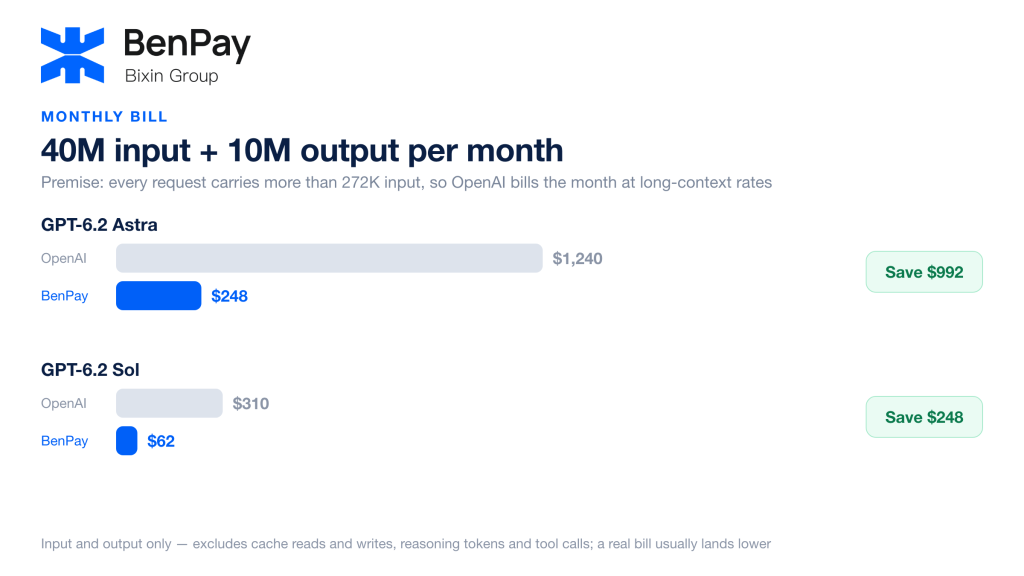
For Astra:
- OpenAI: 40 × $16 + 10 × $60 = $1,240
- BenPay: 40 × $3.20 + 10 × $12 = $248
Based on this set of usage estimates, BenPay’s fees are respectively $992 and $248 lower than OpenAI’s long context price. This is only an estimate of input and output usage. The actual cost will vary with cache, inference tokens, tool calls, and actual usage.
GPT‑6.2 Astra vs Sol: Which Should You Choose?
Start with the task’s difficulty and your cost requirements:
- Try Sol first for everyday writing, routine coding, field extraction, repeatable tasks, or workloads with many requests.
- Evaluate Astra for complex code changes, multi-step reasoning, professional document work, and tasks that require more difficult judgments.
- Use both where appropriate: If your tool or code lets you select a model for each task, use Sol for routine requests and switch to Astra when a task calls for it. Before putting the workflow into production, test accuracy, failure rates, and actual token usage with your own tasks.
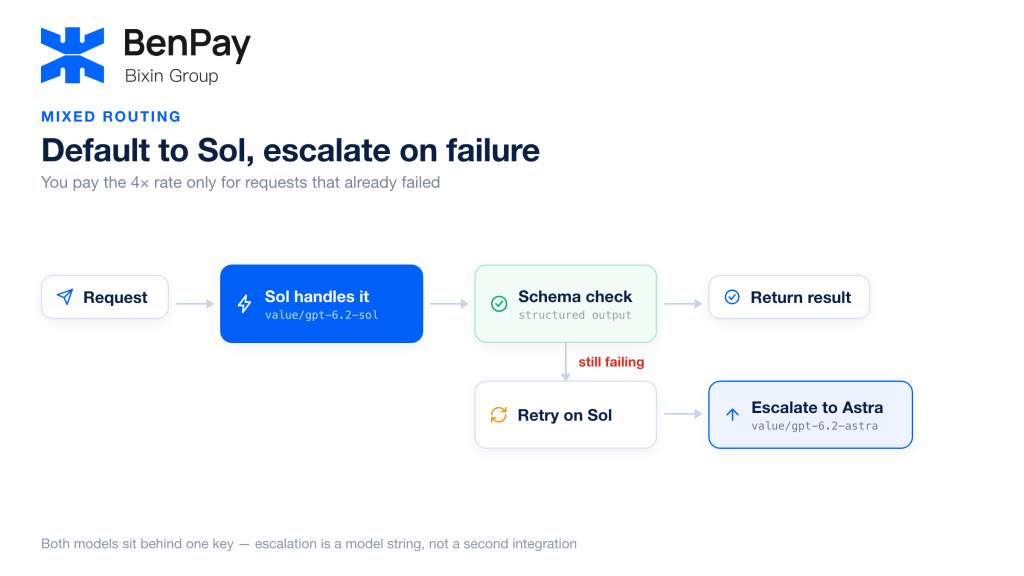
A model’s intended role does not guarantee a particular result. The cost of a task also depends on input and output length, cache hits, and retries—not just the per-token rate.
How to Call GPT‑6.2 Astra and Sol Through BenPay AI API
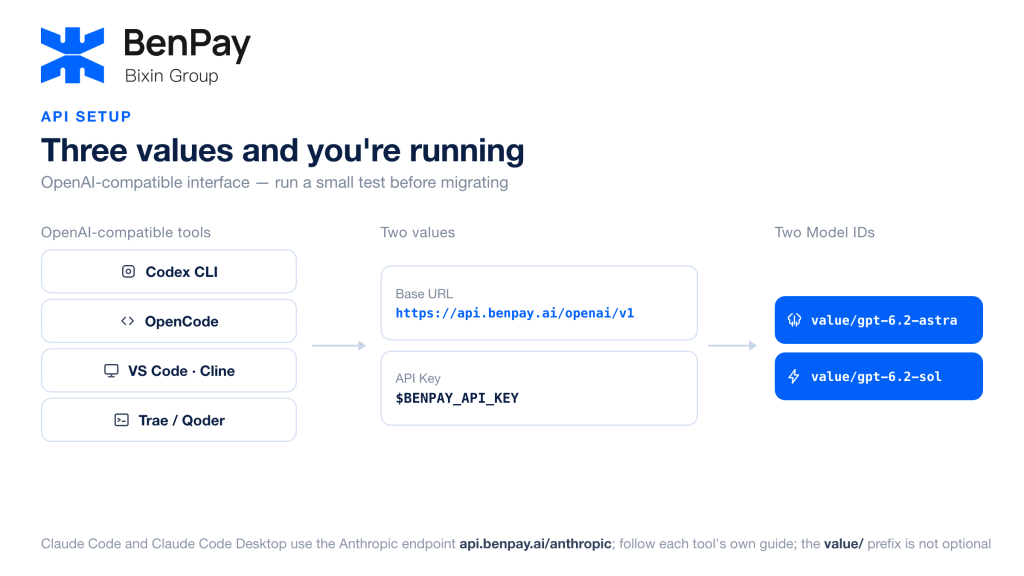
Both models use the same OpenAI-compatible Base URL. Select the appropriate Model ID for each request:
- Base URL:
https://api.benpay.ai/openai/v1 - Astra Model ID:
value/gpt-6.2-astra - Sol Model ID:
value/gpt-6.2-sol
Create and copy your API key from BenPay AI API Workspace. Treat the full key as a credential. Do not place it in files that will be committed to a code repository.
Send a Simple Request with curl
The example below calls Sol. First, set your API key in the BENPAY_API_KEY environment variable:
curl https://api.benpay.ai/openai/v1/chat/completions \
  -H "Authorization: Bearer $BENPAY_API_KEY" \
  -H "Content-Type: application/json" \
  -d '{
    "model": "value/gpt-6.2-sol",
    "messages": [
      {"role": "user", "content": "Summarize this support ticket in one sentence."}
    ]
  }'
To use Astra instead, change the model value to:
"value/gpt-6.2-astra"BenPay’s Model IDs include the value/ prefix. Copy the exact ID shown in the current model list; do not assume OpenAI’s official Model ID will work unchanged with BenPay.
If you use Claude Code, Codex CLI, OpenCode, a desktop application, or an IDE plugin, see the BenPay AI API setup guide and follow the instructions for your tool.
What to Check Before Switching API Providers
API compatibility does not guarantee identical features. Before migrating a production workflow, run a small test and confirm:
- Your tool or code supports the OpenAI-compatible interface.
- The Model ID matches the current BenPay model list.
- Your request is within the context and output limits of the service you are using.
- Required features—such as image input, tool calling, or streaming—are supported by the selected model, interface, and tool.
- Cache read and write rules fit your application.
- Current prices and usage records are available in BenPay.
- Your API key is stored securely; rotate it if you suspect it has been exposed.
A BenPay AI API key is issued by BenPay, not OpenAI. Calling a model through a compatible interface does not mean that BenPay and OpenAI offer identical features, terms of service, or processing rules.
Frequently Asked Questions
How much does GPT‑6.2 Astra cost on BenPay?
BenPay’s current value/gpt-6.2-astra rate card lists input at $3.20 per million tokens and output at $12. Cached input is $0.16 and cache write is $4. Prices may change; check the current model page for the latest rates and cache rules.
How much does GPT‑6.2 Sol cost on BenPay?
BenPay’s current value/gpt-6.2-sol rate card lists input at $0.80 per million tokens and output at $3. Cached input is $0.04 and cache write is $1. Check the current model page for the latest rates and cache rules.
Are these GPT‑6.2 models really 80% cheaper on BenPay?
BenPay’s 80% label compares its listed rates with OpenAI’s long-context rates. OpenAI applies those rates to requests with more than 272K input tokens. If your requests do not meet that threshold, compare against the OpenAI rate tier that applies to your actual request size.
What is the main difference between Astra and Sol?
Astra is designed for complex professional work, while Sol is positioned for everyday work and efficiency. On BenPay’s current value/ rate cards, Astra’s input and output rates are four times Sol’s. Evaluate whether Astra is worth the additional cost based on task quality and actual usage.
Which Model ID should I use through BenPay?
Use the exact ID shown in BenPay’s current model list: value/gpt-6.2-astra or value/gpt-6.2-sol. The Base URL is https://api.benpay.ai/openai/v1. Check the current page for updates before making requests.
Do these models support a 1M-token context window?
BenPay currently lists a 1M-token context window for both models. OpenAI lists a context window of 1,050,000 tokens in its official documentation. Follow the limits published for the service and interface you are using. If a request approaches the limit, plan for a fallback such as splitting the input into smaller parts.
Test Your Own Work Before Choosing a Model
GPT‑6.2 Astra is worth evaluating for complex tasks, while GPT‑6.2 Sol can be a starting point for everyday work. BenPay AI API provides OpenAI-compatible access to both models with usage-based billing. Check the current rates in Workspace, create an API key, and start with a small request to confirm connectivity and output quality.
For budgeting, use your own input, output, and cache usage, and select the OpenAI price tier based on the input size of each request. Model and pricing information in this article was checked on November 25, 2026. Before publishing or making API calls, refer to the current BenPay AI API model list and OpenAI’s official announcement.