
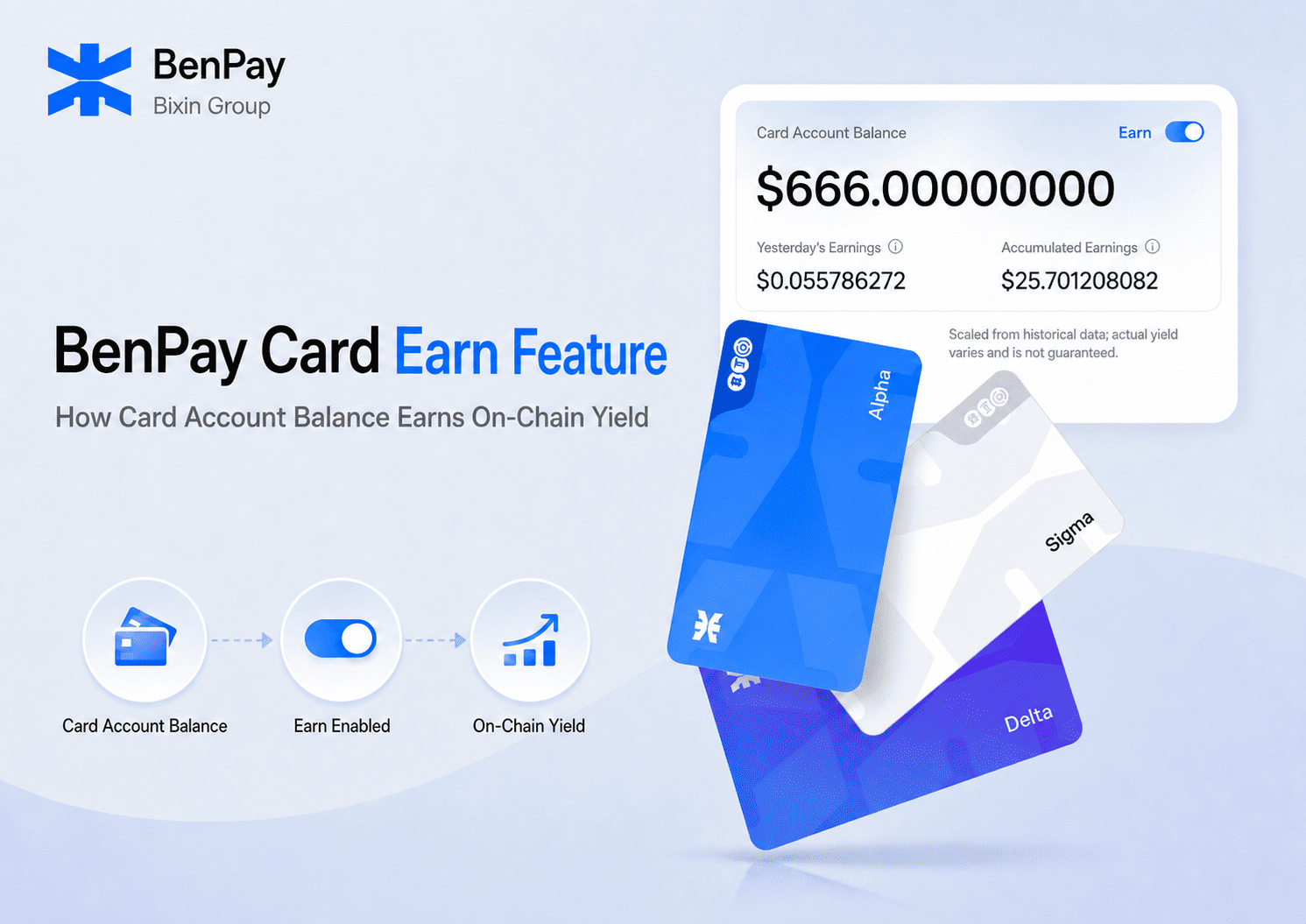
Many users do not spend their entire virtual crypto card balance immediately after adding funds. Money may remain in the account while waiting for the next subscription renewal, international purchase, or travel payment.
The BenPay Card Earn feature gives eligible card account balance another potential use. After a user activates Earn, eligible funds can participate in on-chain decentralized finance protocols under the applicable system rules and generate variable on-chain yield.
This is sometimes described as a form of on-chain passive income, but the term needs context. Returns are not fixed or guaranteed. They depend on underlying DeFi protocols, market conditions, and current product rules, and the feature involves DeFi-related risks.
This guide explains:
- The difference between Card Account Balance and Card Balance
- How to activate the BenPay Card Earn feature
- Where to view yesterday’s and accumulated earnings
- How funds can be transferred for card payments
- How Card Earn differs from BenPay DeFi Earn
- The risks to understand before enabling on-chain yield
What Is the BenPay Card Earn Feature?
BenPay Card Earn is an optional on-chain yield feature that must be activated by the user.
Once Earn is enabled, eligible Card Account Balance can participate in on-chain DeFi protocols according to system rules. Returns are generated dynamically and settled into the Card Account Balance under the applicable product rules.
Key points include:
- Earn does not start until the user activates it
- The feature applies to eligible Card Account Balance
- Returns can change with protocol and market conditions
- Users can view yesterday’s earnings, accumulated earnings, and transaction records
- Funds can be transferred from Card Account Balance to a specific Card Balance for spending, subject to the rules shown on the page
BenPay Card Earn is not a bank deposit or a fixed-income product. Users must review the relevant service agreement and risk disclosure before activating the feature.
Card Account Balance vs. Card Balance
Understanding these two balances is essential before using Card Earn.
| Balance Type | What It Represents | Relationship to Card Earn |
|---|---|---|
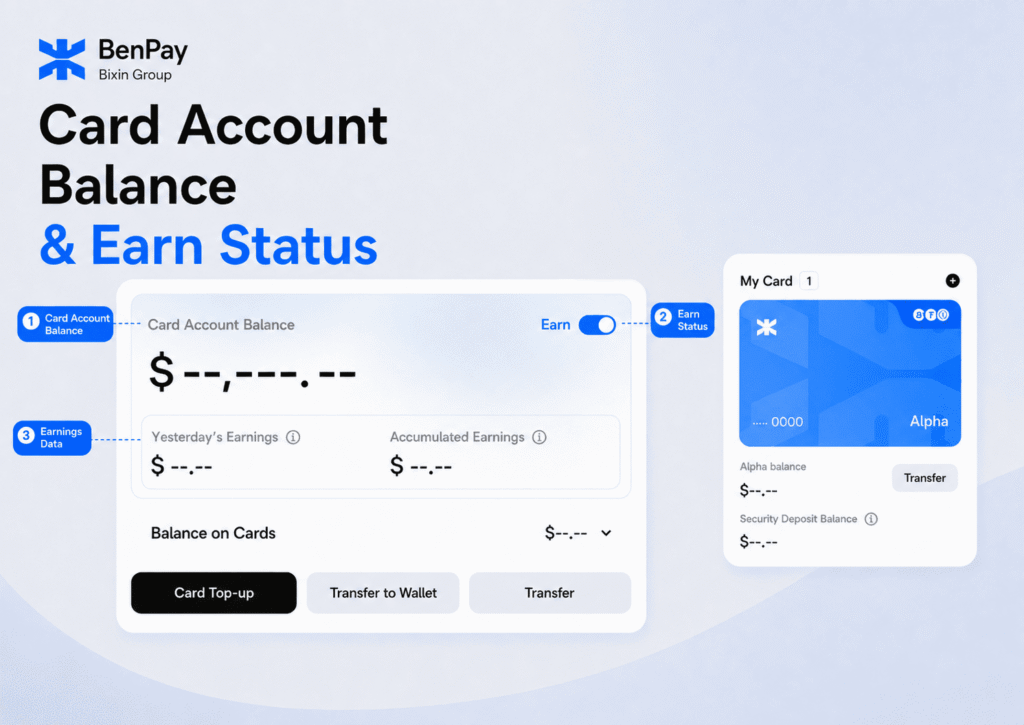
| Card Account Balance | Funds held at the card account level. Subject to the applicable page rules, they can participate in yield generation, be transferred to the wallet, or be moved to a specific card. | After the user enables Card Earn, eligible funds can participate in on-chain yield generation. |
| Total Card Balance | The combined balance of all individual cards held under the user’s account. | Displayed as an aggregated total only; it is not a separate yield-bearing account. |
| Individual Card Balance | The available balance of a specific card, such as the Alpha Card balance, that can currently be used for payments. | Primarily used for subscriptions, shopping, and other card payments. |
In simple terms, Card Account Balance sits at the account level, while Card Balance is the amount available on a specific card for payments.
When funds are needed for a subscription, purchase, or other payment, users can transfer the required amount from Card Account Balance to Card Balance according to the instructions shown on the page. Yield participation and daily card payments are handled separately, and the actual amount participating in Earn is determined by the account page and system rules.
How Does BenPay Card Earn Work?
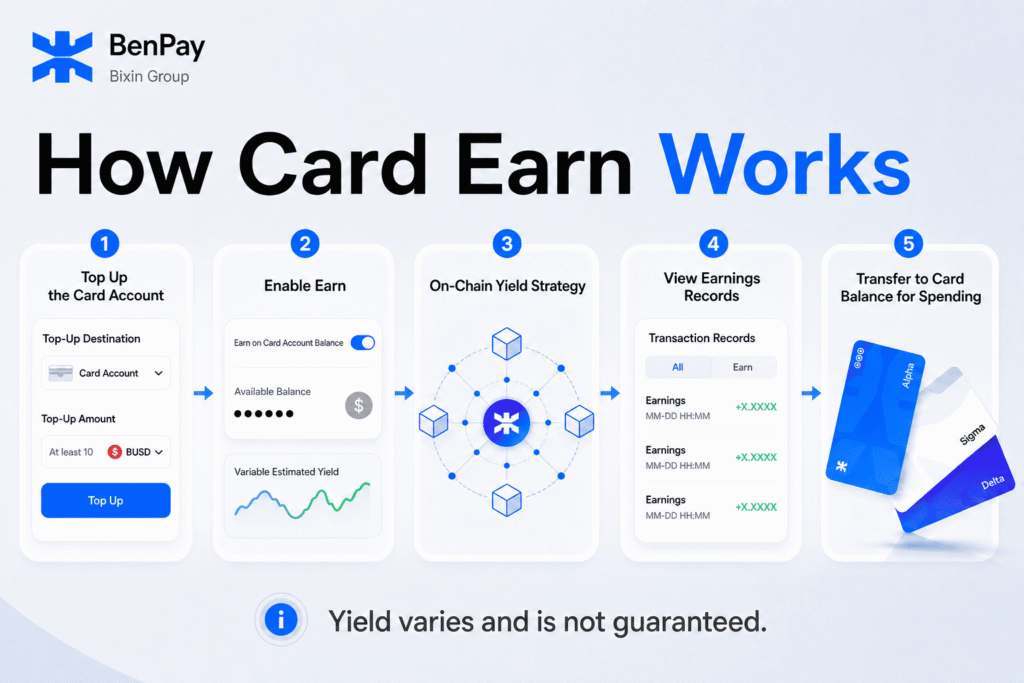
Step 1: Add Funds to Card Account
Go to the BenPay Card page, select Card Top-Up, and choose Card Account as the top-up destination.
According to the current official BenPay activation guide, Card Account top-ups currently start from 10 BUSD. Minimum amounts and supported assets may change, so check the information displayed on the page before confirming.
Step 2: Activate Earn
After the top-up is completed, return to My Card and activate the Earn toggle in the Card Account Balance section.
When enabling it for the first time, review and accept the DeFi Card Service Agreement & Risk Disclosure. Eligible Card Account Balance will only begin participating in on-chain yield after the user provides authorization.
Step 3: Yield Is Generated Dynamically
After Earn is activated, eligible Card Account Balance can participate in the applicable on-chain DeFi protocols.
The return is not a fixed interest rate promised by BenPay. It is generated dynamically based on the underlying protocols and current market conditions.
The account page can display Yesterday’s Earnings and Accumulated Earnings, allowing users to monitor recent and total recorded yield.
Step 4: Review Earnings in Transaction History
Open Transaction History and select the Earn category to view earnings records.
Each earning entry appears as Profit with a Complete status. The amount and settlement timing shown in an account are subject to actual system records and current product rules.
Step 5: Transfer Funds for Card Payments
When funds are needed for subscriptions, shopping, or another payment, users can transfer the required amount from Card Account Balance to the relevant Card Balance according to the rules shown on the page.
After the transfer is completed, the funds can be used through the corresponding card for supported payment scenarios. Transfer requirements, processing times, card fees, and merchant acceptance are subject to the current account page and product rules.
Card Earn vs. BenPay DeFi Earn
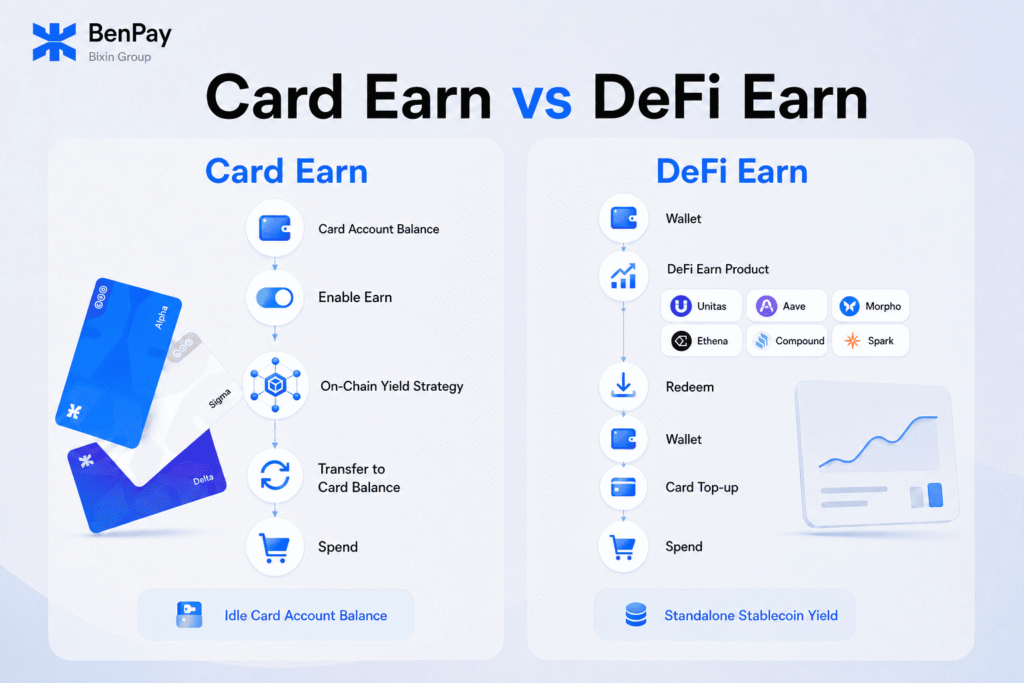
Card Earn and BenPay DeFi Earn both involve on-chain yield, but they are not the same feature.
| Category | BenPay Card Earn | BenPay DeFi Earn |
|---|---|---|
| Starting Point | Card Account Balance | BenPay Wallet or the DeFi Earn product page |
| How It Is Activated | Turn on the Earn toggle on the card page | Select an available earning product or strategy |
| Yield Management | Runs according to the Card Earn system rules | Runs according to the selected product or strategy |
| Route to Card Spending | Transfer the required amount to Card Balance | Typically redeem to the wallet before topping up the card |
| Best Suited For | Cardholders managing idle Card Account Balance | Users with a separate stablecoin yield strategy |
For a broader explanation of the separate earn-to-spend workflow, read How to Earn Stablecoin Yield and Spend It with a Crypto Card.
Users should distinguish between earning on Card Account Balance and using a separate DeFi Earn product, as the interfaces and payment flows are different.
Who May Benefit from BenPay Card Earn?
Users Who Keep Funds in Card Account
If you prepare funds for upcoming subscriptions, shopping, or travel but do not expect to spend the entire amount immediately, Earn can give eligible Card Account Balance an opportunity to participate in on-chain yield while waiting to be used.
Users Who Regularly Pay with Stablecoins
For users managing digital services, international shopping, or other card expenses with stablecoins, Card Earn places the yield entry point and card account in the same interface.
Users Who Want Visible Earnings Records
The interface can display Yesterday’s Earnings, Accumulated Earnings, and Profit entries under Transaction History, making it easier to review how recorded earnings change over time.
Users Who Understand DeFi Risk
Card Earn is better suited to users who understand that returns can fluctuate and who are prepared to accept smart contract, underlying protocol, and market risks.
If you require a fixed rate, guaranteed principal, or a product without on-chain risk, Card Earn may not be suitable for you.
What Risks Should You Understand?
Variable Returns
On-chain yield can change with market demand, protocol utilization, and underlying strategies. Previous earnings do not indicate future results.
Smart Contract Risk
DeFi protocols depend on smart contracts. Even audited protocols may contain undiscovered vulnerabilities or experience attacks, failures, or abnormal behavior.
Cross-Chain Risk
If the movement of funds involves a cross-chain bridge, assets may also be exposed to contract vulnerabilities, network disruptions, or bridge attacks.
Market and Liquidity Risk
During extreme market conditions, returns may decline and transfers or redemptions may be delayed. The mechanics of an underlying protocol may also affect principal.
Product and Operational Risk
Supported assets, minimum amounts, settlement methods, and interfaces may change. Before confirming an operation, check the top-up destination, amount, network, and account status.
These risks do not mean that losses will necessarily occur, but on-chain yield should not be treated as a bank deposit or a risk-free return. Review the official BenPay activation guide and risk disclosure before enabling Earn.
BenPay Card Earn FAQ
Does Card Earn Start Automatically?
No. Users must activate the Earn toggle in the Card Account Balance section and accept the relevant service agreement and risk disclosure.
Does Card Earn Provide a Fixed Return?
No. Returns change with underlying DeFi protocols and market conditions. There is no fixed rate or guarantee of future earnings.
Does Every Card Balance Generate Yield?
Not automatically. Card Earn applies to eligible Card Account Balance. Card Account Balance, the Card Balance on a specific card, and other types of funds should not be treated as the same balance.
Can I Still Use the Funds for Payments?
Users can transfer the required amount from Card Account Balance to Card Balance according to the instructions shown on the page and then use the corresponding card for supported payments. Transfer and payment results depend on account status, card rules, and merchant acceptance.
Where Can I View My Earnings?
Users can view Yesterday’s Earnings and Accumulated Earnings in the Card Account Balance section. Profit records may also be available under the Earn category in Transaction History.
Is Card Earn the Same as DeFi Earn?
No. Card Earn operates around Card Account Balance, while DeFi Earn is a separate on-chain earning product with a different funding and redemption flow.
Can I Lose Principal?
On-chain yield involves smart contract, cross-chain, market, liquidity, and underlying protocol risks. Under extreme conditions, these risks may affect earnings, access to funds, or principal. Card Earn should not be treated as a principal-protected product.
Put Eligible Card Account Balance to Work Before You Spend
The value of BenPay Card Earn is not a promise of fixed or risk-free passive income. It gives eligible Card Account Balance an optional way to participate in on-chain yield while waiting for the next payment.
After activating Earn, users can monitor yesterday’s earnings, accumulated earnings, and historical Profit records. When funds are needed for a payment, the required amount can be transferred to the relevant Card Balance according to the rules shown on the page.
If you understand variable returns and DeFi-related risks and want another way to manage idle Card Account Balance, you can review the current BenPay Card Earn requirements.
Explore BenPay Card and the Earn Feature
Disclaimer: This article explains product functionality and does not constitute investment or financial advice or a promise of returns. On-chain yield varies with market conditions and underlying protocols, and past performance does not indicate future results. Features, supported assets, minimum amounts, and operating rules may change. Always refer to the BenPay Card page, applicable agreements, and real-time account information.