
Introduction: Do You Need to Register on Multiple Platforms to Use Multiple AI Models?
As AI models such as GPT, Claude, Gemini, Perplexity, DeepSeek, Qwen, and Kimi continue to develop, more individual users, content teams, businesses, and developers are beginning to use multiple models at the same time.
Different models have different strengths. Some are suitable for writing and code generation, while others perform well in long-form text analysis, Chinese-language processing, complex reasoning, or cost-efficient API usage. As a result, users no longer rely on just one AI model. Instead, they select different models for different tasks.
However, this also creates new challenges. When using the official APIs of different models separately, users typically need to:
- Register accounts on multiple platforms;
- Apply for and manage multiple API keys;
- Add funds separately on different platforms;
- Review multiple sets of bills and usage records;
- Configure different API endpoints and model parameters;
- Deal with international credit card or regional payment restrictions.
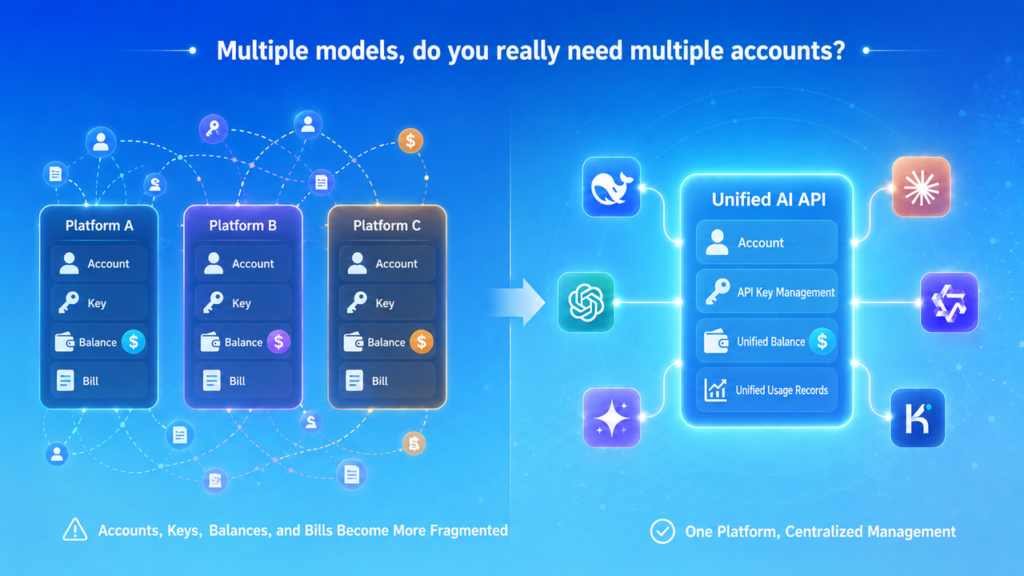
As the number of models increases, accounts, API keys, balances, and API usage records become increasingly fragmented. A unified AI API was created to address this problem. It brings multiple leading AI models together on one platform, allowing users to access the models supported by the platform through one account, a unified API key management system, and one shared balance.
What Is a Unified AI API?
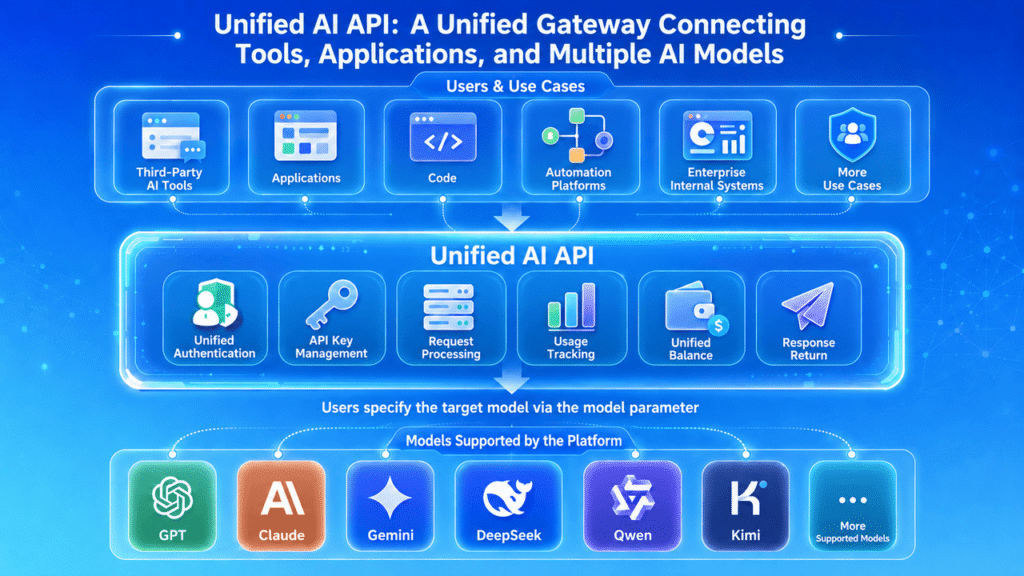
A unified AI API is a single access point that connects users, AI tools, applications, and multiple AI models.
Under the traditional approach, users who want to access GPT, Claude, and Gemini generally need to register separate accounts on different platforms, add funds to each account, and obtain three independent API keys. With a unified AI API, users only need to connect to one platform and can then select different models based on their needs.
Simply put, a unified AI API can be understood as a way to access multiple supported AI models through one unified platform and one API key management system. It may also be referred to as:
- A unified LLM API;
- An AI API aggregator;
- One API for all AI models.
It is important to note that “one API for all AI models” is a general description. The specific models, versions, and features available through a unified AI API still depend on the platform’s current list of supported models. It does not mean that every AI model on the market is accessible.
Why Is a Unified AI API Needed?
A unified AI API addresses more than technical interface issues. It also reduces the fragmentation of accounts, payments, balances, and cost management.
- Multiple Platform Accounts Are Difficult to Manage
Different AI models are generally provided by different companies. Users need to complete registration, verification, payment, and account maintenance separately on each platform. For individuals or teams using multiple models at the same time, the management burden can increase rapidly.
- The Number of API Keys Keeps Increasing
Each platform provides its own API key. When users also need to separate different projects, devices, third-party tools, and team members, the number of API keys increases further. This can lead to API keys being mixed up, lost, or exposed.
- Balances and Bills Are Fragmented
Users may need to prepay separately on multiple platforms. This can result in fragmented funds: one platform may still have an unused balance, while another has already run out of funds. At the end of the month, teams must also review Token usage and bills across several different platforms.
- Switching Models Is Complicated
When users want to test a new model, they often need to register again, add funds, create a new API key, and configure a new endpoint. This increases the time required to test different models and makes users more likely to remain tied to one platform over the long term.
- Payment Methods May Be Restricted
Some AI API platforms primarily accept international credit cards. Users without an international credit card, users whose bank card payments fail, or users facing regional payment restrictions may be unable to activate a model API successfully.
The core value of a unified AI API is that it brings these fragmented processes together on one platform.
How Does a Unified AI API Work?
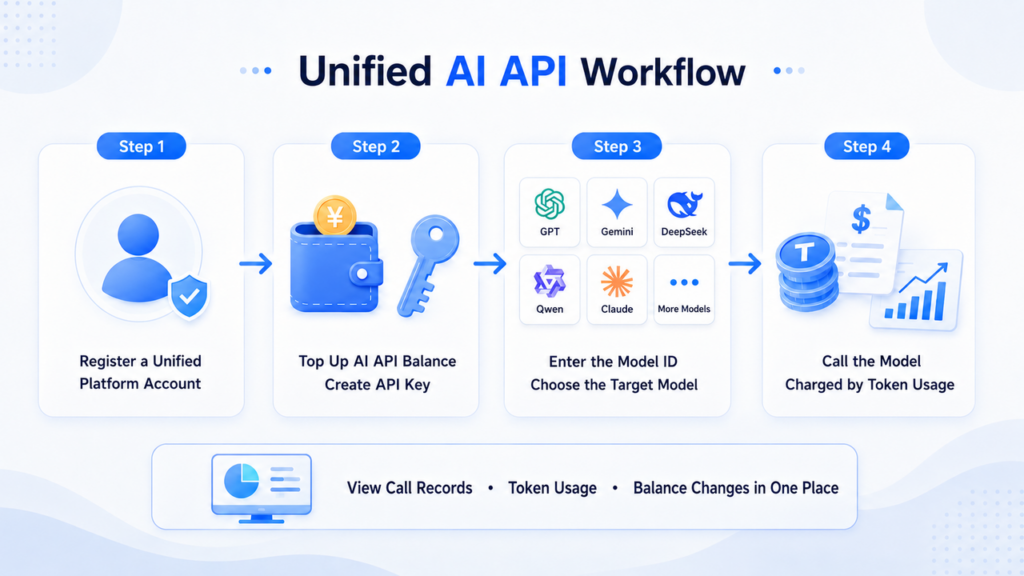
For most users, the process of using a unified AI API can be summarized in four steps.
Step 1: Register an Account on a Unified Platform
Users only need to register one account with a unified AI API platform. They do not need to create separate accounts with multiple model providers.
Step 2: Add Funds and Create an API Key
Users add funds to their AI API balance and create an API key for authentication. Some platforms allow users to create multiple API keys so that different tools, projects, or teams can be managed separately.
Step 3: Select the Model You Want to Use
Users can select a target model based on the specific task.
For example:
- Use GPT for general writing and coding tasks;
- Use Claude for long-form text and complex content;
- Use Gemini for multimodal tasks;
- Use DeepSeek, Qwen, or Kimi for reasoning, Chinese-language tasks, or high-frequency usage.
In third-party tools that support custom APIs, users can usually select or enter the model name directly. Developers can specify the model through the model parameter in the API request.
Step 4: Pay Based on Actual Usage
After a model is called, the platform deducts fees from the shared balance based on the selected model’s price and the actual number of Tokens used. API records, model usage, and balance changes can also be viewed on the same platform.
The usage logic of a unified AI API can therefore be summarized as follows: register one account, add funds to the balance, create an API key, and then select different AI models based on the task.
Traditional Single-Model APIs vs. a Unified AI API
| Comparison Item | Purchasing Different Model APIs Separately | Unified AI API |
| Account management | Register separately on multiple platforms | One unified platform account |
| API keys | Multiple keys managed separately | Centralized management on one platform |
| Model availability | Usually limited to one provider | Access to multiple models supported by the platform |
| Funding | Add funds separately on each platform | One shared balance for multiple models |
| Usage records | Distributed across different platforms | Viewed centrally on one platform |
| Model switching | May require new registration and configuration | Usually requires changing or selecting a Model ID |
| Payment management | Multiple payment channels and bills | Unified funding and deductions |
| Model pricing | Based on official provider pricing | Based on the unified platform’s pricing |
Neither approach is absolutely better than the other. If a user only needs one fixed model and must use all of the model provider’s native features, using the official API directly may be more suitable. If a user needs to access multiple models and wants to reduce the work involved in managing accounts, payments, and API keys, a unified AI API is generally more convenient.
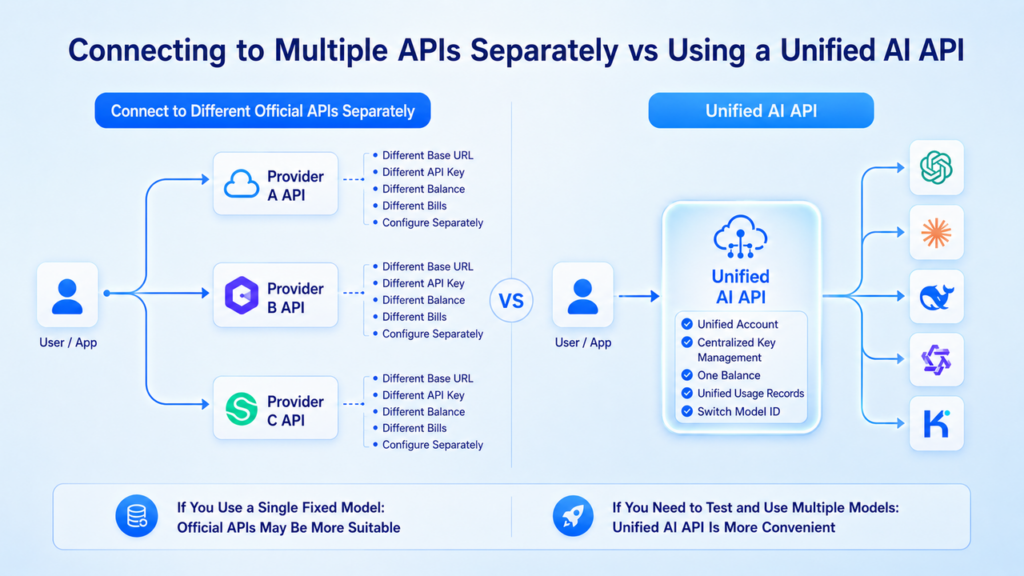
What Are the Advantages of Using a Unified AI API?
- Use Multiple Models Through One Account
Users do not need to repeatedly register and log in across multiple AI platforms. Through one account, they can access the leading models currently supported by the platform.
- Share One Balance Across Multiple Models
Users do not need to add funds separately to multiple model platforms. A unified balance can be used to call different models, reducing fragmented funds and repeated payments.
- Centralized API Key Management
Users can create and manage API keys on one platform. Different keys can also be assigned to third-party AI tools, personal projects, team projects, or different development environments.
- Test and Switch Models More Easily
Different models are suitable for different tasks. A unified AI API allows users to compare the output quality, speed, and cost of multiple models more quickly, without repeating the entire purchasing and configuration process each time.
- View Usage Costs in One Place
Users can view API records, Token usage, and actual costs for multiple models on one platform. For content teams, studios, and businesses, this can also reduce the complexity of financial reconciliation and cost reporting.
- Access More Flexible Payment Options
Some unified AI API platforms provide funding methods other than credit cards. For users without international credit cards or users facing cross-border payment restrictions, this can lower the payment barrier to using AI APIs.
Who Is a Unified AI API Suitable For?
A unified AI API is not only for developers.
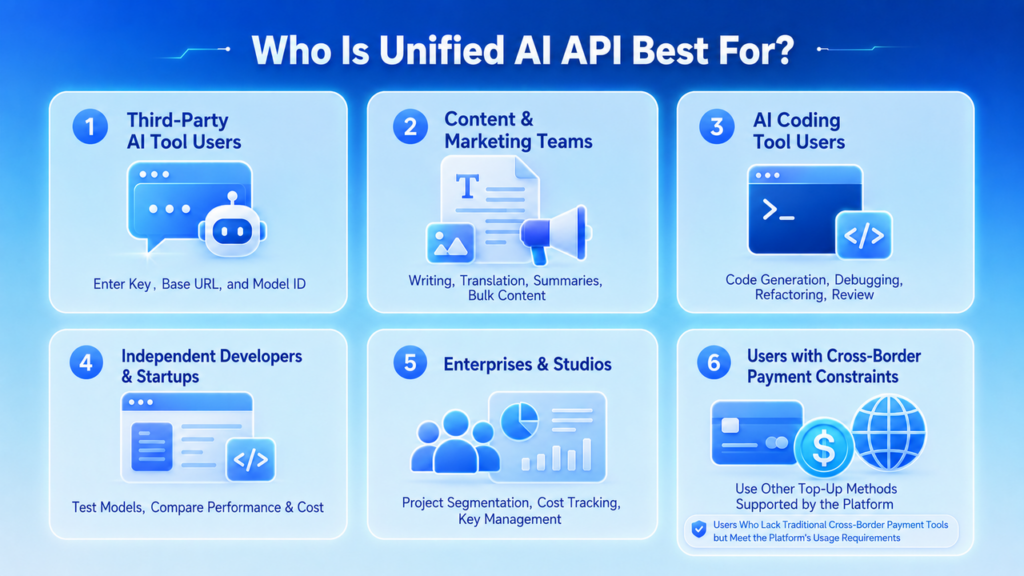
- Individual Users of Third-Party AI Tools
Many AI clients, writing tools, translation tools, knowledge management applications, and automation platforms allow users to enter a custom API key. These users usually do not need to write code. They only need to enter the following information according to the tool’s requirements:
- API Key;
- Base URL;
- Model ID;
- Interface type.
Once configured, users can access different AI models supported by the platform within the same third-party tool.
For example, users can use one model to organize information and generate articles, then switch to another model to process long documents, translations, or complex analysis. Compared with registering separate accounts and purchasing credits for each model, a unified AI API can simplify model configuration, funding, and switching.
Therefore, even without a programming background, users who use AI clients or productivity tools that support custom APIs may benefit from a unified AI API.
- Content Creators and Marketing Teams
Content creation is not a single task. It consists of multiple stages, including topic research, information summarization, article writing, translation, localization, advertising copy, social media content, and data analysis.
Different models have different characteristics in terms of language style, long-form text processing, Chinese-language capabilities, creative generation, and API costs. For example:
- Use one model to generate article outlines and creative directions;
- Use another model to process long-form source material and reports;
- Use a model with stronger Chinese-language capabilities to improve localized content;
- Use a lower-cost model for bulk classification, rewriting, and summarization;
- Compare and review the same content across multiple models.
A unified AI API allows content teams to select models based on the task without creating separate accounts, adding funds, and managing API keys for every model.
For teams that continuously produce articles, advertising materials, social media content, and multilingual content, a shared balance and centralized usage records also make it easier to calculate overall AI costs.
- Users of AI Coding Tools
Claude Code, Codex CLI, and other AI coding tools generally require users to configure their own API keys and model endpoints.
These users may use AI for:
- Code generation;
- Bug troubleshooting;
- Code explanation;
- Project refactoring;
- Unit testing;
- Technical documentation;
- Code review;
- Terminal task automation.
Different models may vary in code comprehension, complex reasoning, context length, and API pricing. With a unified AI API, users can select different models through compatible interfaces and Model IDs within the platform’s supported range, without separately completing account registration, billing setup, and interface configuration for every model.
Users who work with multiple AI coding tools can also create separate API keys for different projects or tools, reducing the management risks of using one key across every use case.
- Independent Developers and Startup Teams
During the early stages of product development, teams are often unable to determine which AI model is best suited to their business.
For example, an AI customer service product may focus more on response consistency and cost. A document analysis tool may prioritize long-context capabilities. An AI Agent project may require reasoning, coding, and content-generation capabilities at the same time.
Independent developers and startup teams can use a unified AI API to:
- Test multiple models quickly;
- Compare outputs using the same Prompt;
- Compare model prices and Token usage;
- Adjust models based on the product development stage;
- Reduce repeated integration work across multiple model platforms;
- Avoid tying a product to a single model provider too early.
When new models become available, teams can also test them within the unified platform’s supported range without rebuilding an entire account, funding, and API management system each time.
- Businesses and Studios
When businesses use AI APIs, their concerns usually extend beyond whether a model can be called. They must also manage projects, track costs, and support team collaboration.
For example:
- Marketing teams use AI to generate content;
- Customer service teams call models to handle user questions;
- Product teams test different models;
- Technical teams integrate AI into internal systems;
- Studios provide AI services for multiple client projects.
If each department or employee separately purchases APIs from different platforms, it can be difficult for a business to understand its total spending. It may also lead to API keys being mixed between projects, former employees retaining access to keys, fragmented balances, and bills that are difficult to reconcile.
A unified AI API allows businesses to centrally manage API keys, model calls, balances, and cost records for multiple projects within one account system. Teams can create separate keys for different projects and gain a clearer understanding of the actual usage generated by each model and business activity.
Businesses with stricter security, privacy, and compliance requirements still need to evaluate the platform’s data processing methods, permission controls, and service capabilities before use.
- Users Without International Credit Cards or With Cross-Border Payment Restrictions
Some official AI model platforms mainly support credit or debit cards issued in specific countries or regions.
Users may encounter the following issues:
- No international credit card;
- Bank cards cannot complete overseas online payments;
- Billing addresses or card-issuing regions are not supported;
- Payment methods must be linked separately on multiple platforms;
- Credit card payments frequently trigger risk controls;
- Teams cannot use personal bank cards to purchase APIs centrally.
If a unified AI API platform supports funding with stablecoins or other crypto assets, users can purchase AI API credits through payment methods other than credit cards.
This approach is not intended to bypass model or regional rules. It provides an alternative funding option for users who meet the platform’s usage requirements but do not have access to traditional cross-border payment tools. For users who need multiple models, unified funding can also reduce the need to prepare separate payment methods for different AI platforms.
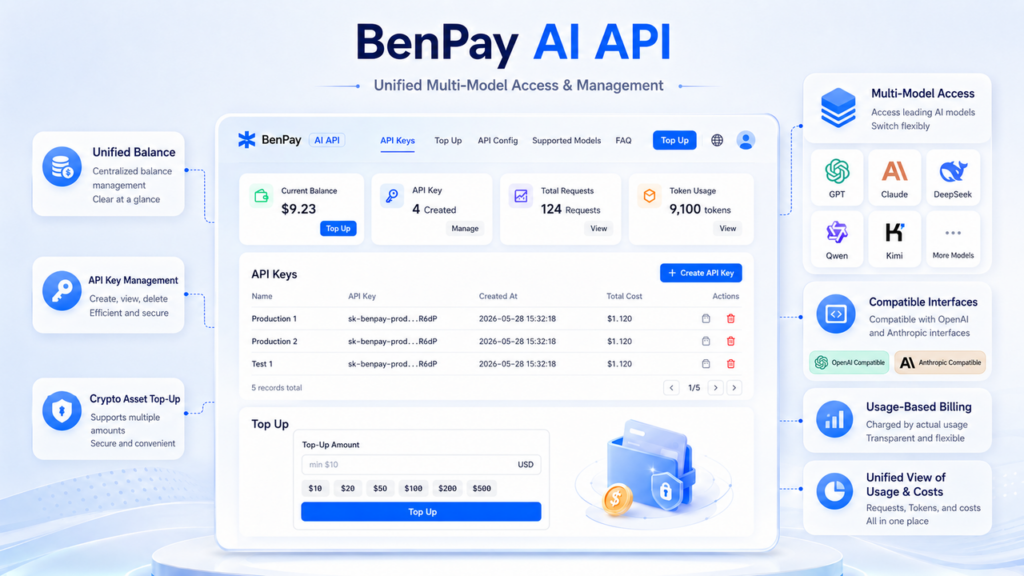
Unified Multi-Model Capabilities Provided by BenPay AI API
BenPay AI API is a unified multi-model AI API service designed for individual users, third-party AI tool users, developers, and business teams.
Through one BenPay account, users can centrally manage their AI API balance, API keys, model calls, and usage records while accessing multiple leading AI models currently supported by the platform.
- Access Multiple Leading Models Through One Account
BenPay AI API supports multiple model families, including GPT, Claude, DeepSeek, Qwen, and Kimi. Users do not need to register and add funds separately with multiple model providers.
View the BenPay AI API supported models page to check the currently available models, versions, and pricing.
- Use One Balance Across Multiple Models
After adding funds to their BenPay AI API balance, users can use the same balance to call different models supported by the platform. This one-balance-for-multiple-models approach helps reduce the problem of funds being distributed across multiple AI API accounts.
- Unified API Key Management
Users can create API keys on the BenPay AI API page and configure them in third-party tools, AI coding software, applications, or internal business systems that support custom APIs.
Users can also manage multiple API keys for different projects or use cases.
- Compatible Interfaces
BenPay AI API provides OpenAI-compatible and Anthropic-compatible interfaces.
For individual users, the API key, Base URL, and Model ID provided by BenPay can be configured in tools that support custom APIs.
For developers, compatible interfaces can also help reduce the complexity of migrating existing applications and integrating multiple models.
- Pay Based on Actual Token Usage
BenPay AI API uses a pay-as-you-go pricing model. Users do not need to purchase a separate fixed package for every model. Fees are deducted from the shared AI API balance based on the selected model and the actual number of Tokens used.
- Crypto Asset Funding
BenPay AI API supports adding funds to the AI API balance using currently available crypto assets such as USDT and USDC.
This provides another funding option for users without international credit cards, users whose bank card payments fail, or users who prefer to use digital assets.
The actual supported assets, funding networks, and minimum funding amounts are subject to the information displayed on the funding page.
- View Model Usage and Costs in One Place
Users can view API records, Token usage, and balance changes for different models within one account.
Compared with logging in to and reconciling accounts across multiple platforms, centralized records allow individuals and teams to understand their AI API usage more clearly.
The core features of BenPay AI API can be summarized as multi-model access, a unified account, a shared balance, compatible interfaces, pay-as-you-go pricing, and crypto asset funding.
Conclusion: From Purchasing APIs Separately to Using Multiple Models Through One Platform
As the number of AI models continues to grow, the challenge users face is no longer limited to choosing a model. It also includes how to purchase, fund, configure, and manage multiple models. When using official APIs from different model providers separately, users typically need to maintain multiple accounts, multiple API keys, multiple balances, and multiple sets of bills.
A unified AI API brings these fragmented processes together on one platform. Users can manage API keys and balances through one account, select different models based on their tasks, and centrally review actual usage and costs.
For users who need multiple AI models, configure third-party AI tools, manage team AI costs, or face restrictions with international payment methods, a unified AI API provides a more centered and flexible approach.
In addition to unified multi-model access, BenPay AI API provides compatible interfaces, a shared balance, pay-as-you-go pricing, and crypto asset funding, helping users reduce the complexity of purchasing and managing AI APIs across multiple platforms.
FAQ: Common Questions About Unified AI APIs
Q1: What Is the Difference Between a Unified AI API and Web Subscriptions Such as ChatGPT or Claude?
Web subscriptions are mainly used through official chat interfaces and are generally billed monthly. A unified AI API is used by third-party tools and applications, connects through an API key, and charges based on Token usage. The credits for the two services are not interchangeable.
Q2: Can I Use a Unified AI API Without Programming Knowledge?
Yes. As long as a third-party AI tool supports a custom API key, Base URL, and model name, users generally do not need to write their own code.
Q3: Can I Continue Using Official APIs After Using a Unified AI API?
Yes. A unified AI API and official APIs can be used at the same time for different use cases.
Q4: Does a Unified AI API Automatically Select the Best Model?
Not necessarily. Many unified AI API platforms require users to select the model themselves. Automatic model selection is an additional LLM Router feature.
Q5: Is a Unified AI API Always Cheaper Than an Official API?
Not necessarily. A unified platform can reduce account, payment, and management costs, but the price of each model call still needs to be compared separately with the official pricing.