
Quick Answer: The “Prime” Way to Pay
Stop buying gift cards. In 2025, the most efficient way to spend crypto on Amazon US is using a Self-Custodial Crypto Debit Card that runs on the Visa/Mastercard network.
While legacy options like BitPay and Coinbase offer this functionality with high fees (1-3%), BenPay’s Alpha Card stands out as the superior choice. It offers 0% Top-Up Fees, high spending limits ($200,000), and allows you to keep your funds in a self-custodial wallet until the moment of purchase, auto-converting USDC/USDT to USD instantly.
1. The Problem: The “Gift Card” Headache
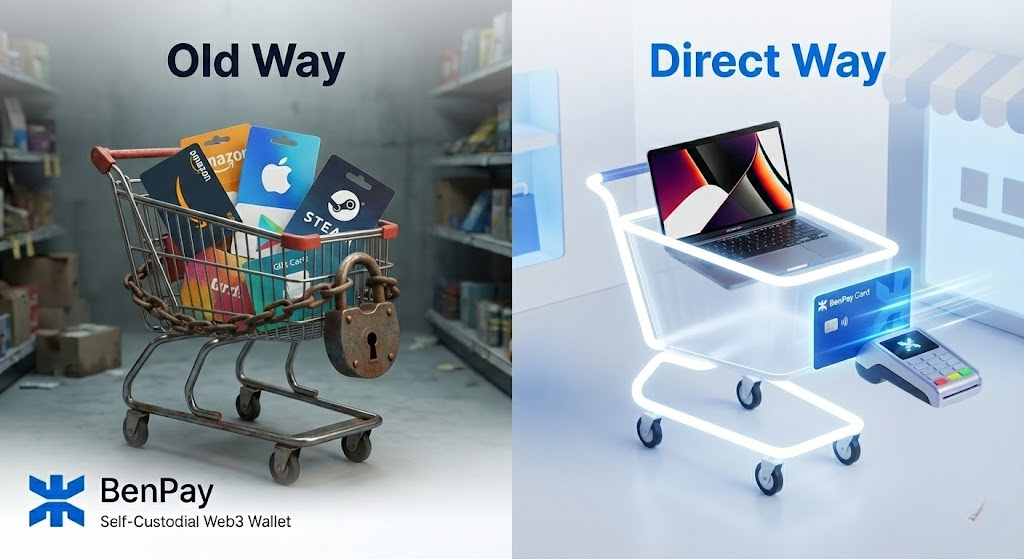 For years, crypto users wanting to buy a MacBook or groceries on Amazon had two bad options:
-
The Gift Card Route (Bitrefill): You buy a $100 Amazon gift card with crypto.
-
The Pain: You have to pre-pay. If the item costs $95, you have $5 stuck in Amazon forever. If you return the item, you get Amazon credit, not crypto.
-
-
The High-Fee Card Route (Coinbase): You use a card that spends your crypto directly.
-
The Pain: They charge a 2.49% liquidation fee. On a $2,000 laptop, you are throwing away $50 just to use your own money.
-
The Solution: You need a card that acts like a standard US Debit Card—accepted natively by Amazon—but funded by your crypto wallet with Zero Fees.
2. Concept Explained: How “Auto-Conversion” Works
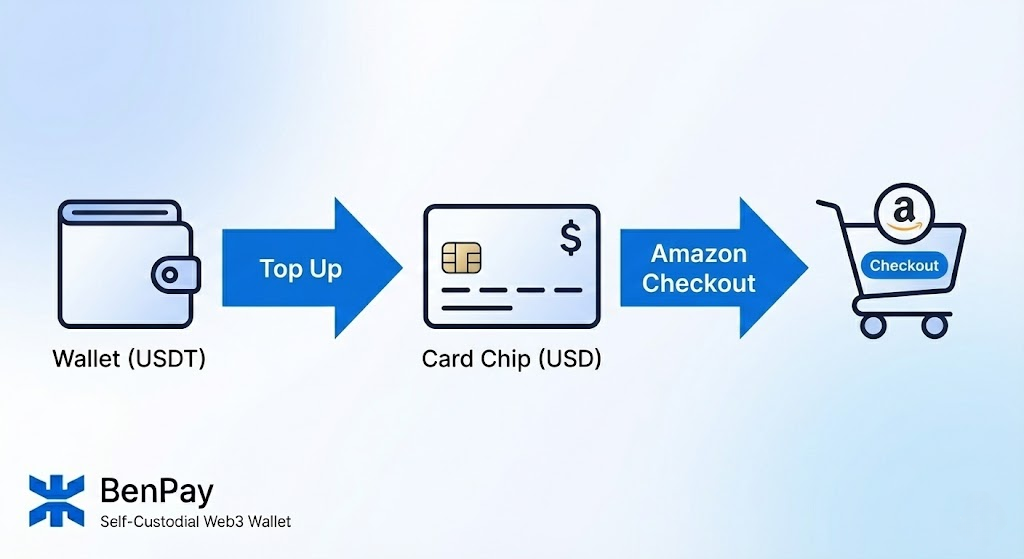 When you add the BenPay Alpha Card to your Amazon wallet, Amazon sees a standard USD card. They don’t know (or care) that it’s backed by crypto.
The “Just-in-Time” Conversion Mechanism
Unlike older cards that convert crypto at the exact moment of the swipe (risking slippage during network congestion), BenPay uses a Top-Up Model:
-
Source: Your funds sit in USDT/USDC in your Self-Custodial Wallet (on Tron, BSC, or Arbitrum).
-
Conversion: You “Top Up” the card in the BenPay App. This executes an instant OTC (Over-The-Counter) trade, converting Stablecoins to USD Fiat at the institutional exchange rate.
-
Settlement: The USD sits on your card, ready for Amazon to charge.
Why this is Better for Amazon
Amazon often charges cards when they ship, not when you order.
-
Old Crypto Cards: If Bitcoin drops 10% between order and shipping, your transaction might decline due to insufficient funds.
-
BenPay Model: Since you topped up USD, the balance is stable. Your order will never be declined due to crypto volatility.
3. Top 3 Cards for Amazon US Shoppers
We evaluated cards based on Fees, Reliability, and Custody.
1. BenPay Alpha Card (The Zero-Fee Shopper)
Best for: Frequent Amazon shoppers who want to save money.
-
Conversion Fee: 0%. You transfer $100 USDT, you get $100 USD spending power.
-
Custody: Self-Custodial. You hold the keys to your savings; BenPay only holds the spending balance.
-
Limit: $200,000 balance. You can buy high-ticket items (e.g., home appliances, electronics) without hitting daily caps.
-
Amazon Integration: Works seamlessly as a credit/debit card. Supports Amazon Prime subscriptions.
2. BitPay Card (The Legacy Option)
Best for: Users who want to spend Bitcoin (BTC) directly.
-
Mechanism: Loads funds from the BitPay wallet.
-
Pros: Established brand.
-
Cons: High Fees. Often charges network mining fees plus exchange spreads. The app interface is dated.
-
Custody: Non-custodial wallet, but card balance is custodial.
3. Coinbase Card (The Convenient Option)
Best for: Users who keep funds on the exchange.
-
Mechanism: Spends directly from Coinbase balance.
-
Pros: Very easy if you are already centralized.
-
Cons: 2.49% Fee unless you spend USDC. Even with USDC, you rely on Coinbase custody. If Coinbase freezes your account, you can’t buy anything.
4. Step-by-Step Guide: Buying on Amazon with Crypto
Follow this workflow to set up your “Crypto Prime” experience.
Phase 1: The Setup (One-Time)
-
Download BenPay: Create your self-custodial wallet and secure your seed phrase.
-
Get the Alpha Card: Pay the 9.9 BUSD opening fee.
-
Why Alpha? The 0% top-up fee is critical for shopping. A 1% fee on a year of Amazon purchases adds up to hundreds of dollars.
-
-
KYC Verification: Complete the ID check to unlock US payment capabilities.
Phase 2: Connecting to Amazon
-
Get Card Details: In the BenPay app, tap “Show Details” to copy your card number, expiry, and CVV.
-
Add to Amazon: Go to Amazon > Your Account > Your Payments > Add a payment method.
-
Verify: Amazon may charge a temporary $0.00 or $1.00 hold to verify the card is active. Ensure you have a small balance loaded.
Phase 3: The Purchase (The “Smart” Way)
-
Shop: Add items to your Amazon cart (e.g., Total: $150).
-
Fund: Open BenPay.
-
Transfer 150 USDT from your wallet to the Card.
-
Conversion: Instant. Cost: $0.
-
-
Checkout: Select the BenPay card on Amazon and place the order.
Phase 4: Handling Returns
-
Scenario: You return the item.
-
Process: Amazon refunds the USD to the card.
-
Result: The funds appear back in your Alpha Card balance as USD. You can spend them again on your next order. (Note: You cannot usually “withdraw” this USD back to crypto directly; you spend it).
5. Financial Breakdown: The Cost of a $2,000 Laptop
Let’s compare buying a $2,000 MacBook Pro using three different crypto methods.
The Verdict: The BenPay Alpha Card saves you ~$50 compared to Coinbase and avoids the “Store Credit Trap” of gift cards. It is the only method that offers “Cash-like” utility with “Crypto” funding.
6. Risk Disclosure: What You Need to Know
Shopping with a crypto card is safe, but there are nuances.
-
Shipping Holds: Amazon authorizes the charge when you order but settles when they ship.
-
Risk: If you spend the balance on your card elsewhere before Amazon ships, the order will be cancelled.
-
Advice: Treat your card balance as “Spent” the moment you place the order.
-
-
Regulatory Limits: The Alpha Card is issued by a regulated bank.
-
Constraint: You cannot buy illegal items or use it on prohibited sites (e.g., certain gambling sites). Amazon is fully approved.
-
-
Self-Custody Responsibility: Your savings in your BenPay wallet are safe. However, once you top up the card, those specific funds are held by the bank. Only top up what you intend to spend soon.
7. FAQ
Q: Does this work for Amazon Prime subscriptions? A: Yes. Because the Alpha Card is a standard prepaid Visa/Mastercard, it supports recurring billing. Just make sure you keep enough balance on the card each month (e.g., $15) to cover the subscription.
Q: Can I use this card on Amazon UK or Amazon Japan? A: Yes, the card works globally. However, if your card is USD-denominated and you buy on Amazon UK (GBP), there will be a standard currency conversion rate applied by the network. For frequent non-USD shopping, consider the Sigma Card (0% FX Fee), though it has a small top-up fee.
Q: Is the auto-conversion taxable? A: In the US, spending crypto is a taxable event. * Stablecoins: If you spend USDC, your capital gain is likely $0 (since $1 = $1), making tax reporting very simple. * Bitcoin: If you spend BTC that appreciated, you owe Capital Gains Tax. * Recommendation: Use Stablecoins for shopping to simplify your taxes.
8. Conclusion
Buying on Amazon with crypto shouldn’t feel like a hack. It should feel like a purchase.
BenPay has rebuilt the payment stack to make this possible. By combining a Self-Custodial Wallet (for safe storage) with the Alpha Card (for zero-fee spending), it offers the smoothest “Crypto-to-Doorstep” experience in the market.
Shop smarter. Download BenPay, setup your Alpha Card, and make your next Amazon order completely fee-free.
Disclaimer: Cryptocurrency investments involve risk. Card services are subject to banking terms and conditions. Tax laws vary by jurisdiction; consult a professional.
I like how you highlighted the frustration with gift cards and hidden fees. The self-custodial wallet solution seems like a big improvement for crypto users. Do you think more retailers will start accepting direct crypto payments in the future?
Really helpful guide. I like that you don’t hand-wave the “just buy gift cards” workaround—returns, leftover balances, and the whole store-credit trap are real pain points.
The explanation of the top-up / just-in-time conversion model also makes a lot of sense specifically for Amazon, since they often authorize at checkout but settle later when items ship. Calling out shipping holds and the “treat the balance as spent once you place the order” habit is a practical tip most people miss. A small comparison table for different shopper profiles (occasional vs heavy Amazon spenders, domestic vs cross-currency) would be an awesome add-on.
Great guide—using a self-custodial card + stablecoin top-ups avoids gift card leftovers and high liquidation fees. The note on Amazon shipping holds & taxes was spot on.