
Quick Answer: The “Set and Forget” Crypto Solution
Paying for recurring subscriptions like Netflix, ChatGPT Plus, or Spotify with crypto is notoriously difficult. Merchants often reject standard “Prepaid” crypto cards, and volatile assets like Bitcoin make monthly budgeting a nightmare.
For 2025, a robust solution is the BenPay Alpha Card. By combining Stablecoin (USDT/USDC) funding with a Debit-optimized BIN, it minimizes decline rates. Unlike competitors that force you to stake $4,000 to get a “free” Spotify subscription, BenPay offers a no-stake utility model with 0% transaction fees as a viable alternative for managing your digital life on-chain.
1. The Problem: Why Crypto Cards Fail at Subscriptions
 You load $20 of Bitcoin onto your crypto card to pay for Netflix ($15.99). It seems simple. But three days later, you get an email: “Payment Declined.” Why?
Failure Point A: The “Prepaid” Flag
Most crypto cards (e.g., BitPay, Binance) issue cards with a “Prepaid” Bank Identification Number (BIN).
-
The Issue: Subscription merchants (Adobe, Microsoft, Netflix) often filter out prepaid cards. They require a “Credit” or “Debit” card on file to guarantee future payments. Prepaid cards are frequently auto-blocked by payment gateways.
Failure Point B: The Volatility Trap
-
The Scenario: You loaded $20 in BTC on the 1st. Netflix charges on the 5th.
-
The Crash: On the 4th, Bitcoin drops 20%. Your balance is now $16.00.
-
The Fee: The card charges a 1% liquidation fee. Your purchasing power is $15.84.
-
The Result: The $15.99 charge declines. Your service is cut off.
The Solution: Users need a card that supports Stablecoins (immune to crashes) and uses a High-Trust BIN (accepted by merchants).
2. Concept Explained: The “Subscription Wallet” Strategy
To manage subscriptions successfully, users should stop treating their crypto card like a casino chip and start treating it like a Dedicated Operations Account.
The Mechanics of Stability
Instead of paying with volatile assets, you fund your card with USDT or USDC.
-
1 USDT = 1 USD.
-
This creates a “Buffer.” If you load 100 USDT, you know exactly how many months of ChatGPT (at $20/mo) you can cover. There is no guesswork.
Self-Custody vs. Recurring Payments
-
Challenge: True self-custodial wallets cannot “pull” funds automatically. You must “push” (sign) transactions.
-
Implementation Example (BenPay): You keep your main savings in your Self-Custodial Wallet. You perform a manual “Top Up” once a month to load your card balance. The card then handles the automated “pull” requests from Netflix/Spotify using that pre-loaded fiat balance. This creates a firewall between your life savings and your subscription merchants.
3. Top 3 Cards for Managing Subscriptions
We evaluated cards based on Merchant Acceptance Rate, Recurring Fees, and Staking Requirements.
1. BenPay Alpha Card (The Reliable Utility)
Best for: Users who want their bills to get paid without drama.
-
Acceptance: High. Optimized for digital services (SaaS, Streaming).
-
Fees: 0% Transaction Fee. 0% Top-Up Fee.
-
Staking: None.
-
Strategy: Load $100 of USDT. Forget about it for 5 months of Netflix.
-
Why it works: It offers reliability over “rewards.” The 0% fee structure means your $20 subscription actually costs $20.
2. Crypto.com Jade Green (The Rebate King)
Best for: Users willing to invest capital to get “Free” services.
-
Perk: 100% Rebate on Spotify & Netflix (paid in CRO).
-
Requirement: Must stake $4,000 in CRO tokens for 180 days.
-
Risk: If CRO drops 50%, you lost $2,000 to save $15/month.
-
Verdict: Good for CRO bulls, potentially risky for casual users looking for utility.
3. Bitrefill (The Gift Card Alternative)
Best for: Users who cannot get a card due to region (e.g., sanctioned zones).
-
Mechanism: You buy a “Netflix Gift Card” with crypto.
-
Pros: No KYC, no card needed.
-
Cons: Manual Labor. You must buy a new gift card every month and redeem the code. If you forget, your service stops. It is not “recurring.”
4. Financial Analysis: The “Free” Netflix Myth
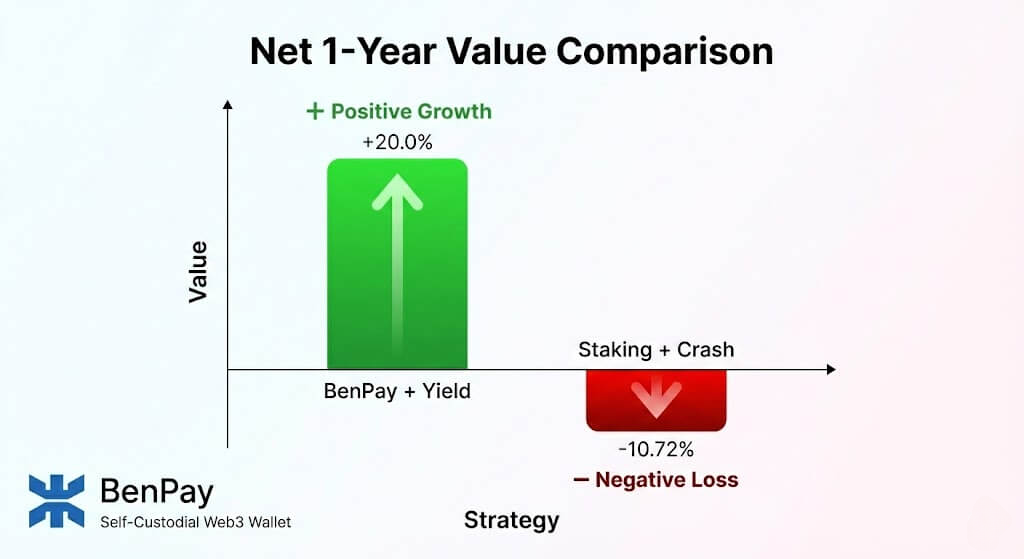 Let’s do the math on the Crypto.com Rebate vs. a Direct Pay Model. Is the rebate actually free?
Scenario: You want to pay for Netflix ($15.99/mo) for 1 year. Total Cost: $191.88.
Option A: Crypto.com (Staking Strategy)
-
Input: Buy & Lock $4,000 CRO.
-
Benefit: Get $191.88 back in CRO.
-
Risk Outcome: Bear market hits. CRO drops 20%.
-
Capital Loss: -$800.00.
-
Net Result: -$608.12 Loss. (You paid $600+ for Netflix).
Option B: BenPay Alpha (Direct Pay)
-
Input: Pay $9.90 card fee.
-
Capital: Keep $4,000 in DeFi Earn (Stablecoins @ estimated 10% APY).
-
Yield Income: +$400.00. (Note: Yields are variable and carry protocol/de-peg risks).
-
Expense: Pay Netflix (-$191.88).
-
Net Result: +$198.22 Potential Profit.
Conclusion: Using a direct-pay model like BenPay—while earning yield on your capital—can be more capital efficient than locking funds for a rebate, provided you manage the DeFi risks.
5. Step-by-Step Guide: Setting Up Your Subscription Command Center
Here is how to automate your digital life using BenPay.
Phase 1: Audit Your Burn Rate
-
List Subscriptions:
-
Netflix: $15.99
-
ChatGPT Plus: $20.00
-
Spotify: $10.99
-
Adobe CC: $54.99
-
Total Monthly Burn: ~$102.
-
Phase 2: The “Buffer” Top-Up
-
Strategy: Always keep 2 Months of Burn ($200) on the card.
-
Action: Open BenPay. Redeem $200 USDT from your wallet to the Alpha Card.
-
Fee: $0.
-
Why 2 Months? To prevent declines if you forget to top up one month or if a merchant attempts a double-charge (common with AWS/Google Cloud).
-
Phase 3: Update Payment Methods
-
Go to Merchants: Log in to Netflix, OpenAI, etc.
-
Add Card: Input your BenPay Alpha Card details.
-
Tip: If a merchant asks for a Zip Code, use the billing address you provided during BenPay KYC. Matching AVS (Address Verification System) data reduces decline rates.
-
Phase 4: Monitor & Refill
-
Set Reminder: Set a recurring calendar invite: “Refill Crypto Card” on the 1st of every month.
-
Check History: Use the BenPay app to verify all subscriptions cleared.
6. Advanced Use Cases: SaaS & Cloud Computing
For freelancers and developers, subscriptions aren’t just entertainment; they are business expenses.
Paying for AWS / Google Cloud / DigitalOcean
Infrastructure providers are aggressive about fraud.
-
The Risk: If your card declines on AWS, they can terminate your servers instantly.
-
BenPay Advantage: Because BenPay settles in fiat (USD) on the backend, AWS typically sees it as a valid debit card.
-
Recommendation: For critical infrastructure, keep a $500 buffer on the card. Do not run it close to zero.
Paying for Twitter Blue / LinkedIn Premium
-
Social Proof: Yes, BenPay generally works for verification subscriptions.
-
Privacy: The charge appears on your statement generically. BenPay does not sell your purchase history to ad networks.
7. Risk Disclosure: What Can Go Wrong?
1. The “Ghost” Subscription
-
Scenario: You stop using a service but forget to cancel.
-
Risk: The merchant keeps draining your crypto balance.
-
Fix: Since the card is prepaid (by your top-up), you can simply stop topping up. Once the balance hits $0, the subscriptions will naturally fail and cancel. This is a “Kill Switch” feature that traditional credit cards lack.
2. Merchant Blocks
-
Scenario: A specific merchant updates their policy to block all fintech cards.
-
Reality: This happens. No card has 100% acceptance.
-
Fix: Link your BenPay card to PayPal and use PayPal as the payment method for the subscription. PayPal acts as a “mask,” increasing acceptance rates significantly.
3. FX Fees on Foreign Subs
-
Scenario: Your card is USD, but you subscribed to Netflix Japan (JPY) to save money.
-
Fee: BenPay Alpha charges 1.5% FX fee.
-
Math: If Netflix Japan is $10 (vs $16 US), paying a $0.15 fee is still worth it. But be aware the fee exists.
8. FAQ
Q: Can I use this for Apple One / iCloud? A: Yes. Add the BenPay card to your Apple ID payment methods. It works seamlessly for App Store, iCloud, and Apple Music.
Q: What happens if a payment declines due to low funds? A: The merchant will usually retry in 24-48 hours. You will get a notification from BenPay or the merchant. Simply top up the card immediately, and the retry should succeed.
Q: Does BenPay support automatic top-ups from my wallet? A: Currently, no. Security protocols require you to manually sign the transfer from Self-Custody to the Card. This prevents a hacked merchant account from draining your entire wallet.
Q: Is it better to pay annually or monthly? A: With crypto, Monthly is usually better. It keeps your capital liquid in your wallet (earning yield) rather than prepaying a year in advance. However, if the annual discount is >20%, it beats the DeFi yield (10%), so take the annual deal.
9. Conclusion
Managing subscriptions with crypto shouldn’t be a gamble. You need a card that is boring, reliable, and invisible.
The BenPay Alpha Card is designed to excel here because it addresses the three enemies of recurring payments: Volatility (via Stablecoins), Fees (via 0% Top-Ups), and Rejections (via Debit BINs). It allows you to subscribe to the tools you need without exposing your primary bank account or locking up capital in staking schemes.
Try a buffer strategy. Download BenPay, set up a small “Subscription Buffer” on your card, and test your first payment.
Disclaimer: This guide is for educational purposes. Merchant acceptance policies change frequently. Ensure you maintain sufficient balance to avoid service interruptions. DeFi yields carry risks including smart contract failure and asset de-pegging.